Forum Replies Created
-
AuthorPosts
-
George
ParticipantHey Steve,
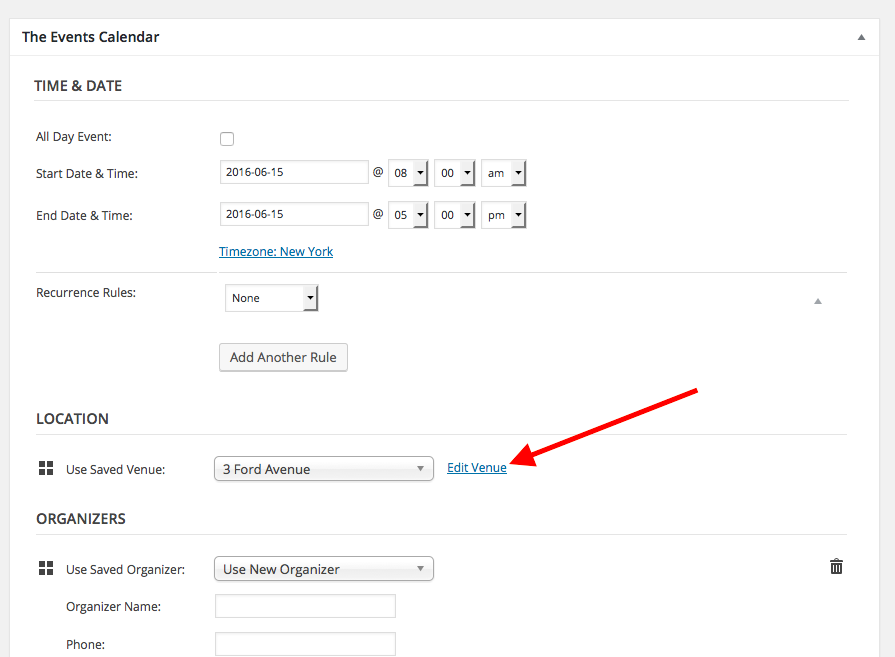
The Events Calendar Pro “Additional Fields” show up on the front end in the event details box, which by default includes the date, organizer, venue, etc.
Here’s a screenshot for example:

You can learn more about the fields here ? https://theeventscalendar.com/knowledgebase/pro-additional-fields/
Cheers,
GeorgeParticipantHey John,
Thanks for reaching out.
Tags should already be enabled/showing on Events, in the edit screen as shown in this screenshot:
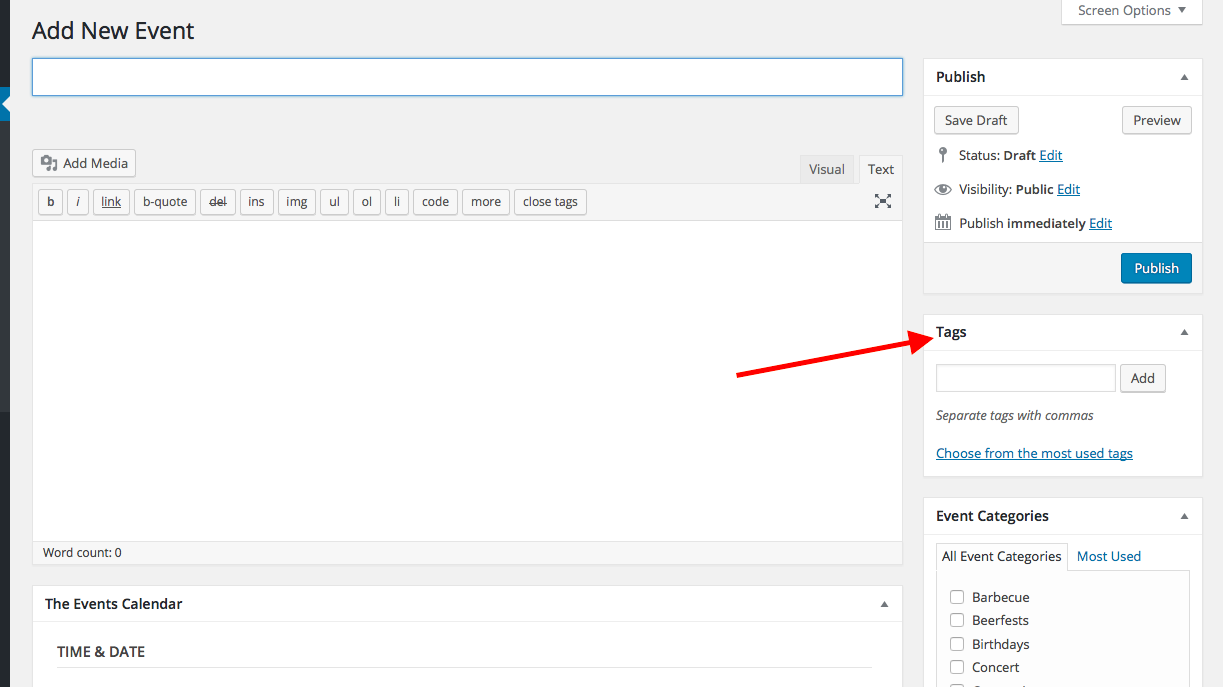
☝️Do you not find this to be the case for you? If so, please post your site’s “System Information”, which you can learn how to do here ? https://theeventscalendar.com/knowledgebase/sharing-sys-info/
If this is not what you are referring to, then can you elaborate on things a bit more? Perhaps share screenshots, etc?
Thank you!
GeorgeJune 12, 2016 at 8:38 pm in reply to: Calendar Month Navigation sitting over month navigation #1125968ParticipantHey @Phillip,
That text is “screen reader text,” so while I’m not sure why it is showing now when it wasn’t before, I would recommend adding this CSS to the bottom of your theme’s style.css file to hide that text:
.screen-reader-text {

    clip: rect(1px, 1px, 1px, 1px) !important;

    position: absolute !important;

    height: 1px !important;

    width: 1px !important;

    overflow: hidden !important;

}
I hope this helps!
GeorgeParticipantHey @Stephen,
You can email us at support at the events calendar dot com, but unfortunately—whether through email, forums, Twitter, or carrier pigeon!—we do not provide support for nonprofit licenses.
This is covered in more depth in our knowledgebase guide about the program ? https://theeventscalendar.com/knowledgebase/do-you-offer-discounts-for-nonprofit-organizations/
Thank you,
GeorgeParticipantHey @Arto,
Thanks for reaching out. I’m sorry to bear this news, but our plugins unfortunately don’t provide support for this type of event structure at this time. 🙁
It’s something we’re working on improving, but for now—and for the near future, i.e. at least the next several weeks—the closest you could possibly get with our plugins is to create some really clever date, time, and exclusion configurations with Events Calendar Pro’s “recurring events” feature. This would still result in two separate events, unfortunately, so it’s still not quite what you describe.
Sorry to disappoint! Let me know what you think and if there is anything else I can try to help with.
Sincerely,
GeorgeParticipantHey @Victoria,
Thanks for reaching out. We do not make anything at this time that offers a “timetable” feature. If you can share links to examples of this online, though, I might be able to recommend specific alternatives or some ideas on achieving that specific design/layout (with our plugins or otherwise).
Thanks!
GeorgeParticipant😀
ParticipantHey @PAULUS,
Thanks for reaching out. This is actually something that is implemented by design.
Why, might you ask? Well, when Event Tickets is activated just by itself—without Event Tickets Plus—then the only “ticket” type available is the RSVP type.
This RSVP type has nothing to do with WooCommerce.
And so “Products”, which are a post type provided by WooCommerce, are something completely separate from RSVPs. Thus, you can check the “Products” box which basically says, “Let RSVPs show up on Products.”
This all changes when Event Tickets Plus is activated, because Event Tickets Plus offers another type of ticket: the “Ticket” type.
Unlike RSVPs, “Tickets” are themselves WooCommerce “products” types. So you could not check the “Products” post type without causing issues—it’s a weird paradox, where basically the code would be trying to say, “Let tickets (products) show up on products.” This could create a situation where WooCommerce Products are trying to display on themselves, in other words…which could break things.
So what you find is by design.
With all of this being said, you may still be able to use tickets on the “Products” post type…please do so carefully, though, and proceed with caution and with thorough testing before relying on this functionality. To preserve the “Products” item in that checkbox, add code like this to your theme’s functions.php file:
add_action( 'init', 'paulus_include_products_post_type_on_tickets_settings' );function paulus_include_products_post_type_on_tickets_settings() {
$tribe_woo = Tribe__Tickets_Plus__Commerce__WooCommerce__Main::get_instance();
remove_filter( 'tribe_tickets_settings_post_types', array( $tribe_woo, 'exclude_product_post_type' ) );
}
I hope this helps!
GeorgeParticipantHey @John,
Sorry to hear about this! This seems to be the consequence of a bug that we are working, and for which we have a fix we will be publishing soon.
For now, as a temporary solution, try adding the following CSS to the bottom of your theme’s style.css file:
.tribe-events-list-photo-description.tribe-events-content {

    width: 100%;

}
As for the second issue you mentioned, the view selector seems to be skipping over the normal JavaScript functionality and going right to the view page directly. I am not sure why this is happening and cannot recreate the behavior, so to help investigate, can you post your site’s “System Information”? Here’s how to do that ? https://theeventscalendar.com/knowledgebase/sharing-sys-info/
Thank you,
GeorgeParticipantThis reply is private.
ParticipantHey @laughmasters,
This is possible now as of version 4.2 of Event Tickets Plus. (Please note that you’d need to also have The Events Calendar and Event Tickets at version 4.2, as well.)
As of 4.2, there is an option to require users to log-in to your site before being able to buy tickets or make RSVPs. If this option is enabled, then users can log back onto your site before the event they RSVPed to, and change their RSVP status from “Going” to “Not Going.”
Without that “require users to log-in” option being set to “true”, this is not possible. 🙁
You can learn more here in the “Letting Attendees Edit Their Information” section here ? https://theeventscalendar.com/knowledgebase/managing-your-orders-and-attendees/#editing-attendee-info
I hope this helps!
GeorgeParticipantHey @Debra,
Thanks for reaching out. The email you mention is indeed one generated by WooCommerce, and so for information about editing it and all of that, you will have to turn to the WooCommerce website and support team.
For example, this guide on the WooCommerce support site shows how to make custom templates for things like the email ? https://docs.woothemes.com/document/template-structure/
Check out that guide and explore other documentation there for assistance.
Let me know if there’s anything else I can try to help with in the meantime!
George
ParticipantHey @eclair,
Thanks for reaching out. Your addresses may not be turning up in searches for a number of reasons, but one thing that might help is to ensure that you event Venues use latitude and longitude for map placement. This is possible by heading to individual Venues and checking the “Use latitude + longitude” option as shown in this screenshot:
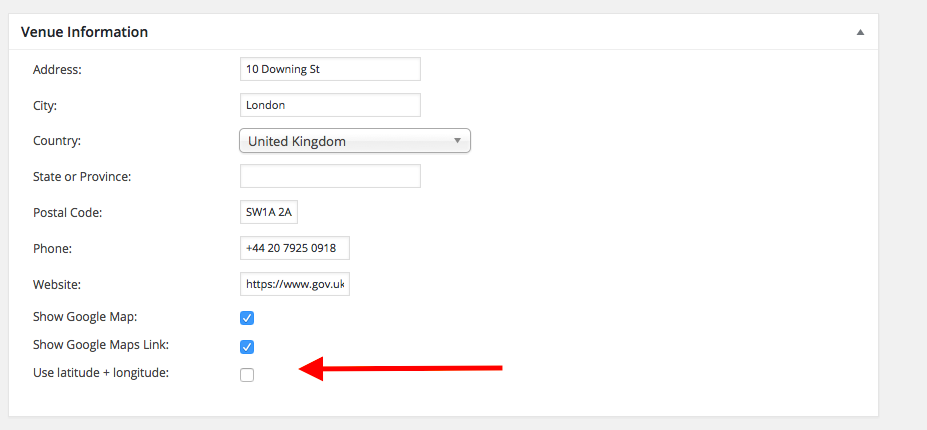
If you notice any particular events that fail to show up in zip code search results, try checking this option on the event’s venue and then click “Update” to ensure the venue is updated (you can find a venue’s edit page any time by going to the event itself, then clicking the “Edit Venue” link as shown in this screenshot → https://cldup.com/iafL0UbHnA.png).
Let me know if this helps!
GeorgeParticipantHey @Colt,
I’ve investigated this and unfortunately found the same result. It looks like we have a fatal error, which is reported as follows on my local site, for example:
Fatal error: Class 'Tribe__Tickets__Attendance' not found in /wp-content/plugins/the-events-calendar/vendor/tickets/src/admin-views/attendees.php on line 22
I have made a ticket for our developers to get on top this, and we will publish a fix as soon as possible. I do not have a specific ETA, unfortunately, but we’re actively working on a fix.
If you are interested in doing one additional step to confirm these findings, then I would recommend seeing if any errors pop up on your site if you head to your site’s wp-config.php file and change this line of code:
define('WP_DEBUG', false);to this:
define('WP_DEBUG', true);That will display PHP errors if any exist, which might be quite useful here. So, if possible, you can make this change and then try viewing the same attendees list via that same link; do you find an error like the one I posted above? Copy and paste any errors you find into this thread.
(☝️ These steps are purely optional, of course!)
Sorry for the trouble here, @Colt. Stay tuned for a fix; I will update this thread whenever more information about this bug fix is available.
Sincerely,
Gerge -
AuthorPosts