
Home › Forums › Calendar Products › Events Calendar PRO › System info & link
- This topic has 5 replies, 5 voices, and was last updated 10 years, 3 months ago by
Brian.
-
AuthorPosts
-
June 12, 2016 at 9:48 am #1125849
Chris
ParticipantHi George
Thanks for looking into it for me. Here is one of the affected event pages – http://www.tinytweeties.co.uk/event/pirates-summer-special-2/ and have pasted the system info below.
ChrisJune 12, 2016 at 10:13 am #1125855George
ParticipantHi @Chris,
Are you referring to this thread? ? https://theeventscalendar.com/support/forums/topic/price-displaying-incorrectly/
Might I ask why you posted a new thread instead of just posting replies in that already-existing thread? No worries—I just want to say that you should only post replies on existing threads, as it enables faster support and makes it easier to keep track of things.
I will close that other thread of ours so that we can keep our conversation in this thread.
As for these issues, I notice you are using WooCommerce Tickets. This plugin is no longer active, and should be replaced with the combination of Event Tickets and Event Tickets Plus. (You can read more on doing this here ? https://theeventscalendar.com/knowledgebase/moving-to-event-tickets-plus/)
We do try to patch bugs and such with this plugin until the last valid license key for it expires—but if there is a bug here and we set out to patch it, it could take several weeks for the fix to arrive. So I highly recommend updating to Event Tickets and Event Tickets Plus (which is free; you should have a license and download files for Event Tickets Plus already in your account here on http://theeventscalendar.com) and then seeing if the issue persists.
I will investigate this issue with WooCommerce Tickets to see if I can recreate the bug. Stay tuned!
— George
June 12, 2016 at 11:06 am #1125865ParticipantHey @Chris,
I was not able to recreate your exact issue, but did find several bugs with WooCommerce Tickets and the pricing system within it.
I have ticketed all of these bugs so that our developers can get to work on fixing those!
As for your specific issues, I’m wondering—on the event you linked me to, can you head into the “edit event” screen for that event; scroll down to the metabox where you can create and edit tickets; and then click “edit” for the ticket whose price £6.50?
When you do this, do you see a “Sale Price” value populated? If so, what is the value of this field? Here’s a screenshot of the specific field I am referring to:
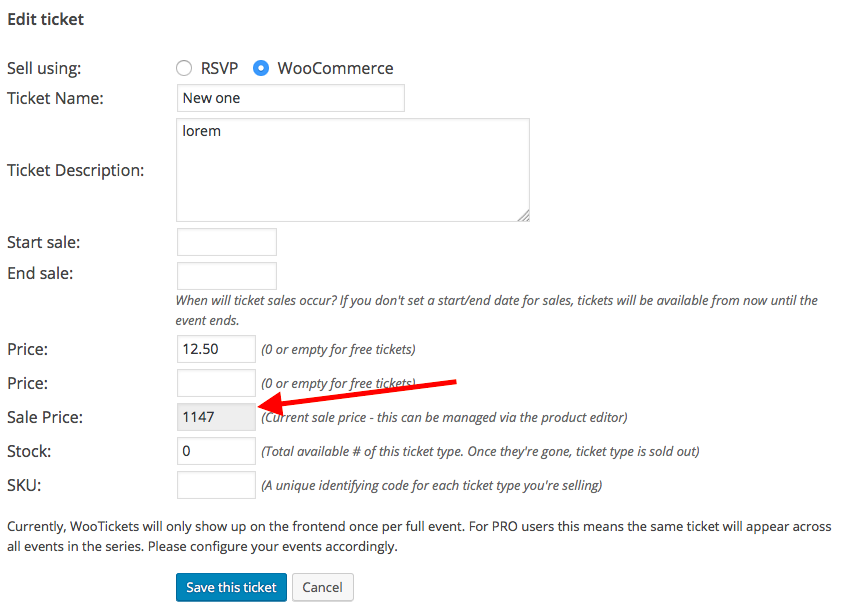
Let me know what you find!
George
June 27, 2016 at 9:35 am #1132430Support Droid
KeymasterThis topic has not been active for quite some time and will now be closed.
If you still need assistance please simply open a new topic (linking to this one if necessary)
and one of the team will be only too happy to help.June 28, 2016 at 9:16 am #1132925MemberHi,
I wanted to follow up here and present a couple solutions.
WooCommerce Tickets 3.12.x will not work well in some cases with the latest version of the Events Calendar 4.1.x or 4.2.x or later.
There are a couple ways to resolve this.
Option 1
If you are current holder of WooCommerce Tickets License and do not have a Event Tickets Plus License in your account (most likely you should have one already) we can generate one for you to upgrade to Event Tickets Plus following this guide:https://theeventscalendar.com/knowledgebase/moving-to-event-tickets-plus/
Option 2
If you do not want to update at this time you can always downgrade to The Events Calendar 4.0.7 and that will work WooCommerce Tickets 3.12.x. You will want to downgrade any other premium plugins to 4.0.x as well.You can download the older versions from your account here on theeventscalendar.com
And older versions of the core plugin here:
https://wordpress.org/plugins/the-events-calendar/developers/Follow these steps to manually change the plugins:
Although this process does not delete or change events or their settings. If you can it is a good idea to backup your site.
Another Possible Option
If neither of those work for you please create a new ticket and we have some other options we can help you with on a case by case basis to get it working with the latest version of The Events Calendar.Since this ticket was already closed I am going to leave it as such, but if you have any other comments or questions please create a new ticket and we can help out.
Thanks
-
AuthorPosts
- The topic ‘System info & link’ is closed to new replies.