
Home › Forums › Calendar Products › Events Calendar PRO › Wrong file template
- This topic has 7 replies, 4 voices, and was last updated 10 years, 3 months ago by
Mathias.
-
AuthorPosts
-
June 10, 2016 at 1:14 pm #1125343
Mathias
ParticipantHello everybody.
I really like this calendar, and hope too see more improvements in the future! 🙂
When that said i have a few quick questions.
1.) In the venue meta field, you will see date and time seperated by itself. Is it possible to have the same structure all over the site? I mean, date and time in 2 seperate divs etc.?
2.) On the frontpage of http://sidefabrikken.dk/ledelsesredskaber/ ,you’ll see the calendar and a pretty nice design. The problem is, i want to figure, why it’s not showing the 3 next events all the time. Try skipping the months, it should still tell you the 3 next events, until you click a certain date?
3.) Is it possible to have the “event” of the specific day in a pop-up or such? (Either by custom coding or anything else) ?
4.) On the event page itself i want to add a full-size banner, which goes outside the normal tribe-event wrapper. I then added it to the default template, but it shows both on the event + events pages. Any idea how to solve that one?
5.) Possible to be using multiple calendars around the site, and thereby also another styling, and then exclude/include several categories?
6.) It seems like i need to use the “Previous/Next” events on the list-view. Maximum events on a page + maybe a pagination solution or even better infinity scroll?
Thanks, looking forward hearing from you!
June 12, 2016 at 3:23 pm #1125890George
ParticipantHey Mathias,
Thanks for reaching out. There are number of questions here, so I will address them one by one.
For starters, though, can you please read this page and confirm that you’ve done so? ? https://theeventscalendar.com/knowledgebase/what-support-is-provided-for-license-holders/
☝️ I only mention this page because it covers our support policy. We unfortunately cannot help with any code customizations, which may be necessary to achieve some of the things you ask about here.
I am happy to help regardless, and will do so! But I just wanted to set your expectations early.
Sincerely,
GeorgeJune 12, 2016 at 5:48 pm #1125927Participant1.) In the venue meta field, you will see date and time seperated by itself. Is it possible to have the same structure all over the site? I mean, date and time in 2 seperate divs etc.?
Can you please share a screenshot of the “venue meta field”? I am sorry for my misunderstanding; I just do not quite understand what you mean here.
June 12, 2016 at 5:55 pm #1125929Participant2.) On the frontpage of http://sidefabrikken.dk/ledelsesredskaber/ ,you’ll see the calendar and a pretty nice design. The problem is, i want to figure, why it’s not showing the 3 next events all the time. Try skipping the months, it should still tell you the 3 next events, until you click a certain date?
:point_up: I took a look at your site and found that this calendar widget works as expected.
First, please look at these three screenshots of the widget calendar:
• June 2016: https://cloudup.com/c9ou2-n77FM
• July 2016: https://cloudup.com/coGIo2Bt4wd
• August 2016: https://cloudup.com/cPFTzyBdaygNow, let’s look at your actual calendar here: http://sidefabrikken.dk/ledelsesredskaber/begivenheder/
Please look at this screenshot of your calendar:
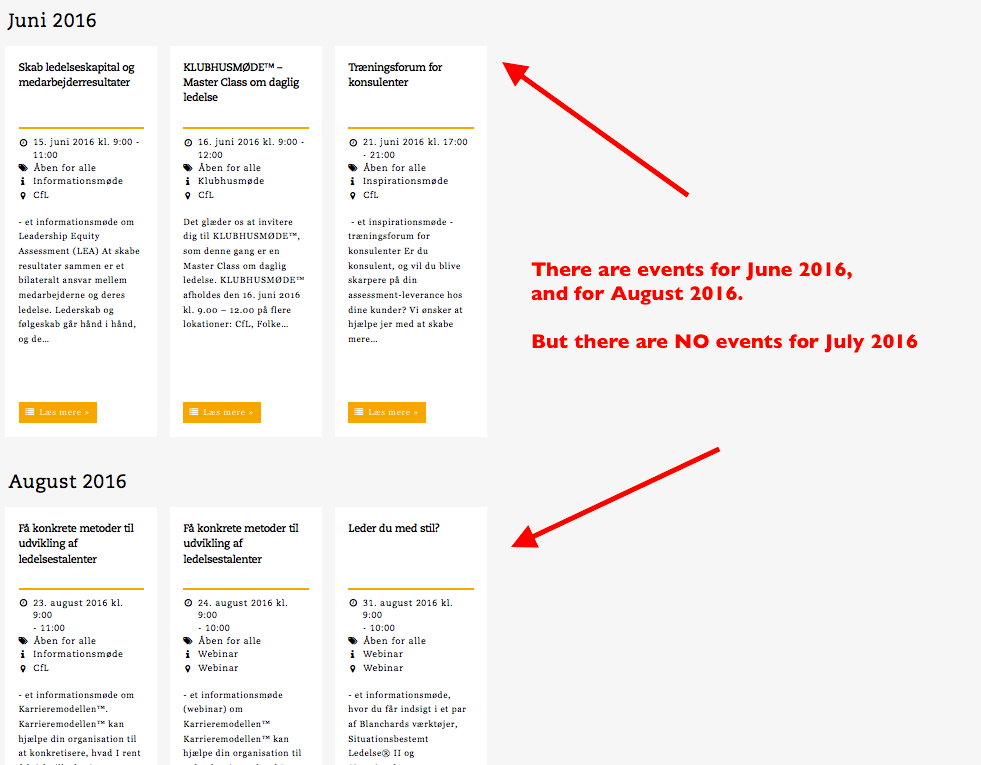
As seen in that screenshots, there are no events for July 2016.
So lets look at the widget for July 2016:
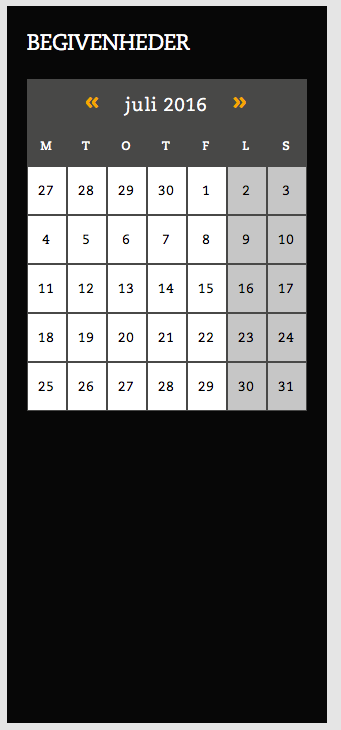
☝️ There are no events for July 2016, so no event show in the widget calendar when you move to July 2016. This is the default and correct behavior of the plugin, and unfortunately cannot be changed without extensive code customization. 🙁
June 12, 2016 at 6:08 pm #1125933Participant3.) Is it possible to have the “event” of the specific day in a pop-up or such? (Either by custom coding or anything else) ?
☝️ I am not quite sure what you mean here; if you mean a pop-up window in any sort of way that is not currently present on the site, then unfortunately yes it would require custom coding. We are not able to help with custom coding, but we have a list of great developers here → http://m.tri.be/18k1 (and we have no affiliation with any of these folks–they’re simply some well-respected names in the community that we’ve compiled).
4.) On the event page itself i want to add a full-size banner, which goes outside the normal tribe-event wrapper. I then added it to the default template, but it shows both on the event + events pages. Any idea how to solve that one?
☝️ Can you add the banner back onto your site, and then share links to BOTH “the event + events pages”? I will take a look at both and recommend a solution to hide the CSS.
5.) Possible to be using multiple calendars around the site, and thereby also another styling, and then exclude/include several categories?
☝️ This is unfortunately not possible. 🙁 I’m sorry to disappoint!
6.) It seems like i need to use the “Previous/Next” events on the list-view. Maximum events on a page + maybe a pagination solution or even better infinity scroll?
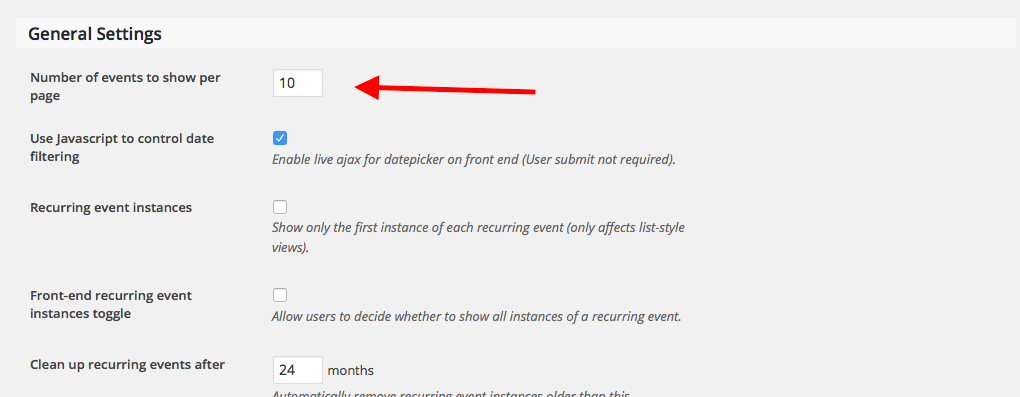
☝️ If you want to increase the number of events per-page, then head to Events → Settings in your wp-admin. In the “general” tab, adjust the option called “Number of events to show per page”, as shown in this screenshot:
 June 12, 2016 at 6:10 pm #1125934Participant
There is a lot of information here, Mathias! If you have specific follow-up replies to make, please be sure to refer to the question you are referring to by its number. So, for example, if you have something related to Question 2, please make it clear that you are referring to Question 2 just to make it easier to keep track of things.
Thanks!
GeorgeJune 27, 2016 at 9:35 am #1132436Support Droid
KeymasterThis topic has not been active for quite some time and will now be closed.
If you still need assistance please simply open a new topic (linking to this one if necessary)
and one of the team will be only too happy to help. -
AuthorPosts
- The topic ‘Wrong file template’ is closed to new replies.