

Forum Replies Created
-
AuthorPosts
-
June 27, 2016 at 4:32 pm in reply to: display past events, begining with the latest event on the top #1132667
George
ParticipantHey @Catalina,
Thanks for reaching out.
I will address your questions in reverse order.
When it comes to translating words to French or any other language, there are many ways to do this. You should first read up on how translations work with our plugins, and you can proceed from there on your own to make the necessary file modifications. Here are some general translation articles worth reading:
• Translating The Events Calendar: http://theeventscalendar.com/knowledgebase/translating-the-events-calendar/
• Translating our premium add-ons: https://theeventscalendar.com/knowledgebase/adding-or-updating-a-translation/
• Changing the language on your site: https://theeventscalendar.com/knowledgebase/changing-the-language-on-your-calendar/Here is another article which may be the most helpful for your specific needs:
• https://theeventscalendar.com/knowledgebase/change-the-wording-of-any-bit-of-text-or-string/I hope this information helps with your translation questions!
We cannot help with modifying code or designs, so you’ll have to take the reins on changing words and such, but I hope that information helps.
Sincerely,
GeorgeJune 27, 2016 at 4:25 pm in reply to: Refund for Community Events Plugin Before Purchasing Bundle #1132662ParticipantThis reply is private.
June 27, 2016 at 4:15 pm in reply to: https://tiga.org/events/the-tiga-games-industry-awards-2016 #1132660ParticipantThank you for this, @richard! And for your patience here over the duration of this thread.
When I investigate your site on the front end, I do not find a specific thing that helps identify the culprit. It looks like you’ll have to turn to your theme developer from here for further assistance; if simply activating a default theme makes things work, then the current non-default theme is definitively the source of the problem.
I’m sorry to bear this news after all of this back-and-forth, but the steps here confirm that the problem is your current theme. Please share this thread with the author of the theme to provide context for the issues—I wish you the best of luck with them!
Sincerely,
GeorgeParticipantThis reply is private.
ParticipantThis reply is private.
ParticipantHey @Gerikg,
Thanks for sharing this! This refers to the Facebook API’s implementation of its own categories structure; our plugins do not handle these categories or import them from Facebook at this time.
Sorry to disappoint about that—I hope the information I shared in my previous is helpful nonetheless!
Sincerely,
GeorgeParticipantThank you for sharing this!
This is a known error message that we are struggling to recreate on our own testing sites, but are trying to fix. There isn’t much progress at this time, but we are working on it and I will update this thread whenever we have news or more details.
In the meantime, I appreciate your mentioning your WordPress version and such.
In addition to that, can you please follow the instructions on the link that I shared with you and use those instructions to share your site’s full, un-edited, complete “system information”? Here’s that link again: https://theeventscalendar.com/knowledgebase/sharing-sys-info/
This extra info will help us look for patterns and could thus help us resolve this issue more quickly.
Thank you!
GeorgeJune 27, 2016 at 10:57 am in reply to: Tons of Warning messages in error Log upon upgrading to version 4.2 #1132497ParticipantThis reply is private.
ParticipantThis reply is private.
ParticipantHey @gerikg,
Thanks for reaching out!
The hook that Brian mentioned in that thread indeed exists now, and you can use it to assign a category to all events upon import.
Now, it’s a bit tricky to assign per-event categories, i.e. it is a bit tricky to have one event go into one category, then another event into another category, and so on. But this is possible to some degree.
But you can use the event, venue, and organizer information to assign a category to events.
The new hook is called tribe_events_facebook_event_created.
☝️ That action is fired when an event is imported from Facebook and successfully created within WordPress.
Here’s an example of how to use that action:
function tribe_add_categories_to_fb_events_upon_import( $event_id, $organizer_id, $venue_id ) {if ( ! $event_id )
return;// An array of IDs of event categories we want this event to have.
$cat_ids = array( 6, 8 );wp_set_object_terms( $event_id, $cat_ids, 'tribe_events_cat' );
}add_action( 'tribe_events_facebook_event_created', 'tribe_add_categories_to_fb_events_upon_import', 10, 3 );
We cannot yet pull the categories from Facebook, but with this hook you can achieve many things upon the importing of an event and I hope this helps.
Let me know what you think, and what other questions you might have on this.
Thank you!
GeorgeJune 27, 2016 at 9:26 am in reply to: How to have seperate EVENT page and CLASS page with list view #1132412ParticipantHi @Kelli,
Thanks for reaching out!
It is unfortunately not possible to have two separate events pages at this time—that is, you cannot have the full-on “List View” in more than one location.
However, you may be able to make something close to what you have in mind by using the events widgets provided by The Events Calendar and Events Calendar Pro.
You can read about these widgets—the “List Widget” probably being the most helpful in your case—in the following two knowledgebase articles:
• https://theeventscalendar.com/knowledgebase/events-calendar-widgets/
• https://theeventscalendar.com/knowledgebase/pro-widget-shortcodes/☝️ I hope this information helps!
— George
ParticipantHey @taylormason,
I’m sorry to see this issue on your site. I cannot recreate it, so I would recommend performing ALL of the steps on this page ? https://theeventscalendar.com/knowledgebase/testing-for-conflicts/
After EACH STEP in that process, take another look at that wp-admin events menu and see if anything changes with the menu and what shows up in it….
Let us know what you find! 😀
Thank you,
GeorgeParticipantHey @Joey,
Thanks for reaching out. Before addressing your questions specifically, I just want to point you to our support policy so that you can set your expectations here ? https://theeventscalendar.com/knowledgebase/what-support-is-provided-for-license-holders/
I’m happy to help here, of course! But we can only provide very, very limited support for any sort of code-customizing, feature-modifying, etc., so I just wanted to make you aware of these limitations so you know what to expect.
With that being said, I will address your questions in the order they appear. 😀
Question #1
While you can indeed modify EDD’s confirmation emails, though it will require custom coding and some extensive tinkering. We do not make EDD, so we cannot help much with the actual process of making these customizations. However, to try and help get you started, the actual confirmation email contents are generated from within this file:
easy-digital-downloads/includes/email/template.phpLook here for the function edd_get_sale_notification_body_content(), wherein the email is constructed. You can explore this function and add The Events Calendar’s template tags here to get things like the event start date and such.
To explore The Events Calendar’s template tags, open up your plugin files for The Events Calendar and explore the /src/functions/template-tags directory.
You’ll find all sorts of helpful functions here that get specific components of event information. tribe_get_start_date() will get the event’s start date, for example; tribe_get_venue will get the venue; and so on.
For further assistance in customizing that email, reach out to the EDD team or hire a professional developer to assist in your customizing. (We have a list of great developers here, if it’s helpful → http://m.tri.be/18k1. We have no affiliation with any of these folks–they’re simply some well-respected names in the community that we’ve compiled).
Question #2
Building a custom filterable table column is a rather complex customization to do, but we do make a free plugin called “Advanced Post Manager” that provides a filter for events based on Ticket Stock. Check out that plugin here: https://wordpress.org/plugins/advanced-post-manager/
If you install that and activate it, you should have access to a stock filter as shown in this screenshot:
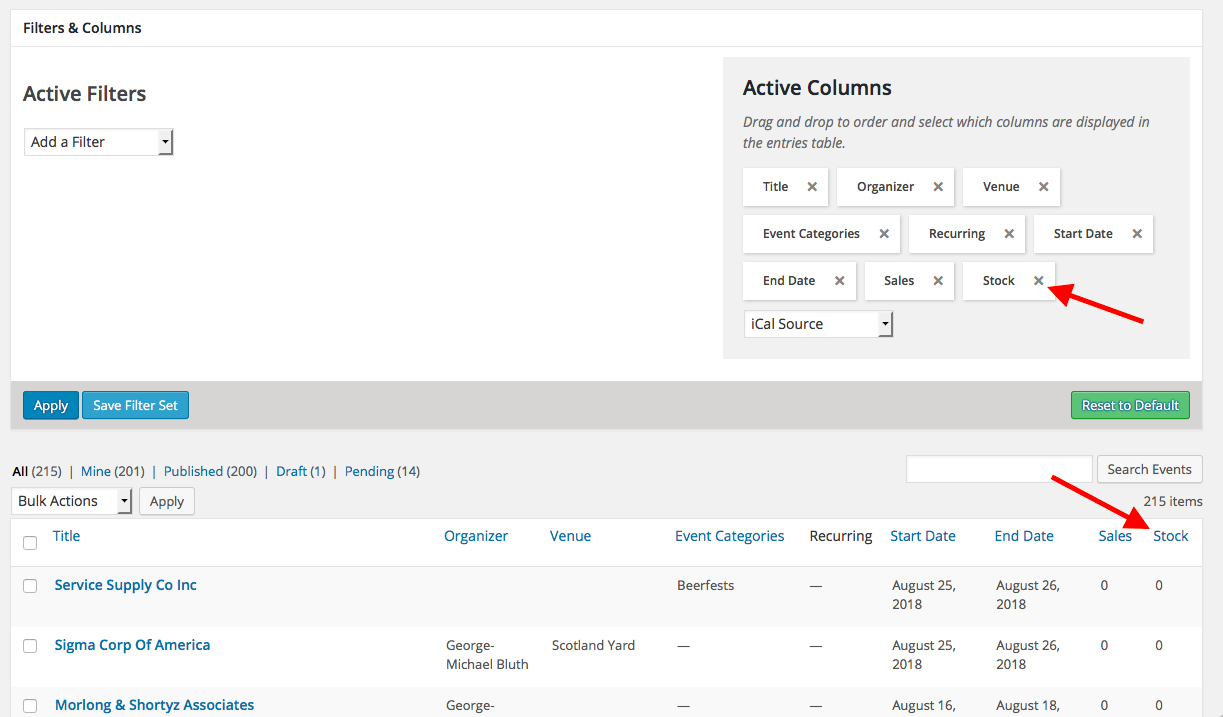
☝️This isn’t quite “Attendees”, but is a close approximation and an easy, free thing to use. I hope this helps—let me know, if not I can try to share some more information about what the customization you describe would entail.
Sincerely,
GeorgeParticipantHey @Pete,
Thanks for reaching out.
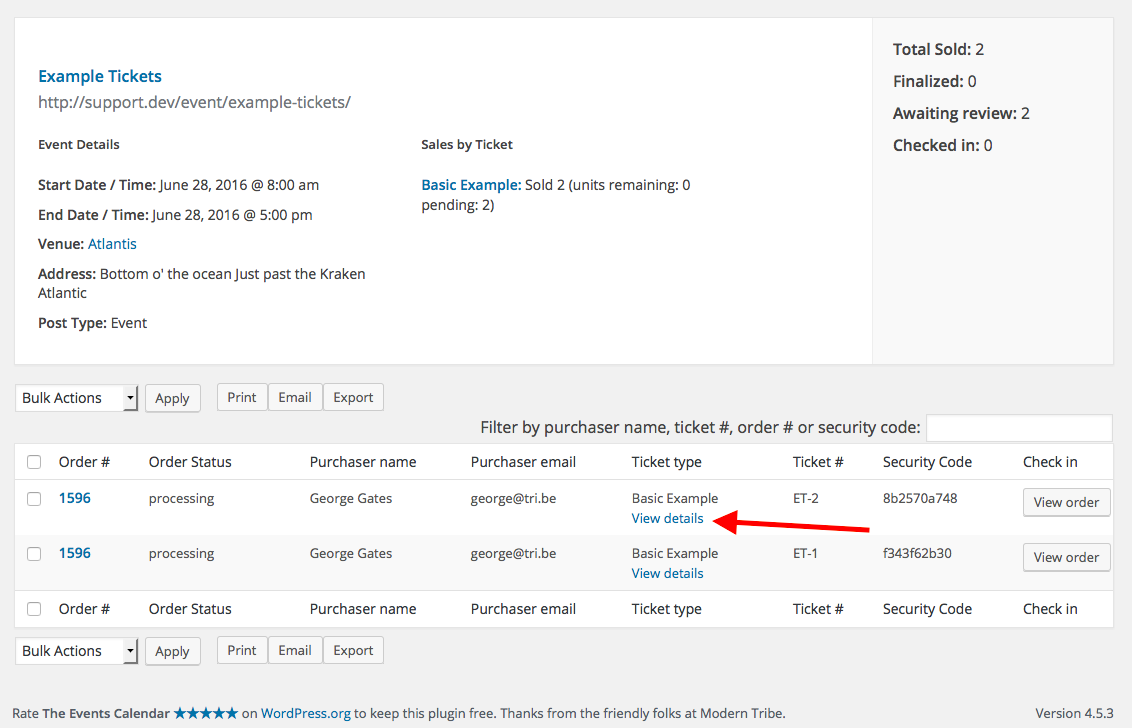
While editing the information that the user supplied is not easily possible, to at least see it you should be able to find it in the main “Attendees” list for an event.
Look for the “View Details” link on this Attendees list, as shown in the following screenshot:
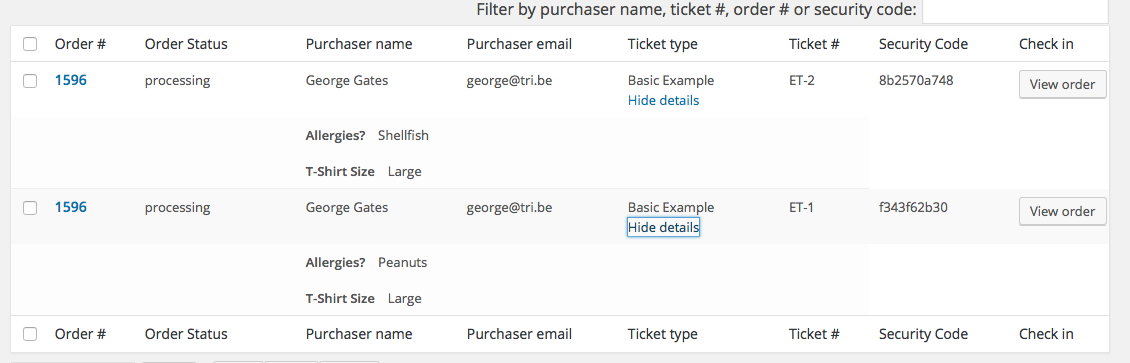
When you click that, the details entered by the user will drop down and you can view them as shown in this screenshot:
To learn more about managing attendees and their “Additional Information”, please explore these knowledgebase articles in-depth:
• https://theeventscalendar.com/knowledgebase/managing-your-orders-and-attendees/
• https://theeventscalendar.com/knowledgebase/collecting-attendee-information/I hope this information helps! 😀
GeorgeJune 27, 2016 at 8:33 am in reply to: Calendar plugin breaks wordpress emails by forcing contenttype text/html #1132349ParticipantHey Jonathan,
Thank you for reaching out about this. I’m sorry for the trouble and appreciate your highlighting of this fact about our plugins:
I’ve been investigating and found the issue in your plugin file:
/wp-content/plugins/the-events-calendar/vendor/tickets/src/Tribe/Tickets_Handler.php
You are adding a filer to wp_mail_content_type but you are not removing that filer after sending the email!
☝️ I think you are correct that we should be un-hooking that filter, and I have gone ahead and made a bug ticket for our developers to investigate—and hopefully fix—this issue some time in the not-too-distant future.
Thank you! And please open a new thread any time if other issues or questions arise.
Sincerely,
George -
AuthorPosts