
Home › Forums › Ticket Products › Event Tickets Plus › Need better method for getting attendee
- This topic has 5 replies, 4 voices, and was last updated 10 years, 2 months ago by
Joey.
-
AuthorPosts
-
June 24, 2016 at 11:55 am #1131701
Joey
ParticipantHi there.
I’m using Event Ticket Plus with easy digital downloads. Since the purchase confirmation only comes with the title of the event, we don’t know the date/time of the event the person signed up for. Right now we are going to every event individually to see where they signed up. There has to be a better way!
Question 1: is it possible to get the Title, Date and Time to show up on the confirmation email from EDD?
Here is how the notification appears now:
A Downloads purchase has been made.Downloads sold:
National Core Certification Training – Tucson –
Industrial & Institutional Certification Training – Tucson –
Wood Destroying Certification Training – Tucson –Purchased by: Bill Bennett
Amount: $300.00
Payment Method: Authorize.netThank you
Question 2: is it possible to have every class show number of attendees in on the summary screen in admin? Something like this (rought mockup): http://screencast.com/t/Fid2RoPgym7
Right now it’s a pain in the #$% to figure out what day and time someone signed up for, especially since its the same 4 classes over and over.
Any help is appreciated!
June 27, 2016 at 9:15 am #1132394George
ParticipantHey @Joey,
Thanks for reaching out. Before addressing your questions specifically, I just want to point you to our support policy so that you can set your expectations here ? https://theeventscalendar.com/knowledgebase/what-support-is-provided-for-license-holders/
I’m happy to help here, of course! But we can only provide very, very limited support for any sort of code-customizing, feature-modifying, etc., so I just wanted to make you aware of these limitations so you know what to expect.
With that being said, I will address your questions in the order they appear. 😀
Question #1
While you can indeed modify EDD’s confirmation emails, though it will require custom coding and some extensive tinkering. We do not make EDD, so we cannot help much with the actual process of making these customizations. However, to try and help get you started, the actual confirmation email contents are generated from within this file:
easy-digital-downloads/includes/email/template.phpLook here for the function edd_get_sale_notification_body_content(), wherein the email is constructed. You can explore this function and add The Events Calendar’s template tags here to get things like the event start date and such.
To explore The Events Calendar’s template tags, open up your plugin files for The Events Calendar and explore the /src/functions/template-tags directory.
You’ll find all sorts of helpful functions here that get specific components of event information. tribe_get_start_date() will get the event’s start date, for example; tribe_get_venue will get the venue; and so on.
For further assistance in customizing that email, reach out to the EDD team or hire a professional developer to assist in your customizing. (We have a list of great developers here, if it’s helpful → http://m.tri.be/18k1. We have no affiliation with any of these folks–they’re simply some well-respected names in the community that we’ve compiled).
Question #2
Building a custom filterable table column is a rather complex customization to do, but we do make a free plugin called “Advanced Post Manager” that provides a filter for events based on Ticket Stock. Check out that plugin here: https://wordpress.org/plugins/advanced-post-manager/
If you install that and activate it, you should have access to a stock filter as shown in this screenshot:
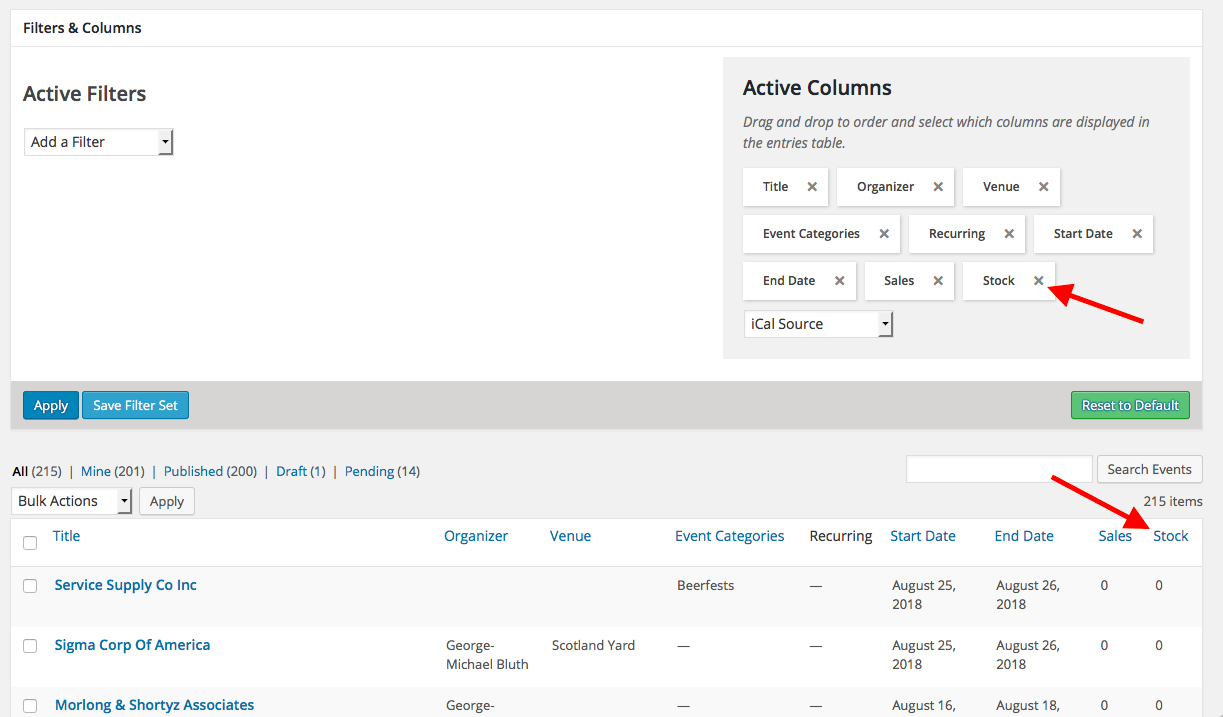
☝️This isn’t quite “Attendees”, but is a close approximation and an easy, free thing to use. I hope this helps—let me know, if not I can try to share some more information about what the customization you describe would entail.
Sincerely,
GeorgeJune 30, 2016 at 5:59 pm #1134304ParticipantI installed the plugin but I don’t see any controls for the filters, and my screen doesn’t look like yours. I’m using the version of the calendar, paid version of Event Tickets Plus.
Here is what I see: http://screencast.com/t/PisvDo8v52cn
What am I doing wrong?
July 4, 2016 at 9:54 am #1135125ParticipantThis reply is private.
July 19, 2016 at 9:35 am #1141530Support Droid
KeymasterThis topic has not been active for quite some time and will now be closed.
If you still need assistance please simply open a new topic (linking to this one if necessary)
and one of the team will be only too happy to help. -
AuthorPosts
- The topic ‘Need better method for getting attendee’ is closed to new replies.