

Forum Replies Created
-
AuthorPosts
-
George
ParticipantSorry to hear this, @V.A.!
1. Can you clarify where on your site, exactly, this error arises? Share a link to the page if possible.
2. Can you post your site’s “System Information”? Here’s how ? https://theeventscalendar.com/knowledgebase/sharing-sys-info/
Thank you!
GeorgeParticipantHi there,
Thank you for reaching out. These forums here are our “Pre-sales Questions” forums, so we unfortunately cannot field technical support questions here.
It doesn’t currently appear that you have a premium license with us. If this is wrong, and you do have a premium license with us, then apologies for my misunderstanding!
However, in that case please log into the account on this site that has your premium license, and then post this question in a premium support forum.
If you indeed do not have a premium license, then please post your question in our free support forums here → http://wordpress.org/plugins/the-events-calendar
We check those forums a bit more than once per week, so hopefully we will be able to get to your question there.
Thank you,
GeorgeParticipantThis reply is private.
ParticipantThis reply is private.
June 24, 2016 at 10:30 am in reply to: Tons of Warning messages in error Log upon upgrading to version 4.2 #1131613ParticipantI’m really sorry to hear this, @lafate.smith. I have made a new bug ticket so that we can take another look at why this is happening!
#1 — System Information
Can you post your system information again, now that you’ve updated to 4.2.x, just in case it is handy? (https://theeventscalendar.com/knowledgebase/sharing-sys-info/)#2 — Front-end Impact
Can you please confirm if there is ANY front-end impact of these errors? Does anything break on the front-end at all? Or are these errors still ONLY arising in the error logs files?#3 — Recreating the Errors
I, personally, have not recreated these errors. To try and help me do so, can you please confirm if, now after updating to 4.2.x, there is any specific set of steps you do that seem to cause the errors to be written to the log in the first place?For example, if you check the error log; then view a single venue on the front end; and then check the error log, does this act of checking the single view out alone seem to cause another instance of the error to be reported?
Thank you so much for your patience here. If you can address the three pointed questions above, I will ensure that our developers see that information and it may help us in pinning down exactly what’s going on here.
Sincerely,
GeorgeParticipantI hope my snippet helps—do stay tuned to future releases to see when this arrives. Check out the release notes for releases on http://theeventscalendar.com/blog to see what is included in each release.
Cheers!
GeorgeParticipantThank you for clarifying!
Does anything improve if you add the following line of CSS to the bottom of your theme’s style.css file instead of what I recommended above?
dd.tribe-meta-value a {

    word-wrap: break-word !important;

}
Thanks!
GeorgeJune 24, 2016 at 10:11 am in reply to: License Number being rejected even though its active #1131601ParticipantThis reply is private.
June 24, 2016 at 10:06 am in reply to: License Number being rejected even though its active #1131599ParticipantHi Craig,
It was not clear to me that the aliasing of omcar1.staging.yournewsites.com to omcar.com was such that they are literally the same wp-admin.
This is the reason why licenses are not working as expected. They have the same IP address and such, and are effectively the same site, but have different top-level domain names. Our license system is simply not “smart” enough to parse that that omcar.com and omcar1.staging.yournewsites.com are really actually the same site, with different domain names.
I can report this to our developers for further investigation, and perhaps in time we can roll out improvements to better support aliases. But at this time, there is unfortunately nothing we can do to try and get our licensing system to handle aliases better.
In the meantime, I have added a new free Personal License for Events Calendar Pro to your account. You can try using this new license on JUST omcar.com/wp-admin, and see if anything improves.
However, since both sites are the same with just different top-level domain names, odd behavior is likely to persist. 🙁 It is worth a try though, and is the only step we can do at this time.
— George
ParticipantAs for your issues with omcar.com and its staging site, let’s look at what you wrote here. You say this:
4. I have done that multiple times and it just adds it back into my Tribe account as omcar1.staging.yournewsites.com which is why I have asked you for help on this.
☝️ To be clear, do you mean that when you go into omcar1.staging.yournewsites.com/wp-admin and remove the license key from the wp-admin settings page in omcar1.staging.yournewsites.com/wp-admin, when you refresh the page in the wp-admin, the license key is added back? I.e., you cannot remove the license key from the omcar1.staging.yournewsites.com/wp-admin settings panel?
— George
ParticipantHey Craig,
As established earlier, these are your three currently-licensed sites:
• omcar.com
• rairc.com
• ralsc.orgI cannot help with issues on reti.us at this time.
— George
ParticipantGlad to hear it! 😀
June 23, 2016 at 1:31 pm in reply to: Attendeed Information and Adding to Emailed Tickets and Admin Notification #1131192ParticipantHey Darren,
I was curious if you could clarify your goals a bit more clearly?
I only ask because you request having the purchaser first and last names on the ticket; however, this is already included by default. See the “Purchaser” section of this screenshot of a ticket:
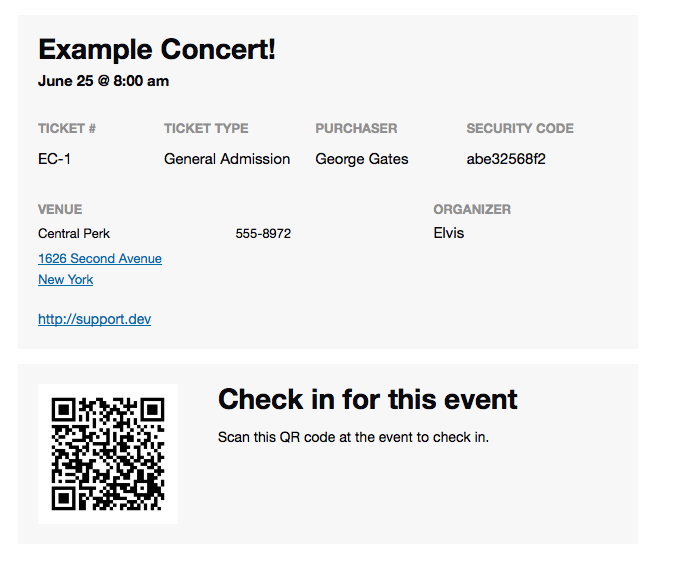
☝️ If this is not what you mean, then can you clarify what you’re doing differently? Do you, for example, have “Additional Fields” that for some reason try to collect the customer first and last names separately from the already-provided first and last name?
Do you have a configuration for such additional fields like in the following screenshot? And so you’re asking how to get these instances of first and last names into the tickets? (See screenshot:)
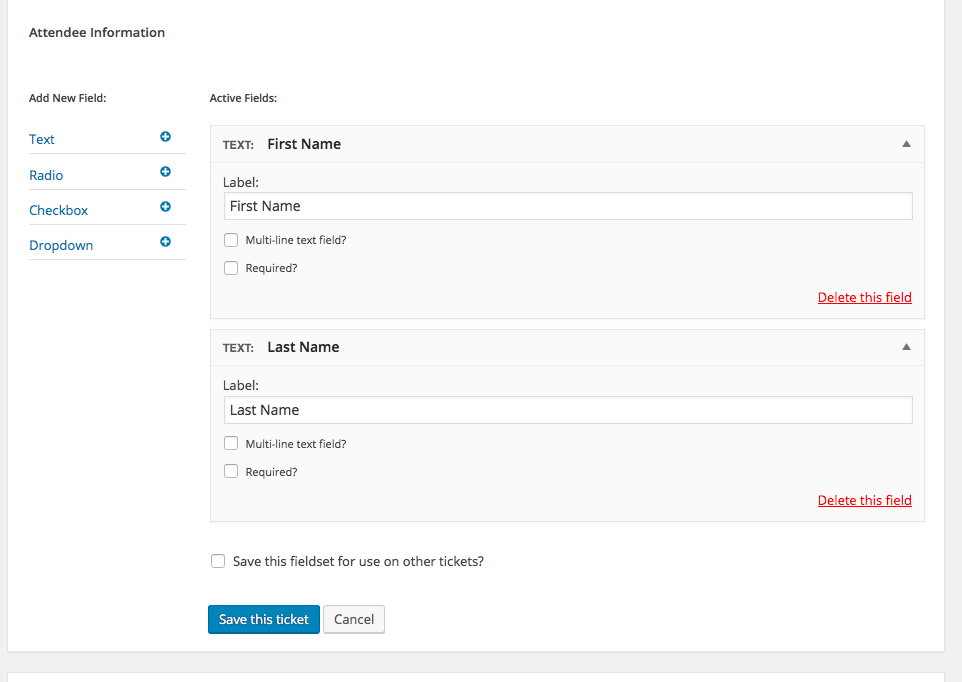
Thank you,
GeorgeParticipant😀
June 23, 2016 at 9:16 am in reply to: Tons of Warning messages in error Log upon upgrading to version 4.2 #1130958Participant😀
-
AuthorPosts