
Home › Forums › Ticket Products › Event Tickets Plus › Attendeed Information and Adding to Emailed Tickets and Admin Notification
- This topic has 8 replies, 6 voices, and was last updated 10 years, 2 months ago by
Darren.
-
AuthorPosts
-
June 22, 2016 at 12:20 pm #1130506
Darren
ParticipantHello,
I’m currently running Event Tickets 4.2 & Event Tickets Plus 4.2 along with Events Calendar 4.2 as well as Events Calendar: Community Events 4.2. I’m also running Remove QR Codes 0.1.1. All is working fantastic, thank you for the recent updates and added functionality.
My question is, is there any way to add the new “Attendee Information” that is collected during the purchase phase, i.e, First & Last Name of Tickets being purchased to the individual tickets as well as to the administrator that is receiving the new customer order email notification? I understand that the purchaser information is collected automatically, however, in this case, I’d like the ticket itself, maybe to have the attendee name on it as well.
One other request would to have the tickets that are purchased be attached to the email as say a .pdf file opposed to embedded into the email body?
Thank you for your time and consideration.
Darren Cox
Executive Director
Smallbox Media GroupJune 22, 2016 at 7:52 pm #1130754Geoff B.
MemberGood evening Dion and welcome back!
Thank you for reaching out to us, for your fantastic words and for sending your system information.
But most importantly, thank you for taking the time to share your great ideas with us. It’s truly appreciated.I would love to answer your questions.
is there any way to add the new “Attendee Information” that is collected during the purchase phase, i.e, First & Last Name of Tickets being purchased to the individual tickets as well as to the administrator that is receiving the new customer order email notification?
That is a great question. The short answer is yes, it is possible.
However, for now they are not built-in features.
But the good news is that here are a couple of things that can be done about it:
- You could create a template override / customization to achieve that. You might want to read our Themer’s guide to get a sense of how that works.
- You could hire one of our recommended customizers to do the customization for you.
- You could suggest it as a feature here: https://tribe.uservoice.com/forums/195723-feature-ideas . That way other people can vote for it too!
One other request would to have the tickets that are purchased be attached to the email as say a .pdf file opposed to embedded into the email body
Adding that feature is actually absolutely in our plans (as you can see here: https://tribe.uservoice.com/forums/195723-feature-ideas/suggestions/5486386-tickets-attached-to-emails-as-pdfs)
I highly encourage you to cast your vote there to help make this very interesting feature more popular.
In the meantime, the best compromise would probably be to use a plugin such as: https://www.woothemes.com/products/pdf-invoices/
If you take a look at their documentation, you can add fields to the invoices by doing a template override: https://docs.woothemes.com/document/hooks-and-filters-in-woocommerce-pdf-invoice/
I wish I had a better answer for you, but for now it’s the best one I have.
Best regards,
Geoff B.
June 23, 2016 at 1:31 pm #1131192George
ParticipantHey Darren,
I was curious if you could clarify your goals a bit more clearly?
I only ask because you request having the purchaser first and last names on the ticket; however, this is already included by default. See the “Purchaser” section of this screenshot of a ticket:
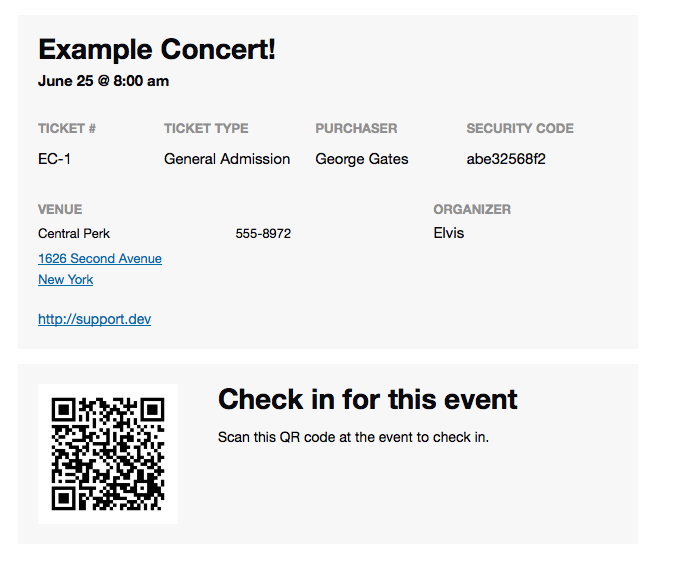
☝️ If this is not what you mean, then can you clarify what you’re doing differently? Do you, for example, have “Additional Fields” that for some reason try to collect the customer first and last names separately from the already-provided first and last name?
Do you have a configuration for such additional fields like in the following screenshot? And so you’re asking how to get these instances of first and last names into the tickets? (See screenshot:)
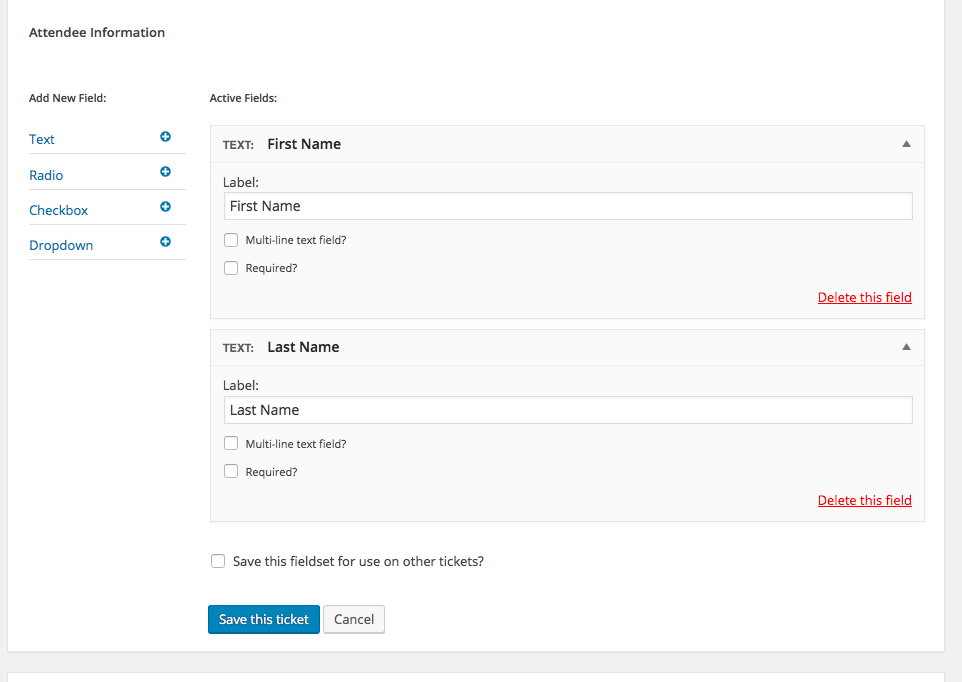
Thank you,
GeorgeJune 24, 2016 at 2:39 pm #1131751ParticipantGeoff,
Thank you for taking the time to reply. I’ll go through the information that you’ve so kindly provided and take a look. Also, thank you for the temp solution for having the tickets attached in pdf format and the customization of that solution.
Regards,
Darren
June 24, 2016 at 2:42 pm #1131753ParticipantGeorge,
Your second scenario is what I’m looking for. I understand that the purchasers name of the tickets is already included, I’m looking to actually add a field to the ticket titled “Attendee Name” and understand that it maybe the same as the purchaser, however it is very helpful to have the additional attendees names on the tickets.
Cheers,
Darren
June 24, 2016 at 11:37 pm #1131836MemberGood evening Darren,
I have relayed your answer to George and we are glad the information provided so far was helpful.
Unfortunately, I cannot commit to a release date at this point. But stay tuned, you will be contacted as soon as something is out!
Have a good week-end,
Geoff B.
July 7, 2016 at 2:04 pm #1136912Geoff
MemberHey there, Darren!
We wanted to follow-up to let you know that we were able to patch this up in Event Tickets Plus 4.2.2, which is now available to download and install if you haven’t done so already.
Please do be sure to check out our release notes for a full overview of what’s new in the release and feel free to let us know if you run into this or any other issues after the update.
Thanks so much for your patience while we worked on this!
Cheers,
GeoffJuly 22, 2016 at 9:35 am #1142999Support Droid
KeymasterThis topic has not been active for quite some time and will now be closed.
If you still need assistance please simply open a new topic (linking to this one if necessary)
and one of the team will be only too happy to help. -
AuthorPosts
- The topic ‘Attendeed Information and Adding to Emailed Tickets and Admin Notification’ is closed to new replies.