

Forum Replies Created
-
AuthorPosts
-
George
ParticipantHey Jake,
Thanks for reaching out!
Our plugins unfortunately do not provide features “out of the box” for making the sort of calendar you describe, which only logged-in users can see. However, it is technically possible with a bit of custom coding and tinkering.
While we cannot help with writing custom code ourselves, we have put together a knowledgebase article here that covers some of the basic ways you can go about achieving this → https://theeventscalendar.com/knowledgebase/members-only-calendar/
Check out that article and let me know if those ideas are at all helpful—I’m sorry for the lack of options here, but I hope this helps! 😀
George
ParticipantHey @Divaker,
While you continue to work with Hunter here on the duplication issues, I just wanted to see if you could confirm whether or not the 4.2.2 release of The Events Calendar did at least help with those error messages you reported?
Let us know! 😀
Thank you,
GeorgeJuly 18, 2016 at 9:07 am in reply to: Error: Warning: key() expects parameter 1 to be array, null given in #1141068ParticipantHey Sheir!
I just wanted to check in quickly here to see if the recent 4.2.2 release of The Events Calendar has helped with these issues at all?
🙂
— George
ParticipantHey Jason!
I just wanted to check in quickly here to see if the recent 4.2.2 release of The Events Calendar has helped with these issues at all?
🙂
— George
ParticipantHey @V.A.!
I just wanted to check in quickly here to see if the recent 4.2.2 release of The Events Calendar has helped with these issues at all?
🙂
— George
July 18, 2016 at 9:02 am in reply to: Tons of Warning messages in error Log upon upgrading to version 4.2 #1141063ParticipantHey folks!
I just wanted to check in quickly here to see if the recent 4.2.2 release of The Events Calendar has helped with these issues at all?
🙂
— George
ParticipantHey Heather!
I just wanted to check in quickly here to see if the recent 4.2.2 release of The Events Calendar has helped with these issues at all?
😀
— George
July 18, 2016 at 8:47 am in reply to: Recurring Event should be shown weekly but is shown daily #1141054ParticipantSorry to hear this, Dina!
1. Can you share a screenshot of the complete recurrence information for the event you are having trouble with? To do this, head to the wp-admin “Edit” screen for the event, and take a screenshot of the entire “Time & Date” section. Then share that here: You can do so by uploading the screenshots to this thread. If you have issues with that, you can upload to Imgur.com, Flickr.com, CloudUp.com, or any similar image-hosting site; then just share the links to those images here and I’ll take a look.
Here is an example of what this type of screenshot should look like → https://cloudup.com/csUNd9JZAWY
2. Can you post your site’s complete, un-edited System Information to this thread? This guide shows you how to do that → https://theeventscalendar.com/knowledgebase/sharing-sys-info/
Both pieces of information will help me investigate this problem.
Thank you!
GeorgeParticipantHey @David,
Thanks for reaching out.
For starters, just to set your expectations early, we cannot assist with custom coding as per our support guidelines. You can find out more about these rules here ? https://theeventscalendar.com/knowledgebase/what-support-is-provided-for-license-holders/
1. The “RSVP via Email”
When it comes to the RSVP-via-email idea you are working on, this may take some more tinkering and may not even be possible to the degree that you want it to be possible.
One thing that may help is to ensure that you are URL-encoding all of the output of The Events Calendar’s template tags. So, for example, instead of just echo tribe_get_start_date();, you may find more success by using echo urlencode( tribe_get_start_date() );. Next, I noticed your code uses a function called tribe_get_text_categories() — this is not a function that we make or that is available in any of our plugins, so I assume this is a function you have written yourself. If so, ensure that the function is not producing errors. (It’s probably not, but just wanted to highlight this!)
2. Modifying the RSVP Email Subject and Recipient
You ask about preventing the RSVP email confirmation from being sent to the attendee—this is indeed possible, especially because you then ask if you can have the confirmation go to the event organizer instead.
So, what you can do here is basically kill two birds with one stone by just changing the “recipient” of the RSVP confirmation emails. By default, the recipient is the attendee. But you can use a filter to change the email address to that of an organizer. So, something like this:
add_filter( 'tribe_rsvp_email_recipient', 'tribe_modify_the_rsvp_email_recipient' );function tribe_modify_the_rsvp_email_recipient( $to ) {
return '[email protected]';
}
☝️ In that case, the replacement recipient’s email address is hard-coded. You can make this dynamic, so that it automatically uses the email address of the event organizer instead, but that would require some further and extensive coding.
Now that the confirmation emails will go to the organizer instead of the attendee, you can change the subject line using another filter called tribe_rsvp_email_subject.
So, if you wanted to change the subject to, “Your RSVP information!”, you would use code like this:
add_filter( 'tribe_rsvp_email_subject', 'tribe_modify_the_rsvp_email_subject' );function tribe_modify_the_rsvp_email_subject( $subject ) {
return 'Your RSVP information!';
}
To truly get things exactly how you envision them, you will have to take the reins from here for the most part—we are not able to help with customizing and coding, but I hope my examples and information help!
Best of luck with your customizing,
GeorgeParticipantThanks for elaborating, Stuart!
WooCommerce’s coupon code feature is quite flexible, but there is unfortunately no “out of the box” way to pull off what you describe here. 🙁
Providing different coupon codes with the sorts of rules/limitations you describe should be technically possible, but only with some extensive custom coding to link the WooCommerce coupon code feature with The Events Calendar’s organizers post type and the WooCommerce cart/checkout process.
I’m sorry to disappoint, Stuart. You may be able to approximate the sort of behaviors you describe here by way of some WooCommerce extensions that allow for more advanced coupon code management within WooCommerce. I do not know of any such extension, but just wanted to share that it is a possibility. You can search for extensions here → https://woocommerce.com/extensions/
Finally, if you’re interested in hiring someone for the custom coding that would be required, we have a list of great developers here → http://m.tri.be/18k1 (we have no affiliation with any of these folks–they’re simply some well-respected names in the community that we’ve compiled).
Sorry to bear the bad news! Let me know if there is anything else I can try to help with.
Sincerely,
GeorgeParticipantHey Stuart,
Thanks for reaching out. This is an interesting question. To help me provide a solid answer here, can you clarify the following things?
1. I assume you are using WooCommerce as the eCommerce platform on your site—is this correct? Or are you using, for example, Easy Digital Downloads?
2. When you say, “Organizers”, are you referring to folks who have actual admin log-ins and accounts on your site? Or are these just the “organizer” post type for events that you find under the “Events” wp-admin menu, as shown in the following screenshot:
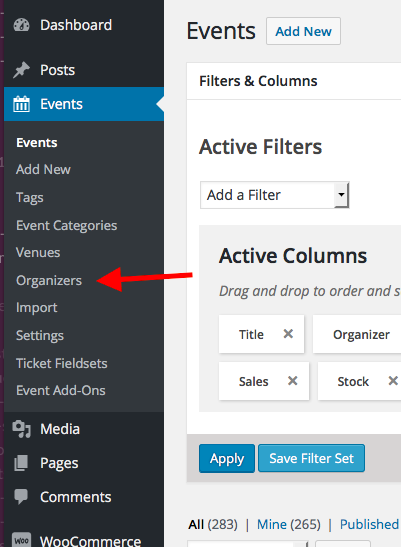
Thank you!
GeorgeJuly 17, 2016 at 8:56 pm in reply to: Discount for non-profit that cant prove it because boss is old and untrusting? #1140931ParticipantThanks for reaching out, Bill. I’m sorry to hear about this predicament, and while I can of course not guarantee an approval or rejection of a Nonprofit application (each one is evaluated on a case-by-case basis), I would still recommend applying through our application form → https://theeventscalendar.com/apply-for-nppp/
☝️ That page does require an upload for the “proof of nonprofit status” section, but if you just upload a generic PDF or image or something, and explain in that application what you explain here, we can take things from there and reach out over email regarding the application.
Thank you for considering the program and our software in the first place; submit an application, perhaps including a link back to this thread in the description section just to helps us cross-reference things, and you should hear back from us in no more than a few business days. 🙂
Cheers!
GeorgeJuly 17, 2016 at 8:51 pm in reply to: Recurring Events are repeating the same day and not stopping at the date set. #1140929ParticipantThank you for posting this, Tyler.
I’ve looked through your system information and didn’t spot anything outright problematic, nor was I able to recreate this problem on my own testing site using the same exact recurrence configuration as the event you shared a screenshot of.
With this in mind, then, to further help troubleshoot here:
1. Does that recurring event have any “exclusions”? If so, can you share a screenshot of the recurrence info that includes all of the exclusions?
2. Can you try making a NEW event—just for testing purposes—that has the same recurring event configuration as the one you shared a screenshot of here? Now that you have updated to the newer versions of our plugins, I am curious if the same problem will arise with this new, post-update Test event.
Thank you!
GeorgeJuly 17, 2016 at 8:37 pm in reply to: HELP _ Events Calendar Plug-in permanently disabled by our hosting company! #1140927ParticipantThanks for assisting here, Brook.
Kelly—Brook is very insightful with performance issues, so hopefully with his brain and mine here we can help figure out what’s going on!
The steps Brook recommended above are excellent—please let us know how things behave after you do them.
In your reply above, you mention that we did not make it clear that BOTH The Events Calendar and Events Calendar Pro were updated—apologies for the lack of clarity on that! Here is a link I shared earlier in the thread, which should be helpful if you want to learn more about that Events Calendar Pro 4.2.2.1 update → https://theeventscalendar.com/release-events-calendar-pro-4-2-2-1/
☝️ That’s a short read, but hopefully a helpful one to describe that release and its purpose.
Ensure your site is up-to-date with the following software versions:
• The Events Calendar 4.2.2
• Events Calendar Pro 4.2.2.1And let us know how things behave after doing so! 🙂
Thank you for your patience with these issues,
GeorgeParticipantThis reply is private.
-
AuthorPosts