
Home › Forums › Ticket Products › Event Tickets Plus › Discount coupon based on organizers
- This topic has 5 replies, 4 voices, and was last updated 10 years, 1 month ago by
Stuart.
-
AuthorPosts
-
July 16, 2016 at 7:50 am #1140716
Stuart
ParticipantHI!
I have events from multiple organizers.
I want to offer a discount coupon code to a specific role of “Volunteer.”
That’s easy to do, BUT, I only want that coupon to work for one “organizer,” not all the organizers on my site.
Do you know of a way to do this?
Many thanks,
StuartJuly 17, 2016 at 9:01 pm #1140933George
ParticipantHey Stuart,
Thanks for reaching out. This is an interesting question. To help me provide a solid answer here, can you clarify the following things?
1. I assume you are using WooCommerce as the eCommerce platform on your site—is this correct? Or are you using, for example, Easy Digital Downloads?
2. When you say, “Organizers”, are you referring to folks who have actual admin log-ins and accounts on your site? Or are these just the “organizer” post type for events that you find under the “Events” wp-admin menu, as shown in the following screenshot:
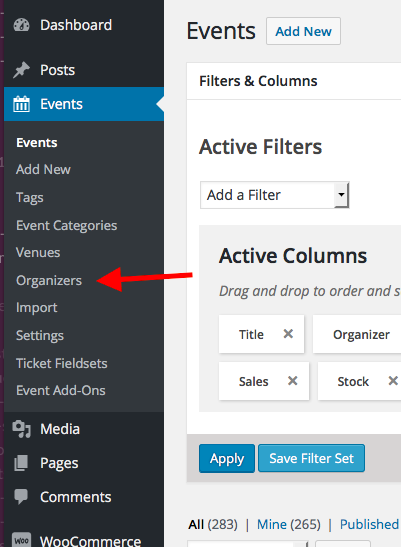
Thank you!
GeorgeJuly 18, 2016 at 6:42 am #1141002ParticipantHi George,
Thanks for your help.
Sorry I wasn’t clearer.
Yes, I am using WooCommerce.
And yes, I am referring to the “organizer” post type.
My best-case scenario is that I could create a coupon code that is only available for a role of “volunteer” and for a specific “organization.” (I have multiple organizations and only one organization that offers discounts to their volunteers. The others do not.) The discount code would work only for people with the proper role and that organization’s events, not on anything else in their cart (like CDs MP3s, or events sponsored by other organizations).
Thanks for checking to see if this is possible.
Please let me know if you have any further questions.
Cheers,
StuartJuly 18, 2016 at 7:39 am #1141022ParticipantThanks for elaborating, Stuart!
WooCommerce’s coupon code feature is quite flexible, but there is unfortunately no “out of the box” way to pull off what you describe here. 🙁
Providing different coupon codes with the sorts of rules/limitations you describe should be technically possible, but only with some extensive custom coding to link the WooCommerce coupon code feature with The Events Calendar’s organizers post type and the WooCommerce cart/checkout process.
I’m sorry to disappoint, Stuart. You may be able to approximate the sort of behaviors you describe here by way of some WooCommerce extensions that allow for more advanced coupon code management within WooCommerce. I do not know of any such extension, but just wanted to share that it is a possibility. You can search for extensions here → https://woocommerce.com/extensions/
Finally, if you’re interested in hiring someone for the custom coding that would be required, we have a list of great developers here → http://m.tri.be/18k1 (we have no affiliation with any of these folks–they’re simply some well-respected names in the community that we’ve compiled).
Sorry to bear the bad news! Let me know if there is anything else I can try to help with.
Sincerely,
GeorgeAugust 9, 2016 at 9:35 am #1149474Support Droid
KeymasterThis topic has not been active for quite some time and will now be closed.
If you still need assistance please simply open a new topic (linking to this one if necessary)
and one of the team will be only too happy to help. -
AuthorPosts
- The topic ‘Discount coupon based on organizers’ is closed to new replies.