

Forum Replies Created
-
AuthorPosts
-
George
ParticipantGlad to help, Karly! Cheers. Make sure to keep a backup of this custom code…and come back to the forums any time if other issues or questions arise.
Best of luck with your site,
GeorgeParticipantSounds good, Kathryn. Thanks for your follow-up here.
Stay tuned to http://theeventscalendar.com/blog for release news—the new versions are coming soon!
And if issues or questions ever arise, open a new thread any time.
For now: best of luck with your project! 😀
— George
September 22, 2016 at 8:49 am in reply to: Paypal Split payments – Woocommerce order pending #1167414ParticipantHey Nicolas,
Thanks for reaching out here. The payments should be marking as “complete” once the transactions go through successfully on PayPal’s end of things.
1. I noticed that you posted some system information here. Unfortunately much of the information was cut off, and does not include the full information text. To help us investigate your issues, can you first post the COMPLETE system information block to this thread? Here is how to do that → https://theeventscalendar.com/knowledgebase/sharing-sys-info/
If possible, don’t edit the block or remove info from the block (other than to obscure license keys, for example, like you did originally).
2. Next, you mention using PayPal Sandbox…to be clear, are the “Still pending” orders you are describing ones that were processed with the Sandbox still being active? In other words, are thing still in Sandbox mode and test mode? Or are you now NOT in Sandbox any longer, and are trying to really process real payments?
3. Just to be clear, does any payment ever get to Complete? Or does literally every attempted payment end up as Pending?
Thanks!
GeorgeParticipantThis reply is private.
ParticipantThanks for the update Matt, glad to hear that things worked out. If other issues or questions ever arise, don’t hesitate to open a new thread any time.
Best of luck with your project in the meantime!
Cheers,
GeorgeParticipantHey Karly!
This is possible with two steps. First, add a code snippet like the following to your theme’s functions.php file:
if ( class_exists( 'Tribe__Events__Main' ) ) {/**
* Add "author" support to venue and organizer post types.
*
* @return void
*/
function tribe_add_authors_to_venues_and_organizers() {
add_post_type_support( Tribe__Events__Main::VENUE_POST_TYPE, array( 'author' ) );
add_post_type_support( Tribe__Events__Main::ORGANIZER_POST_TYPE, array( 'author' ) );
}add_action( 'init', 'tribe_add_authors_to_venues_and_organizers' );
}
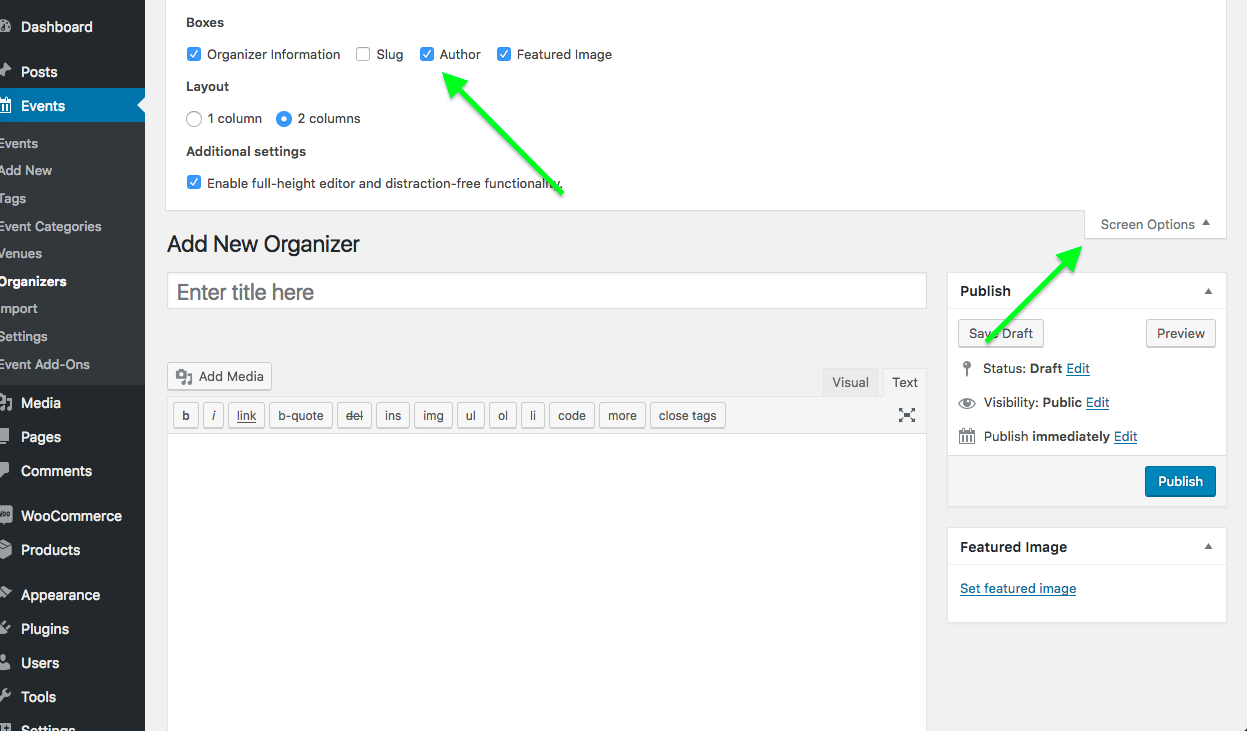
Then, head to the “edit” screens for venues and organizers and click “Screen Options” in the top right corner of the admin screen. This should reveal set of checkboxes—one checkbox should now be “Author”. Check this box if it’s not already, and you should have the same author control ability that you have with Events! (and posts, pages, etc…)
Here is a screenshot of the screen options checkboxes—click for larger version:
Cheers,
GeorgeParticipantSorry to hear about this Matt!
I would recommend doing all of the following steps:
- Back up your site and database.
- Set your active theme to the “basic wordpress theme” you mention in your post here.
- Deactivate all plugins on your site.
Once your site is in this state, proceed as follows:
- DELETE the The Events Calendar from your site. Not “deactivate”, but outright DELETE.
- DELETE WooCommerce Tickets from your site. WooCommerce Tickets is a deprecated and defunct plugin, and is no longer supported. It is also version 3.12.x, which will cause issues with using other plugins that are version 4.x.x.
- The replacement for WooCommerce Tickets is to install the new Event Tickets plugin, and its pro add-on Event Tickets Plus. As a WooCommerce Tickets customer, you should have an Event Tickets Plus license in your account already for free. If you don’t find this, let me know.
Once The Events Calendar and WooCommerce Tickets are both DELETED, proceed as follows:
- Go to wordpress.org/plugins/the-events-calendar and download a fresh copy of The Events Calendar. Install it and activate it on your site.
- Any issues?
- If not, then go to wordpress.org/plugins/event-tickets and download a fresh copy of Event Tickets. Install it and activate it on your site.
- Any issues?
- If not, then go to http://theeventscalendar.com/my-account/downloads and download a fresh copy of Event Tickets Plus. Install it and activate it on your site.
- Any issues?
If you are new to Event Tickets Plus and were not aware of the news last year that it would be replacing WooCommerce Tickets, you can read more about the transition here → https://theeventscalendar.com/knowledgebase/moving-to-event-tickets-plus/
The plugins have much in common, Event Tickets Plus is just better. The transition should be fairly painless.
Let us know how this all goes!
Thanks,
GeorgeParticipantHey Kathy,
Thanks for reaching out!
There is an update for Events Calendar Pro coming very soon—somewhere in the range of one to two weeks, if all goes to plan!–that will indeed allow for multiple separate calendars.
For now however, even with Events Calendar Pro it is not possible. There are only some workarounds that give the appearance of multiple calendars, which are all covered here ? https://theeventscalendar.com/knowledgebase/can-you-have-multiple-calendars/
I hope this information helps!
Cheers,
GeorgeParticipantSo sorry for the continued weirdness here, @Chuck! 🙁
In Firefox, Safari, and Chrome alike—with refreshed caches each—I cannot reproduce the problem. I am reaching out to some other folks on our team and will report what we can find.
Thanks so much for your patience here Chuck. I admit that I’m scratching my head a bit over this, but I’m determined to figure out what’s going on.
Cheers!
GeorgeParticipantI think that would be the best step here, in terms of what you are able to do from here. I will still be working on this and will post updates as soon as I have any other information on why this might be happening.
Thanks so much for your patience here, @Thomas!
Cheers,
GeorgeParticipantHey Thomas,
Thanks for sharing some more details here. I have just tried to recreate the problem on a subdomain site, with no issues either.
I’m really sorry about this!
1. I’m curious — is the ROOT website at creativeandcorporate.com itself a WordPress site?
2. If so, is there any way you could try installing The Events Calendar on that site, and then seeing if any permalinks issues persist there?
Maybe there is something going on with subdomains, but not generally, only specifically with your site / server here (some specific .htaccess settings, for example).
Let me know if this is possible, and if you do those steps, what you find. In the meantime I will reach out to other folks on team, and developers, and see if we can figure out what’s going on.
Thanks,
GeorgeParticipantHey Thomas,
Sorry to hear about the issues here. It seems like the “Redirection” plugin you are trying to use is where the failure is happening. I would recommend contacting the Redirection support team for assistance on this, or trying out a different plugin to set up redirects.
— George
ParticipantHey Tom,
I’m sorry I missed that detail. I admit that I am a bit puzzled here, since I cannot recreate this problem. The only other thing I can think of here is some sort of weirdness arising from the fact that you are using a subdomain — http://www.cheetah.creativeandcorporate.com
But we have no reports of issues with subdomains, and if there was a bug here we wuld likely be hearing from many customers….
In any case, I am going to bring this to our development team and see if they have any insights, while in the meantime building a test site with a subdomain so I can test to see if that’s problem.
Sorry for the trouble here, Tom—your patience means a lot. Sit tight; I will test this on a subdomain myself and see what I find!
Sincerely,
GeorgeParticipantSounds good, Teri—thanks for reaching out here. I will close this thread for now, but open a new thread any time if other questions or issues ever arise.
In the meantime, best of luck with your project!
— George
ParticipantHey Matt,
There unfortunately is not a way to do this at this time with Event Tickets. 🙁
Sorry to disappoint!
George -
AuthorPosts