Hey Karly!
This is possible with two steps. First, add a code snippet like the following to your theme’s functions.php file:
if ( class_exists( 'Tribe__Events__Main' ) ) {
/**
* Add "author" support to venue and organizer post types.
*
* @return void
*/
function tribe_add_authors_to_venues_and_organizers() {
add_post_type_support( Tribe__Events__Main::VENUE_POST_TYPE, array( 'author' ) );
add_post_type_support( Tribe__Events__Main::ORGANIZER_POST_TYPE, array( 'author' ) );
}
add_action( 'init', 'tribe_add_authors_to_venues_and_organizers' );
}
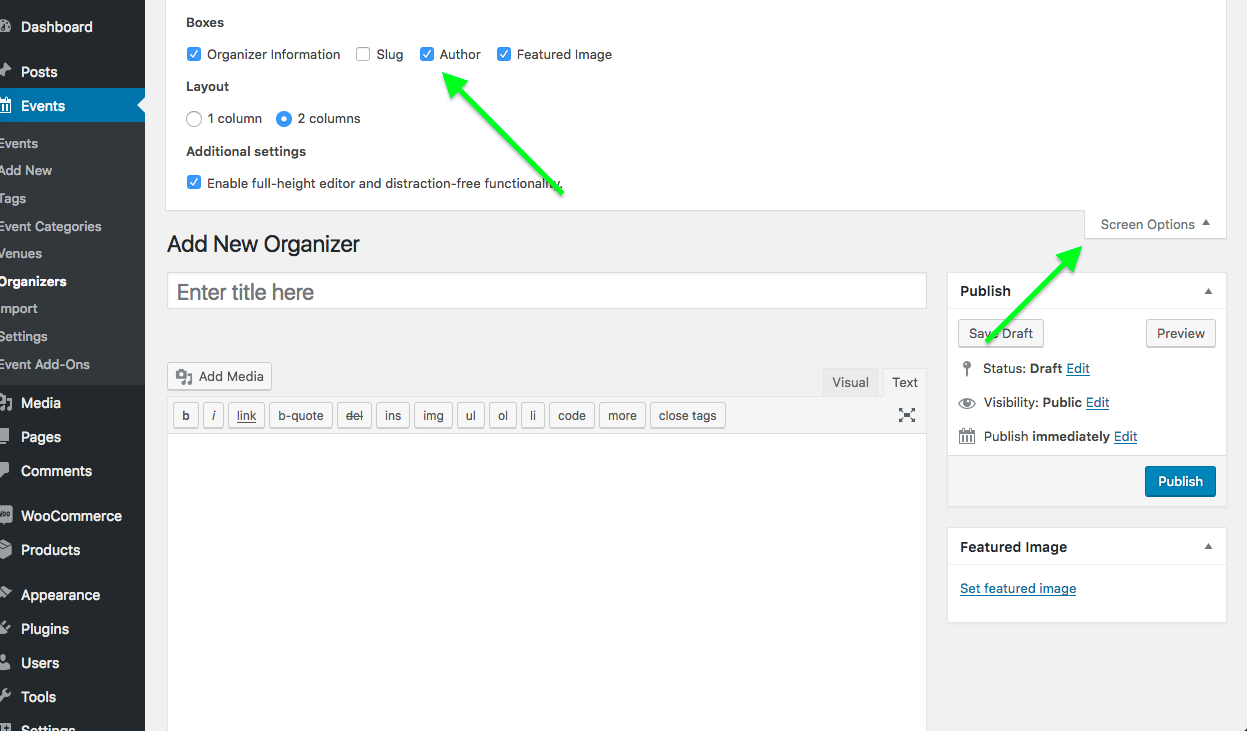
Then, head to the “edit” screens for venues and organizers and click “Screen Options” in the top right corner of the admin screen. This should reveal set of checkboxes—one checkbox should now be “Author”. Check this box if it’s not already, and you should have the same author control ability that you have with Events! (and posts, pages, etc…)
Here is a screenshot of the screen options checkboxes—click for larger version:
Cheers,
George

.

