

Forum Replies Created
-
AuthorPosts
-
November 9, 2016 at 5:38 pm in reply to: Duplicate Calendar, but one with members only events. #1190074
George
ParticipantHey Jamie,
Thanks for reaching out. Having a private calendar in general is unfortunately not easily possible—your specific goals here are especially challenging to pull off, because even harder to pull off than a private calendar is having one public calendar and one private one on the same site.
I am sorry to bear that news—we discuss some of the main methods for making a private calendar in this Knowledgebase article → https://theeventscalendar.com/knowledgebase/making-members-calendar/
I’d recommend giving that article a read and seeing if either option therein is one you can put to use. Other than those options, the only way to implement this would be with extensive code customization. 🙁
Sorry to disappoint! Please let me know if there are any other issues or questions I can try to help with.
Sincerely,
GeorgeParticipantThis reply is private.
November 9, 2016 at 5:26 pm in reply to: Importing edited event creates new event / end date & time not being imported #1190070ParticipantThanks for your feedback Chris, and for your patience here while we work on that first bug. Stay tuned to this thread — I will post updates, as mentioned above.
In regards to your other issue, this sounds like it is itself a bug:
yet it still creates a new event (duplicate) when I change the times.
I will investigate this and try to recreate this problem, and will report back on my findings — I may rope in the assistance of a developer on our team, as well.
Thank you,
GeorgeParticipantHi Markus,
Thanks for confirming the location of these fields. I wrote a custom code snippet for you here that should do the job well ? https://git.io/vXaUa
☝️ Add the code in that snippet to your theme’s functions.php file, and those fields should not show up on your event edit screens.
Cheers!
GeorgeParticipantHey Kim,
This is a great idea, and our plugins should support this at some time, but it’s not currently possible. 🙁
I believe there is a feature ticket for our developers to build this already — if not, I will create that ticket myself to ensure this arrives at some point as a feature in our plugins.
Sorry to disappoint here — please let me know if there are any other issues or questions I can try to help with!
— George
ParticipantHey Markus,
Can you clarify where you need to remove this from? If you simply do not enter a cost or event website URL for those fields, nothing should display for those on the front-end.
If there are two things you want to hide from the front end, then can you please share a link to a single event or something where they are visible? And then specify via screenshot or good description the two elements you’re trying to remove on that page?
This will make it possible for me to write specific CSS to try and help out here.
Cheers,
GeorgePS — When it comes to sharing screenshots, you can do this by uploading the screenshots to this thread. If you have issues with that, you can upload to Imgur.com, Flickr.com, CloudUp.com, or any similar image-hosting site; then just share the links to those images here and I’ll take a look.
ParticipantHey @Hilary,
Thanks for reaching out.
This is actually a bug we are in the process of fixing — I’m sorry for the trouble! I don’t have a specific ETA for when a bug fix will arrive in a plugin update, but we are working on this and can hopefully publish a release in the next several weeks some time.
I will post updates to this thread about the arrival of the fix, whenever news is available.
Sorry to bear this news, Hilary! In the meantime, using the plugin you mention should temporarily work — I know it only affects individual stock, not global, so in addition to being a temporary fix it’s also not a “complete” fix. But it may help.
Please let me know if there are any other issues or questions I can try to help with.
Cheers,
GeorgeParticipantHi Colm,
Thanks for reaching out!
There’s unfortunately no way of removing all of those event instances in one go.
Depending on your Event Aggregator “Update Authority” setting, you may have some luck here if you were to, for example, go to that original event on Meetup.com that recurs for years to come, and edit it so that it only recurs for one year or something the current date.
Can you share what your “Update Authority” option is set to? The best way to do this is actually to post your site’s complete, un-edited System Information as shown in this knowledgebase article ? https://theeventscalendar.com/knowledgebase/sharing-sys-info/
Thanks!
GeorgeNovember 9, 2016 at 3:52 am in reply to: second performance on same day, not displaying in month, day or ‘see all’ views #1189534ParticipantHey Simon,
You say this:
The ‘zero’ time is created by an add-on bit of code taken from your site and used in the child theme functions.php. I use it because for many events I only have a start time not a finish tim
If you remove that code from your site, and then try creating two or three test events with the same or similar recurrence pattern in the above screenshot, but with a specific end time that different than the start time, do issues persist?
I appreciate your patience, and as noted have thus far been unable to reproduce these problems.
Sincerely,
GeorgeParticipantHey Deltex,
I wrote this above to Felix, so will post it here as well:
We unfortunately cannot provide any assistance with writing custom code, which would be required to pull off what you describe. Our Filter Bar add-on indeed offers the Category filter (which you can choose a few different display options for, by the way, so it doesn’t have to be a big complex checkbox system and can be a simple one-level dropdown instead).
Other than our Filter Bar add-on, you would have to manually code all of this filter yourself and/or hire a professional developer for assistance. We have a list of great developers here → http://m.tri.be/18k1 (and we have no affiliation with any of these folks–they’re simply some well-respected names in the community that we’ve compiled).
☝️ I’m sorry to bear this news, but perhaps the code Felix suggested helps.
I wish you both the best of luck with these customizations. Open a new thread any time if other issues or questions arise.
Cheers,
GeorgeNovember 8, 2016 at 6:48 pm in reply to: Importing edited event creates new event / end date & time not being imported #1189453ParticipantHey Chris,
Thanks for reaching out!
To address things in reverse order here, what you describe in issue #2 is actually a known bug that emerged recently and that we are working urgently on — we hope to publish a fix as soon as possible, and while I don’t have a specific ETA, I will post updates on the arrival of that fix to this thread when they are available.
In regards to your first question, you should be able to modify this behavior by adjusting the “Update Authority” setting in your Event Aggregator settings — check out this knowledgebase article to learn more about that setting on the options for it that are available ? https://theeventscalendar.com/knowledgebase/event-aggregator-import-settings/
The “Overwrite my event with any changes from the original source” option for the Update Authority should be helpful here.
Let me know if this information helps!
Sincerely,
GeorgeParticipantHey Colin,
Thanks for reaching out, and for your interest in our plugins!
The features of Events Calendar Pro and Event Aggregator do not overlap, and are totally separate. So Events Calendar Pro does provide recurring events, but no importer/aggregator functionality; and Event Aggregator provides importer/aggregator functionality, but not recurring events.
If you want both features, both products would unfortunately be required at this time.
Please let me know if there are any other issues or questions I can try to help with!
GeorgeParticipantThis reply is private.
November 8, 2016 at 4:05 pm in reply to: Event Carousel Shows Events by Post Date Rather than Upcoming Event Dates #1189399ParticipantThanks for the kind words Milton — I’m sorry we don’t have much specific theme knowledge here but do wish you the best of luck with your project!
Open a new thread any time if other issues or questions arise!
Cheers,
GeorgeNovember 8, 2016 at 3:54 pm in reply to: second performance on same day, not displaying in month, day or ‘see all’ views #1189395ParticipantHi Simon,
Pardon my misspeaking earlier; this event configuration should actually work. I have tested locally and it works fine for me in all views.
I do not reproduce the issues you describe, where some events em>do work and some don’t.
One thing I noticed about your events is that, in one screenshot, you showed an event that technically does not happen. What I mean is, its start time and end time are the same, which means it happens for zero seconds. This is the screenshot of that event I’m referring to (click for a larger-sized image):
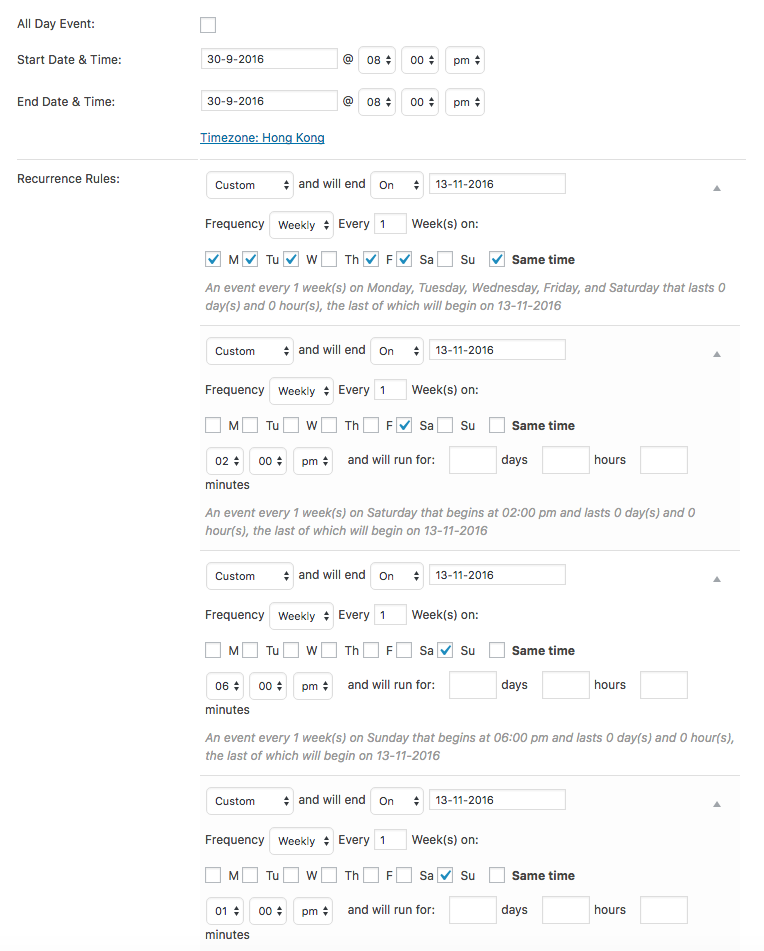
Do you notice that events with a different start and end time behave any better than ones with the zero-second duration like the one in the above screenshot?
Thank you for your patience here, I do understand your frustrations and am happy to keep working on why this issue is happening specifically on your site.
Thank you,
George -
AuthorPosts