
Home › Forums › Calendar Products › Events Calendar PRO › second performance on same day, not displaying in month, day or ‘see all’ views
- This topic has 19 replies, 7 voices, and was last updated 9 years, 8 months ago by
Support Droid.
-
AuthorPosts
-
November 2, 2016 at 7:34 am #1186323
simon
ParticipantSince the recent update the second performance of an event on same day is not displaying in month view, day view or ‘see all’ views.
Example performance at 2:30pm will display, but not the 7:30pm performance the same day.
All single performance days display perfectly well
http://www.bcmagazine.net/bc/event/lady-of-the-camellias-2016/all/see screen shots – just two examples but it applies to multiple events
(note this applies to live site http://www.bcmagazine.net across multiple different events – so not an error with a specific event – and also on the test site)it maybe something in the add-on code snippets you post that has changed, so have included child theme functions.php for reference
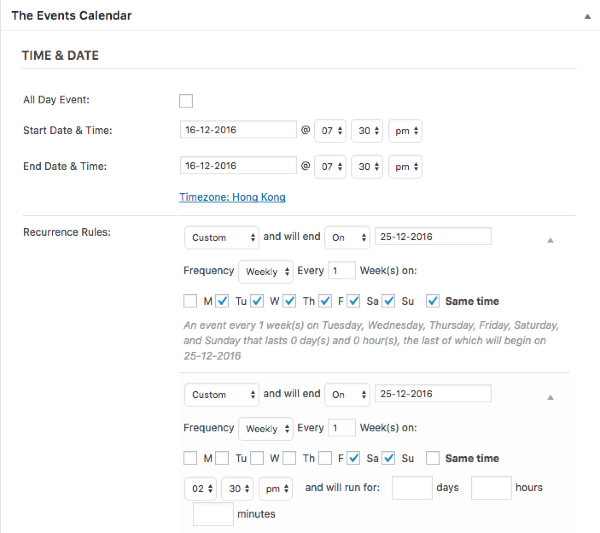 November 2, 2016 at 5:59 pm #1186744
George
ParticipantHey Simon,
Thanks for reaching out.
To be clear, when you say “second performance of an event on same date”, do you mean recurring events that recur within the same day? So that, for example, if the first event is at 7pm and the second one at 9pm, they are part of the same recurring event series?
Thank you,
GeorgeNovember 3, 2016 at 3:07 am #1186887ParticipantHi George
Yes as you can see in these examples the Nutcracker has performances at 2:30pm and 7:30pm on Sat and Sun – but only the 2:30pm shows in the “day view”, “month view” and “see all views”. This never used to occur, all the performances would list in “see all” and “single day view”. (note I added a code snippet in childe them function.php, attached earlier, to prevent 2 performances showing in month view.
I have always added these second shows in the same days as part of a single recurring event series and not had any problems before.
Regards
Simon
November 3, 2016 at 10:59 am #1187187ParticipantThis reply is private.
November 7, 2016 at 5:03 pm #1188863ParticipantHi George
No effect on this, that i can tell, from removing the custom code
Still doesnt display both eventsMy custom code snippets in my child theme was attached in the earlier link
Regards
SimonNovember 7, 2016 at 5:40 pm #1188882ParticipantThis reply is private.
November 7, 2016 at 6:40 pm #1188912ParticipantHi George
The frustration is that they now sometimes display and other times don’t
The Nutcracker entry (screenshot above) doesn’t display http://www.bcmagazine.net/bc/event/the-nutcracker-2016/2016-12-25/,
but Thriller does – screenshots attached http://www.bcmagazine.net/bc/event/thriller-live-macau-2016/2016-11-13/
There are no apparent conflicts when entering events on the same day or publishing them.
Yet Nutcracker entry only displays single day entry – screenshot
While Thriller displays multiple entries – screenshot
I don’t see any difference in how i have entered the event.
If no multiple day performances worked properly then fine. But as my experience and screen shots shows obviously it does work – but with no rhyme or reason that i can see as to which entry will or won’t work/display properly.
Which irritates advertisers and event organisers and affects my revenue and also reputation with readers. Not to mention frustration in the office and wasted time spent trying to why the non-displaying one doesnt work.
Regards
Simon
November 8, 2016 at 3:54 pm #1189395ParticipantHi Simon,
Pardon my misspeaking earlier; this event configuration should actually work. I have tested locally and it works fine for me in all views.
I do not reproduce the issues you describe, where some events em>do work and some don’t.
One thing I noticed about your events is that, in one screenshot, you showed an event that technically does not happen. What I mean is, its start time and end time are the same, which means it happens for zero seconds. This is the screenshot of that event I’m referring to (click for a larger-sized image):
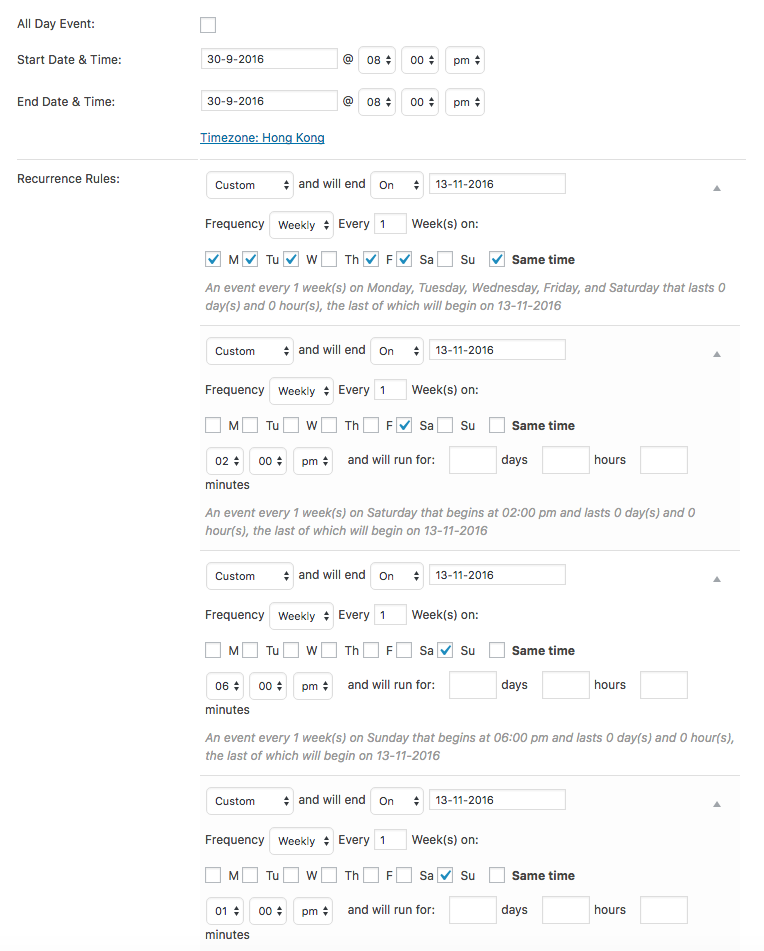
Do you notice that events with a different start and end time behave any better than ones with the zero-second duration like the one in the above screenshot?
Thank you for your patience here, I do understand your frustrations and am happy to keep working on why this issue is happening specifically on your site.
Thank you,
GeorgeNovember 8, 2016 at 9:04 pm #1189462ParticipantHi George
Thank you for the reply.
Given the recurring entry options available, i would expect two performances on the same day to work.
So I can’t see why it works for some events and not others – even in the same data entry session some recurring events work and some don’t.
The ‘zero’ time is created by an add-on bit of code taken from your site and used in the child theme functions.php. I use it because for many events I only have a start time not a finish time. I haven’t noticed it affecting entry displays.
In the past some of your code snippets have needed updating or become invalid due to the changes made in an update – but my coding knowing isn’t good enough to check. i only find out via error messages. But since multiple events show in some cases and not others. I don’t think it’s an event duration problem.There doesn’t seem to be a standard reason/pattern why some show and some dont – at least not that I can detect
I can live with onlyone showing in the month view – it’s that all the events don’t appear in show all that is most frustrating. That’s where advertisers, event organisers and readers look to see more info about a show they are interested in.
regards
Simon
November 9, 2016 at 3:52 am #1189534ParticipantHey Simon,
You say this:
The ‘zero’ time is created by an add-on bit of code taken from your site and used in the child theme functions.php. I use it because for many events I only have a start time not a finish tim
If you remove that code from your site, and then try creating two or three test events with the same or similar recurrence pattern in the above screenshot, but with a specific end time that different than the start time, do issues persist?
I appreciate your patience, and as noted have thus far been unable to reproduce these problems.
Sincerely,
GeorgeNovember 21, 2016 at 6:41 pm #1195620ParticipantHi George
Sorry for the slow reply, but busy recently
Have tried that, sometimes it’s ok and sometimes not.Entered a couple of big repeating multiple show a day events – all events show fine
Then today again it doesnt show second event…really can’t work out why – tried test entering so many different event combos to see if there was ryhme or reason to it
the only recurring similarity is that it always affect events by hk ballet. it affects others as well but always hk balletregards
Simon
November 22, 2016 at 10:05 am #1196019ParticipantHi Simon,
I’m sorry to hear that issues are persisting!
I am not recreating your issues, which I just want to mention again because that’s why this issue is taking some time to resolve. I appreciate your patience with me as we work on this together.
One of the things I’m curious about is if you can share your site’s system information in a new reply here on this thread; you shared the information originally back on November 2, earlier this month, when this thread started. Now here on November 22, things may be different to a meaningful degree. So to help me take another look under the hood, can you post your complete system information in a new reply here? Here is how to do so → https://theeventscalendar.com/knowledgebase/sharing-sys-info/
Thank you!
GeorgeDecember 13, 2016 at 6:28 pm #1205657ParticipantThis reply is private.
December 14, 2016 at 9:11 am #1205995ParticipantThis reply is private.
December 14, 2016 at 4:30 pm #1206209Andras
KeymasterThis reply is private.
-
AuthorPosts
- The topic ‘second performance on same day, not displaying in month, day or ‘see all’ views’ is closed to new replies.