

Forum Replies Created
-
AuthorPosts
-
November 14, 2016 at 7:57 am in reply to: application/ld+json output for Google search has wrong times #1191859
George
ParticipantHey @mindshare,
Thanks for reaching out.
If you head to Events → Settings in your wp-admin, and then try changing the setting from “Use sitewide timezone” to “Use event timezones”, does anything change with these issues?
Thank you,
GeorgeParticipantThis reply is private.
ParticipantThis reply is private.
November 14, 2016 at 7:40 am in reply to: Importing edited event creates new event / end date & time not being imported #1191843ParticipantHey Chris,
Thanks for this information and for your patience — I am in dialogue with our development team and strategists trying to zero in on these problems. The information you’ve provided is helpful — in regards to the times you list here, that may be indicative of an issue, but may also just be related to the lack of updates on the calendar in the interim time windows between each import…
For now, I’m curious:
1. Are your events on Google Calendar entered directly, by hand, into your Google Calendar? Or are they themselves imported from something like, say, Outlook 365, which we’ve had some funky issues with thus far — or imported from any other app or feed into the Google Calendar?
2. If possible, is there any way you could share the public Google Calendar URL you’re importing from? You can post that here in a “Private Reply” so that you only you and us on the support team can see the content of the reply…
Thank you!
GeorgeParticipantGlad to hear it! 😀
Open a new thread any time if other issues or questions arise.
Cheers,
GeorgeNovember 11, 2016 at 2:00 pm in reply to: Importing edited event creates new event / end date & time not being imported #1191176ParticipantThis reply is private.
ParticipantHey Gregg,
I just provided a four-bullet list with some details about finding a good theme. Did you see my reply?
If you are looking for a list of literal, specific themes we support, by name, this is not something we are likely to ever provide: there are literally dozens of thousands of individual themes out there, with more being created and put up on the internet every day.
It is thus not physically possible for us to test each and every single theme out there, especially with any degree of thoroughness, and so we provide general recommendations like the four I listed above that I hope help you find a good theme.
If you are having specific issues in your current theme, then please clarify what specific issues you face; please provide a link to where these are visible on your site; and please post your site’s complete, un-edited System Information as shown here → https://theeventscalendar.com/knowledgebase/sharing-sys-info/
Thanks!
GeorgeParticipantThis reply is private.
ParticipantThis reply is private.
ParticipantNo worries Neil!
I’ve just refunded your Events Calendar Pro purchase in full; you should see those funds back in your accounts in no more than a few business days.
From here, you can proceed with buying an Event Aggregator license any time ? https://theeventscalendar.com/product/event-aggregator/
I hope this helps!
Cheers,
GeorgeNovember 10, 2016 at 5:15 pm in reply to: Importing edited event creates new event / end date & time not being imported #1190686ParticipantHi Chris,
Thanks for your patience here. I wanted to report that I have been doing extensive testing today with Event Aggregator and have not been able to reproduce the issues you describe.
For me, if I change the event time/date and try to re-import, in the import preview it will not list the events whose time/date have been modified — but upon doing the import, I will see message like this (click for a larger-sized image):
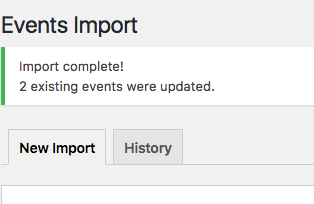
☝️ Then, the events will have their start times/dates adjusted, but a new event will NOT be created.
This is what my Update Authority is set to (click for a larger-sized image):
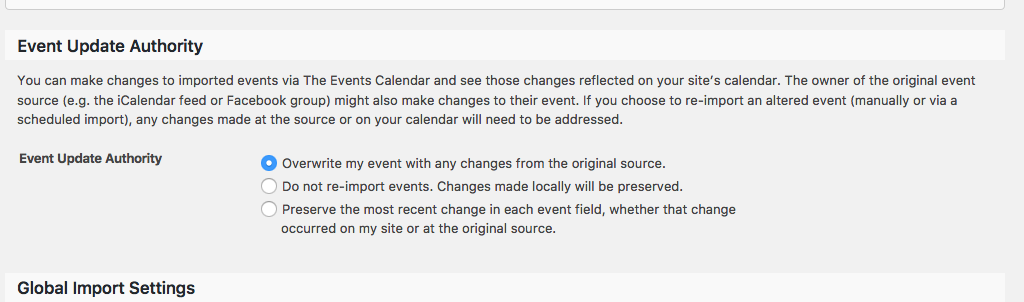
To be clear, I am doing one-time imports. Are you, too? Or are you using Scheduled Imports? If so, what is your schedule (or an example of one)?
Thank you!
Sincerely,
GeorgeParticipantHey there @lifesuccess,
It sounds like you are trying to put your Events Calendar Pro license key into the Event Aggregator license key field.
The Events Calendar Pro key won’t work in that field, so you need to make sure you have installed Events Calendar Pro on your site and then go to Events → Settings → Licenses where you can enter your Events Calendar Pro key.
Learn more about getting started with our plugins here → https://theeventscalendar.com/knowledgebase/new-user-primer-the-events-calendar-and-events-calendar-pro/
Cheers!
GeorgeParticipantHey Jack,
Thanks for reaching out.
We don’t have any current deals or discounts, though you can always check this page for updates and announcements of new sales and such → https://theeventscalendar.com/deals-coupons-discounts/
Sorry to disappoint, Jack! I will close this thread for now — if you have further questions about this, please send us an email at support at theeventscalendar dot com.
Thank you,
GeorgeNovember 10, 2016 at 8:41 am in reply to: Integrating Purchased Events with Woo Commerce "My Account" #1190416ParticipantThanks Carole, I am sorry to have to bear that news here!
I will close this thread for now, but feel free to open a new thread any time if other issues or questions arise!
Sincerely,
GeorgeNovember 9, 2016 at 5:41 pm in reply to: Integrating Purchased Events with Woo Commerce "My Account" #1190075ParticipantHey Carole,
Thanks for reaching out!
This is indeed not possible with a simple option at this point. Extensive customization would be required, to a degree that unfortunately falls outside the scope of premium support → https://theeventscalendar.com/knowledgebase/what-support-is-provided-for-license-holders/
I’m sorry to bear that news! I would encourage you to post this as a feature request on our UserVoice page, at http://tribe.uservoice.com — other customers can “vote” on ideas there, and we often use this page to determine what features to implement in our plugins.
Sorry to disappoint, Carole — please let me know if there are any other issues or questions I can try to help with.
Sincerely,
George -
AuthorPosts