

Forum Replies Created
-
AuthorPosts
-
George
ParticipantHi Mike,
Thanks for the followup. I’m sorry about the disappointing news!
One thing I wanted to touch on here is what you reported in your last reply:
I may be stuck with this theme for a while and will need your support.
☝️ Just to be clear, and help set your expectations early, we can only help with issues that our plugins cause. So if your theme itself has broken HTML or JavaScript that in turn breaks our plugin functionality, we won’t necessarily be able to fix the theme code.
You can learn more about what Pro support provides, exactly, here → https://theeventscalendar.com/knowledgebase/what-support-is-provided-for-license-holders/
Sincerely,
GeorgeParticipantThis reply is private.
ParticipantHey Mike,
Thanks for reaching out. I’m really sorry to bear this news, but there is unfortunately no sort of “cloning” feature like you describe at this time — even within Events Calendar Pro. 🙁
We totally agree about the utility and time-saving aspects of this feature, and it’s something we’ve long been trying to figure out how to do correctly — but it’s a bit trickier to exactly and thoroughly pull off than it seems.
Would this require creating a new event whenever the title must change because it is linked to previous events?
Also, if a new event must be created is there a way to clone the original, since all other details remain the same, and just change the name?Now, if you do not have RSVPS or tickets attached to old event instances, then technically you could just edit their titles, start times, end times, and even publish date if you wanted, and it should be updated without issues — i.e. it should show up on the newly-specified date in the calendar views, with the new title, etc. Though the “original” event instance would no longer be accessible.
And lastly, since these annual event fall on a consistent weekend of the year, but the actual dates on that weekend change every year, is it possible to create the repeating event such that in 2012 it lands on one date, 2013 on another, 2014 another, etc.?
You can indeed do something like this with Events Calendar Pro, and its recurrence engine will correct for those year-by-year shifting of dates to ensure consistency.
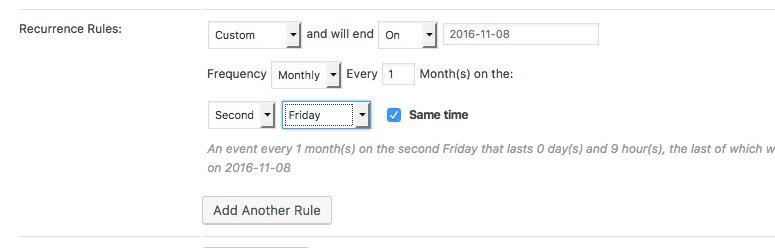
What you’d do is specify a “Custom” recurrence rule, which lets you then specify a “Monthly” recurrence pattern. In this context, you can specify things like the “Third monday”, the “Second Thursday”, and so on.
Since it is a “monthly” pattern, you would set the interval to 12 months if it’s a once-a-year event, 6 months if twice-a-year, and so on. Here’s a screenshot of these options in the wp-admin edit screen for events (click for a larger-sized image):
I hope this all helps!
— George
——————
P.S. — A Possibly-Helpful Hack for “Cloning” Events
There is a bit of a “hack” you can do to save time, though it depends on how comfortable you are with XML and with the WordPress importer/export tools — you can basically just “export” Events on your site, then whittle the big export file down to just the single event or handful of events you’d like to “duplicate”. Then, there in the XML file, you can just tweak the title of the event and its start/end times, etc. And then, of course, remove the “Post ID” of the Event post. 😉
After modifying the XML file in this way, you can then import that single event or handful of events with the built-in WordPress importer tool — it should pull in the Venue and Organizer information from the file, and all other details therein, so it is quite similar to “cloning” an event.
However, again, this all depends on how familiar you are with the XML importer/exporter tools, modifying those XML files directly, the WP_Post table structure, etc.
I apologize if this doesn’t help at all, but just wanted to offer up one suggestion as a temporary way to save a bit of time.
Other than this method, it’s indeed the case that you’d have to manually recreate event details.
ParticipantHey Tom,
I’m sorry for the trouble arising from this bug — we are hoping to publish a fix as soon as this week if we can manage it. Stay tuned to this thread — will post updates as soon as their is news about the arrival of the fix!
Sincerely,
GeorgeParticipantHey Gregg,
You posed the above questions in a separate thread over here ? https://theeventscalendar.com/support/forums/topic/supported-themes/
I wanted to confirm here that I have responded to the above thread, so definitely check out that reply.
Cheers,
GeorgeParticipantHey Gregg,
Thanks for reaching out. I think you are referring to this forum thread, is that correct? → https://theeventscalendar.com/support/forums/topic/structured-data-errors-2/
So, we actually support a wide number of themes, but in the context of that specific issue, here is what is meant:
• We guarantee support for default WordPress themes like Twenty Sixteen, Twenty Fifteen, etc.
• We guarantee support for other themes that pass the official WordPress theme review process: this includes other themes available on WordPress.org.
• We do not guarantee support for themes that would not be accepted on WordPress.org. This includes many page-builder themes, for example.
• We also do not guarantee support for bespoke themes — themes that a singular development team has made for a specific site.☝️ With this in mind, we certainly try to support as many themes as possible, but when it comes to things like the structured data issues you find on your site, these sorts of issues could be arising based on the specific markup of your theme—this is not the sort of thing we would therefore consider a “bug” on our end, and so the best course of action would be to contact the theme creators and/or work with HTML validation tools to ensure the HTML is valid throughout.
As for a list of themes we support, we actually don’t have a specific list at this time but are in the process of building a page with information about recommended/supported themes.
I hope this information helps! Please let me know if there are any other issues or questions I can try to help with.
Sincerely,
GeorgeNovember 7, 2016 at 5:40 pm in reply to: second performance on same day, not displaying in month, day or ‘see all’ views #1188882ParticipantThis reply is private.
November 7, 2016 at 5:34 pm in reply to: Event Carousel Shows Events by Post Date Rather than Upcoming Event Dates #1188879ParticipantNo problem Milton, thanks for clarifying the origin of that feature. I agree that contacting the theme makers is the best approach here, as they will best be able to look into their carousel feature and its event-ordering issue here.
As for the recommendations of other event carousels, I unfortunately do not know of any specific carousels out there. You may be able to ask about this from specific theme authors—for example, if you see a theme with a “blog post” carousel you specifically like, you should ask them if it would support a custom post type like Events well.
Sorry to disappoint, Milton! Please let me know if there are any other issues or questions I can try to help with.
Sincerely,
GeorgeParticipantHey Brandon,
Thanks for elaborating a bit here. I do think you’ve helped to clarify your aims and appreciate it!
So I guess I am looking for a WordPress to Google Calendar one way sync.
☝️ This is unfortunately a bit imperfect at this time, but should generally work.
The main thing to do is to set up your Google Calendar to “subscribe” to an iCal feed. When prompted for the feed URL, you would just add ?ical=1 to your site’s event URL.
So for example, our official demo site is http://wpshindig.com, its main events page at http://wpshindig.com/events. So to listen to its event postings via Google Calendar or another ICS-format-friendly app, you would specify this URL as the iCal events feed of that calendar:
• http://wpshindig.com/events/?ical=1
☝️ See what I mean? The calendar URL is /events/, while its iCal feed is /events/?ical=1
Now, the “tricky parts” arise in a few ways. First of all, if you edit an event on your WordPress site after it has already been imported onto the Google Calendar, it might not update as one would hope. Furthermore, the iCal feed is not all events on your site — it usually will only be a one-month or several-week span of events from the current date.
If at all possible, I would recommend trying out “subscribing” to the wpshindig.com events from within your Google Calendar — just for testing purposes! The feed URL again is http://wpshindig.com/events/?ical=1
I hope this information helps! Please let me know if there are any other issues or questions I can try to help with.
November 7, 2016 at 5:14 pm in reply to: Using Events Calendar Pro on Multisite Install but only one site. #1188871ParticipantHey Michael,
Thanks for posting here. I have responded to you in the new thread you opened on this topic, so we can continue your specific conversation there.
In the meantime, I will close this thread for now since its author hasn’t posted in a few weeks.
Alex, if you have any other issues or questions, then apologies for closing this thread prematurely—feel free to open a new thread any time! 😀
Cheers,
GeorgeParticipantInteresting — I’m not sure what that plugin is doing to cause the breakage, but would recommend contacting their support team to see if they have any insight on the issues.
Thank you for the update here!
Sincerely,
GeorgeParticipantHey Fabrice,
Thanks for reaching out.
I wasn’t able to reproduce any problems with that variable, so I’m wondering if you can clarify a things to help me investigate this issue:
1. Can you please post your site’s complete, un-edited system information? Here’s how to do that → https://theeventscalendar.com/knowledgebase/sharing-sys-info/
2. Next, can you please specify the exact file path to your customized template file where this problem arises? You mention “single-event.php” — but there are numerous instances of this file in our templating system. Is yours at [your-theme]/tribe-events/list/single-event.php, for example? Or perhaps [your-theme]/tribe-events/pro/map/single-event.php
3. Finally, can you copy and paste the complete, un-edited custom file you are referring to into a Gist at http://gist.github.com, and then share a link to that Gist in your reply?
Thanks Fabrice! With this extra information I’ll try to piece together exactly why that variable is blank for you.
Cheers,
GeorgeNovember 7, 2016 at 3:42 pm in reply to: Events Calendar Pro multisite license not accepted #1188854ParticipantThis reply is private.
ParticipantHey Brandon,
Thanks for reaching out.
You say, “I am trying to find out how to ADD my website’s calendar into my Google Apps for Business” — just to be clear, do you envision this working so that your Google Calendar basically “listens” to updates on your WordPress site’s calendar?
And so if a new event is made on Google Calendar, The Events Calendar imports it; and if a new event is made on The Events Calendar, Google Calendar imports it?
Just want to be absolutely clear about your goals here! 😀
— George
November 7, 2016 at 9:40 am in reply to: Event Carousel Shows Events by Post Date Rather than Upcoming Event Dates #1188694ParticipantHey Milton,
Thanks for reaching out!
You say you have “Events Carousel” on your page — can you please clarify where this “Events Carousel” comes from? Is it a feature of your theme, for example?
Our own plugins to not offer an “Events Carousel” feature, so I just want to make sure I’m accurate in understanding where this feature is coming from on your site.
Thanks!
George -
AuthorPosts