
Home › Forums › Welcome! › Pre-Sales Questions › Cloning repeating events
- This topic has 4 replies, 2 voices, and was last updated 9 years, 10 months ago by
Support Droid.
-
AuthorPosts
-
November 7, 2016 at 2:53 pm #1188831
Mike
GuestFolks,
I couldn’t find an answer specific to my question or that I could infer from other questions.
I have a bunch of annual events that after 3-5 years with the same title sponsor a new sponsor will be selected, changing the event name. Example: Race4Cure Sponsored by IBM goes for a few years and then changes to Race4Cure Sponsored by Tesla.
Historically I want to maintain the original name from 2012-2014 events for reference, and change the 2015-2018 name to reflect the new sponsor. However the venue, annual schedule and all other details stay the same from year-to-year.
Would this require creating a new event whenever the title must change because it is linked to previous events?
Also, if a new event must be created is there a way to clone the original, since all other details remain the same, and just change the name?
And lastly, since these annual event fall on a consistent weekend of the year, but the actual dates on that weekend change every year, is it possible to create the repeating event such that in 2012 it lands on one date, 2013 on another, 2014 another, etc.?Thanks again. These answers will likely push me into the Pro version if you respond as I expect. It’s time to enter all the 2017 events into the DB and link everything up.
Mike
November 7, 2016 at 6:25 pm #1188901George
ParticipantHey Mike,
Thanks for reaching out. I’m really sorry to bear this news, but there is unfortunately no sort of “cloning” feature like you describe at this time — even within Events Calendar Pro. 🙁
We totally agree about the utility and time-saving aspects of this feature, and it’s something we’ve long been trying to figure out how to do correctly — but it’s a bit trickier to exactly and thoroughly pull off than it seems.
Would this require creating a new event whenever the title must change because it is linked to previous events?
Also, if a new event must be created is there a way to clone the original, since all other details remain the same, and just change the name?Now, if you do not have RSVPS or tickets attached to old event instances, then technically you could just edit their titles, start times, end times, and even publish date if you wanted, and it should be updated without issues — i.e. it should show up on the newly-specified date in the calendar views, with the new title, etc. Though the “original” event instance would no longer be accessible.
And lastly, since these annual event fall on a consistent weekend of the year, but the actual dates on that weekend change every year, is it possible to create the repeating event such that in 2012 it lands on one date, 2013 on another, 2014 another, etc.?
You can indeed do something like this with Events Calendar Pro, and its recurrence engine will correct for those year-by-year shifting of dates to ensure consistency.
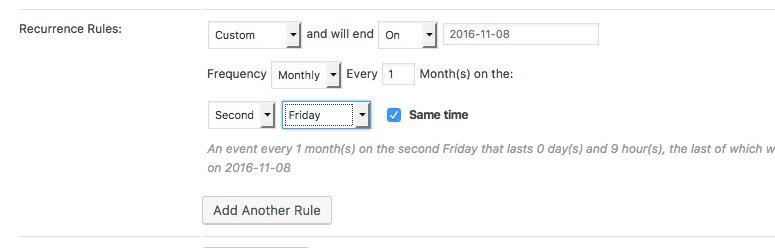
What you’d do is specify a “Custom” recurrence rule, which lets you then specify a “Monthly” recurrence pattern. In this context, you can specify things like the “Third monday”, the “Second Thursday”, and so on.
Since it is a “monthly” pattern, you would set the interval to 12 months if it’s a once-a-year event, 6 months if twice-a-year, and so on. Here’s a screenshot of these options in the wp-admin edit screen for events (click for a larger-sized image):
I hope this all helps!
— George
——————
P.S. — A Possibly-Helpful Hack for “Cloning” Events
There is a bit of a “hack” you can do to save time, though it depends on how comfortable you are with XML and with the WordPress importer/export tools — you can basically just “export” Events on your site, then whittle the big export file down to just the single event or handful of events you’d like to “duplicate”. Then, there in the XML file, you can just tweak the title of the event and its start/end times, etc. And then, of course, remove the “Post ID” of the Event post. 😉
After modifying the XML file in this way, you can then import that single event or handful of events with the built-in WordPress importer tool — it should pull in the Venue and Organizer information from the file, and all other details therein, so it is quite similar to “cloning” an event.
However, again, this all depends on how familiar you are with the XML importer/exporter tools, modifying those XML files directly, the WP_Post table structure, etc.
I apologize if this doesn’t help at all, but just wanted to offer up one suggestion as a temporary way to save a bit of time.
Other than this method, it’s indeed the case that you’d have to manually recreate event details.
November 7, 2016 at 8:29 pm #1188925GuestGeorge,
Thanks for the quick response.
Not the response I was expecting, but I’m OK with it. I wish I understood the DB better and could just drop into that, create new records, and be sure they would work. As you mention its “trickier to exactly and thoroughly pull off” with the emphasis on accuracy.
I’ll make due for this week. Still will be upgrading soon as I need a capability your support previously indicated was in the Pro version, and I may be stuck with this theme for a while and will need your support.
Best regards,
Mike
November 8, 2016 at 3:25 pm #1189383ParticipantHi Mike,
Thanks for the followup. I’m sorry about the disappointing news!
One thing I wanted to touch on here is what you reported in your last reply:
I may be stuck with this theme for a while and will need your support.
☝️ Just to be clear, and help set your expectations early, we can only help with issues that our plugins cause. So if your theme itself has broken HTML or JavaScript that in turn breaks our plugin functionality, we won’t necessarily be able to fix the theme code.
You can learn more about what Pro support provides, exactly, here → https://theeventscalendar.com/knowledgebase/what-support-is-provided-for-license-holders/
Sincerely,
GeorgeNovember 30, 2016 at 8:35 am #1199774KeymasterHey there! This thread has been pretty quiet for the last three weeks, so we’re going to go ahead and close it to avoid confusion with other topics. If you’re still looking for help with this, please do open a new thread, reference this one and we’d be more than happy to continue the conversation over there.
Thanks so much!
The Events Calendar Support Team -
AuthorPosts
- The topic ‘Cloning repeating events’ is closed to new replies.