

Forum Replies Created
-
AuthorPosts
-
Geoff B.
MemberOne final question, can you tell me what your memory setting is in either php.ini or wp-config.php ?
MemberGood evening Nadia and welcome back!
Thank you for reaching out to us.
We are sorry to hear about your website being disabled after the 4.2.2 update. This is certainly unintended on our end.
I would love to help you with this topic. As a side note, if you prefer, we can continue this conversation in french.I’m glad that you managed to fix the category pages issue.
As for Pro crashing your site, that is very weird and we apologize for the inconvenience.
Even though there are 20K events on this site, the fact that it worked like a charm beforehand means that it should continue to do so.Short term, the solution would be to downgrade to the previous versions of the plugin of course: https://theeventscalendar.com/knowledgebase/downgrading-plugin-past-version/
That way, you can still use Pro’s feature while we figure this out.
As per your specific issue, I have a few additional questions:
- You mentioned that you changed themes as part of your testing process. Can you tell me if you did that just for the category issue or also with the Pro issue ? If it was only for the category issue, could you please send me a copy of your WordPress theme / child theme in a .zip file link (via Dropbox or Google Drive) so that I can run some tests on my end ? (in a private reply)
- Secondly, can you tell me if you tend to use recurring events on your website ? It might seem like an odd question, but there has been an issue with that in the latest release.
Best regards,
Geoff B.
MemberGood evening Justin,
In case you haven’t done so already, I would recommend updating to the latest version of our plugin.
This specific thread was inspected by our Dev team and they also found a couple of things that might be of interest to you:
- Your site also has this error: You have included the Google Maps API multiple times on this page. This may cause unexpected errors. http://maps.google.com/maps/api/js?sensor=false Line 92 . Not sure where that is coming from, but it probably is not helping.
- If you still can’t get it to work with your theme, can you tell me if there is any settings for the number of archive posts to display on your site ?
Best regards,
Geoff B.
MemberGood evening David,
Thank you for the files.
That allowed me to run a bunch of tests.
Interestingly enough, even with your child-theme in place, my display is significantly different than yours (as far as element placement goes). In fact, the top: 35px CSS rule I gave out earlier actually makes the display worst on my end 🙁
This is when I figured out that we might be using different stylesheets. It turns out I was right.
Could you remove the previous CSS rule and head over to Events -> Settings -> Display ?
Once there, try switching the stylesheet from Tribe Events Styles to Full Styles and see if you like that better.Let me know how that goes.
Best regards,
Geoff B.MemberThis reply is private.
MemberGood evening Guillaume,
Thank you for writing back.
I’m super stoked that my initial answer was helpful to you.
We have successfully created the initial post recurring event with postmeta fulfilled (:D), but what if we want to “automatically” create recurring children event posts? Do we have to create a loop and create these event one by one with tribe_create_event for example?
Yes absolutely, this would be your best approach (using the variables found in wp_postmeta) entry.
By the way, in case you have not bumped into it already, the following function is pretty handy too: https://theeventscalendar.com/function/tribe_update_event/
Let me know how that goes.
Best regards,
Geoff B.MemberThis reply is private.
MemberGood afternoon Fernando,
Thank you for writing back.
I am sorry that your events page is still not working at this point.I believe I have miscommunicated what I was trying to say. You CAN use the words “events” and “event”.
You just have to make sure that:- There is no “real page” that has those slugs
- The Events URL slug and the Single event URL slug have to be different from one another.
Did you also change the settings for Events Template in Events -> Settings -> Display and then re-saving your permalinks ?
Finally, could you tell me if that issue persists if you very temporarily switch back to a default WordPress theme such as twenty-fifteen.
If that still does not work, the next step is to go through our testing for conflicts procedure (preferably in a staging/dev environment or local install of your WordPress website) and let us know what you find out.
Basically the goal here is to revert back to a bare WordPress installation to see if the problem persists. It also allows us to pinpoint what the cause of the issue is.
Let me know how that goes and hang in there as we are trying to figure out why the calendar page does not appear properly on your site.
Best regards,
Geoff B.July 11, 2016 at 1:00 pm in reply to: Send a mail to the administrator when a ticket is purchased #1138331MemberBonjour Hélène,
Merci de nous écrire à nouveau.
Vous avez entièrement raison! Notre forum “Pre-Sales” (qui a été utilisé pour ce billet) ne contient pas l’option de réponse privée.
À l’avenir, lorsque vous nous soumettez un billet, je vous recommande chaudement d’utiliser la catégorie suivante afin d’avoir accès à cette option.
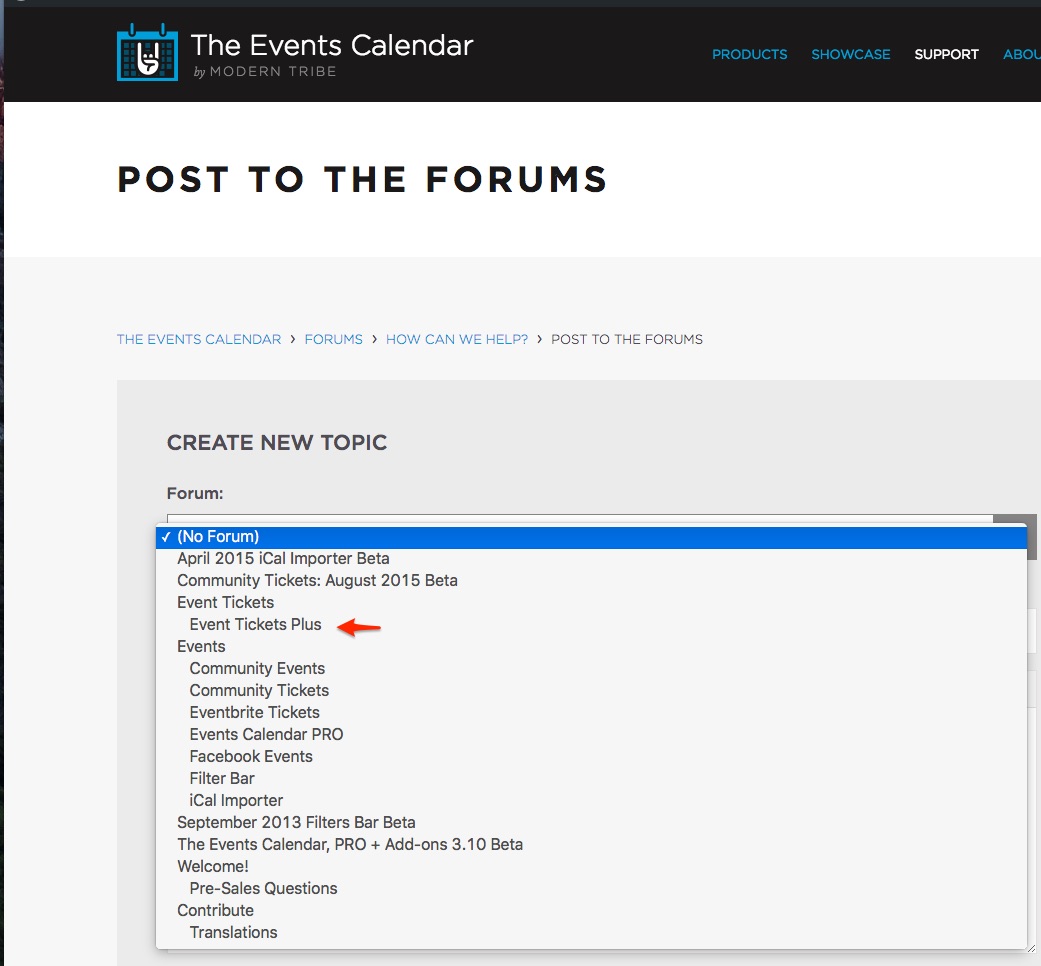
Cela nous laisse donc 2 choix pour poursuivre ce billet:
- Rouvrir un billet dans la catégorie suggérée, afin d’avoir accès à l’option de réponse privée
- Continuer avec ce billet si l’aspect privé de la réponse n’est pas une préoccupation pour vous
Désolé des inconvénients que cela peut causer.
Bonne fin de journée,
Geoff B.
MemberGood afternoon Matt,
I’m stoked that this was helpful to you!
You are welcome back on our support forums any time 🙂
For now, I am going to close this thread.
Have a great week!
Geoff B.
MemberGood afternoon Joshua,
I’m stoked that we managed to tackle all of your issues!
You are welcome back on our support forums any time 🙂
For now, I am going to close this thread.
Have a great week!
Geoff B.
MemberGood afternoon Joelle,
I did pass that recommendation along.
You are welcome back on our support forums any time 🙂
For now, I am going to close this thread.
Have a great week!
Geoff B.
MemberGood evening Michael,
Thank you for writing back and providing very useful details.
I was able to reproduce the issue on my install and this is a legitimate bug which is now one of our top priorities.
Unfortunately, I cannot commit to a release date for a fix at this point.
But you will be contacted as soon as there is one or as soon as we have a temporary workaround for it.Thank you for bringing this to our attention and we apologize for the inconvenience this has caused so far.
Hang tight as we work on fixing this.
Best regards,
Geoff B.
MemberGood evening Brian and welcome to the Events Calendar forum!
Thank you for your interest in our products.
We’ll be glad to answer your questions.The only problem I see is that the widget list the information on the dates below the calendar itself, this will cause the page header to expand depending on the day and look pretty shady.
Is there an option to have a flyout similar to what you have here:
http://wpshindig.com/events/The short answer is that technically you can tweak any Calendar view or widget exactly to your liking.
You might want to read our Themer’s guide to get a sense of how that works.With that in mind, I am not sure which version of our plugins you are using. But the Events Calendar Pro add-on offers the most options for different widgets. E.g.: https://theeventscalendar.com/knowledgebase/configuring-the-this-week-widget/
As an alternative, you might want to take a look at the following third-party free plugin: https://wordpress.org/plugins/the-events-calendar-shortcode/
As for having the same visual results as on WP Shindig, the page you are seeing is actually the full calendar view with tooltips and our Tribe bar filter add-on.
There is no built-in way to achieve tooltips (when you hover over a link) in a widget. But, using our Themer’s guide, that should be feasible.
Let me know if that helps.
Have a great day!
Geoff B.
MemberGood evening Robert and welcome to the Events Calendar Support forum!
Thank you for reaching out to us.
I would love to help you with this topic.I have the event calendar PRO installed on there for ONLY ONE SITE – their main magazine. They are not going to be using it on the other sites. Or if they do, it would only be a feed coming from the main site.
Do I have to buy the multisite license? $349 is a bit steep since I’m not using multisite to provide websites for unlimited clients / etc…
The short answer is no. You don’t need to be a multi-site license if you are not going to be using the Events Calendar Pro on more than one of these sites.
I would recommend reading the following article on that subject: https://theeventscalendar.com/knowledgebase/multisite-license/
Let me know if that helps.
Have a great day!
Geoff B.
-
AuthorPosts