

Forum Replies Created
-
AuthorPosts
-
Geoff B.
MemberGood evening Brian,
Thank you for writing back.
You are right, by limiting the countries, the dropdown does feel rather small.
Upon some further testing it seems like it’s width is hardcoded at 113px.The fastest way to deal with this would be to add the following CSS rule to your WordPress theme’s CSS file.
#EventInfo .chosen-container {

width: 400px !important;

}
Let me know how that goes.
Best regards,
Geoff B.MemberGood evening Lars,
Thank you for writing back.
To be transparent with you, I was merely trying to be helpful here.
According to our archives, it appears you were actually the one that wrote that script initially: https://theeventscalendar.com/support/forums/topic/inserting-title-and-text-above-each-view/#post-945290
Furthermore, the way that snippet is written, you are using hardcoded values.
As such, the custom title would only be triggered upon a very specific condition (if the ‘Events for October 24 – October 28’ string is found).In any case, as you know, the scope of our support is mostly to get our customers started on the right track and to help them in case of issues.
We unfortunately do not provide complete support for customization.
With that in mind, if you want to rework your snippet, there are a couple of potential things I would consider:
- Try hooking to ‘tribe_events_title’ instead of ‘tribe_get_events_title’.
- The $look_for variable might be breaking with the way we display titles. Check out what you find in the debugger with a breakpoint.
Best regards,
Geoff B.
MemberGood evening Jason and welcome to the Events Calendar Support forum!
Thank you for reaching out to us.
We are sorry to hear about the issues you have been experiencing with the availability of recurring events.
I would love to help you with this topic.By the looks of it, there might be a conflict at play.
As a first troubleshooting step, could you please provide us with your complete system information in a private reply using the instructions found in the following link?
https://theeventscalendar.com/knowledgebase/sharing-sys-info/
As a quick test, could you please temporarily revert to a default WordPress theme such as twenty-fifteen to see if the issue persist ?
Best regards,
Geoff B.
MemberGood evening Mr. Peri,
Thank you for writing back.
I was able to run some tests and I have good news.
It seems that the following steps work with your theme:- Find the .pot files for both the Events Calendar, Event Tickets and Event Tickets Plus
- Re-save the .pot files
- Update your .po / .mo files from the .pot file for each plugin
OR, the easier way:
- Download the latest Afrikaaans files here: http://translations.theeventscalendar.com/projects
- Make sure they are renamed properly to match those in your language files folder
- Overwrite the current language files for our plugins
Either one of these solutions will fix all of your translation issues.
Let me know how that goes.
Best regards,
Geoff B.MemberThis reply is private.
MemberGood afternoon Cliff and welcome back!
Thank you for reaching out to us.
I would love to help you with this topic.Before we begin, as a side note, I am noticing that your install seems to be using PHP 2.5.5
To avoid running into some serious issues, I would highly recommend upgrading to at least PHP 5.4 + (in fact WordPress recommends 5.6+)The part that’s tricky is that the client has the need to sell different types of tickets at different prices, for example, Member Tickets @ $40 and Guest Tickets @ $45. So we need more than 1 quantity field, one for each type of registration.
Actually, the first thing you will to do at this point is to download and install our Event Tickets Plus add-on as outlined here: https://theeventscalendar.com/knowledgebase/new-user-primer-event-tickets/
There are a couple of way you could handle the different prices, but all of these actually involve WooCommerce (since our plugin literally hands out the transactional aspect of things to WooCommerce).
As you might imagine, that is slightly out of scope of our typical product support, but I would recommend reading the following links to get you started on what the different options are (typically using third-party plugins):
- https://wordpress.org/plugins/woocommerce-role-based-price/
- https://woocommerce.com/products/woocommerce-memberships/
- https://codecanyon.net/item/woocommerce-membership/8746370
- https://docs.woocommerce.com/document/woocommerce-dynamic-pricing/
To summarize, you can totally have several types of tickets on any event.
Provided you also have a plugin that handles membership, you could then:- Edit some of the tickets so that they are only available to members
- Have just one type of ticket but a discounted price for members
Secondly, they also ask for optional donations along with the ticket purchases, so there needs to be a way to add a field where the registrant can add a donation amount and it gets added to the total.
That part is a bit trickier.
You have a couple of options here:
- Do a template customization to extend the built-in ticket form. You might want to read our Themer’s guide to get a sense of how that works.
- Hire one of our recommended customizers to do the customization for you.
- Change the behaviour of the ticket box “Add to cart” button so that it redirects to an intermediary Donation product page
- Simply add a Donation product as a related/suggested product in the cart. There are a few donation plugins out there (e.g.: https://wordpress.org/plugins/woocommerce-quick-donation/ ).
Let me know if that helps.
Have a great day!
Geoff B.
MemberGood afternoon Cees and welcome to the Events Calendar Support forum!
Thank you for reaching out to us.
I would love to help you with this topic.It turns out that we have the perfect code snippet to do exactly that. Check it out here: https://theeventscalendar.com/knowledgebase/moving-rsvp-ticket-forms/
Let me know if that helps or if you need further assistance on this.
Have a great day!
Geoff B.
MemberGood evening again Brian,
Thank you for bringing this to our attention.
I would love to help you with this topic.As a first troubleshooting step, could you please provide us with your complete system information in a private reply using the instructions found in the following link?
https://theeventscalendar.com/knowledgebase/sharing-sys-info/
On my end, I am getting a very different visual result (see for yourself).
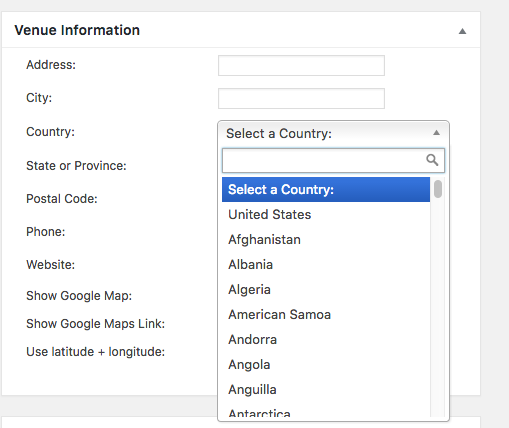
This leads me to a couple of questions:- Which browser are you using (Chrome, Firefox, IE, Safari, etc..) ?
- What type of device are you using (laptop, tablet, windows, mac) ?
- What screen resolution are you using ?
Best regards,
Geoff B.
MemberGood evening Gergana,
Thank you for trying the procedure and for the system information.
I would like to run it by our Dev team to validate that it is still valid.
Once that is done, I will test it out for you.Hang in there as we investigate this a bit further.
Best regards,
Geoff B.
MemberGood evening Alex,
Thank you for writing back, for the screenshot and for clarifying your client’s needs.
I just tried that very event on a live install and even though it took a while (provided the number of events), I was successful in creating them without the memory leak you experienced.
I am wondering if the cause of the memory usage issue you are experiencing might not be:
- Caused by your settings under Events -> Settings -> General . Could you please provide me with a screenshot of these ?
- Some setting on your localhost install
To put this into perspective, I am running things on a very average PHP 5.4.13 install with WordPress 4.6
A decent web host (e.g.: wpengine, Site ground) should be perfectly capable of handling the data intensity required IMHO.
Even with the amount of events you describe.As a side note, some of our users take performance optimization as far as using additional caching mechanism on top of our built-in ones.
In other words, I would still like to help you resolve the issue on your local install.
But I do believe that unfortunately your current experience does not reflect the performance of our plugin on a live web server.Best regards,
Geoff B.
MemberHello again Brian,
I believe this is the final one 🙂
The good news is that once again, this is fixable.
Let me know how that goes.
Best regards,
Geoff B.MemberThis reply is private.
August 30, 2016 at 9:13 pm in reply to: How to prevent auto redirection to cart after adding item #1157940MemberGood evening Matthew and welcome back!
Thank you for reaching out to us.
I would love to help you with this topic.Most likely, what is going on is that our event tickets module is not impacted by that specific WooCommerce setting.
The good news, however, is that you can still control the behaviour of our add to cart button.
Here are a couple of ways to go about this:
- Using a template override. You might want to read our Themer’s guide to get a sense of how that works.
- Using a snippet such as the ones presented by my colleague Brian here: https://theeventscalendar.com/support/forums/topic/add-to-cart-via-ajax/#post-1012713
Let me know if that helps.
Have a great day!
Geoff B.
MemberGood evening Brian,
I want to take a moment to congratulate your thoroughness.
This is truly remarquable and it ensures that we can attend to things in a timely manner.The same fixes as previously should work here to if the strings are indeed translated.
If on any of these installs you experiment difficulties with the workarounds, please let me know.
Best regards,
Geoff B.
MemberHello again Brian,
The good news is that this is fixable using the same 2 alternatives as presented before.
Our apologies once again.
Geoff B.
-
AuthorPosts