

Forum Replies Created
-
AuthorPosts
-
Geoff B.
MemberGood evening Ryan and welcome back!
Thank you for reaching out to us.
We are sorry to hear about the 404 error message. Yikes!
I would love to help you with this topic.You are right, it looks like this might come from version 4.03 (I know 4.02 works fine).
It might also be caused by something in your child theme.If you don’t mind could you please send me a copy of your WordPress theme / child theme in a .zip file link in a private reply (via Dropbox or Google Drive) so that I can run some tests on my end ?
Please ensure you are using the latest files as found on your actual website.
This way I will get access to any updates you might have made.Finally, would it be possible to get a screenshot of your settings under Events -> Settings -> Display ?
Best regards,
Geoff B.
MemberGood evening Krystle and welcome back!
Thank you for reaching out to us.
We are sorry to hear about the checkbox not showing up during the order process. Yikes!
I would love to help you with this topic.Unfortunately, it seems like your website is down currently.
Could you please send me a copy of your WordPress theme / child theme in a .zip file link in a private reply (via Dropbox or Google Drive) so that I can run some tests on my end ?
Please ensure you are using the latest files as found on your actual website.
This way I will get access to any updates you might have made.Best regards,
Geoff B.
MemberGood evening Leonie,
I am glad we are making progress on this.The short answer is yes, you can totally fix this.
The solution is to replace the string “tokopress” by “the-events-calendar” in the template customization files of your theme (the files contained in the /tribe-events/ folder). This is what I did for the details.php file.
I could help you with that, but I would need access to your complete theme files.
Best regards,
Geoff B.
October 3, 2016 at 11:23 pm in reply to: How i save the custom code in the Events Tickets Plus after update this plugin? #1172091MemberGood evening Devon,
Could you please send me a copy of your WordPress theme / child theme in a .zip file link in a private reply(via Dropbox or Google Drive) so that I can run some tests on my end ?
Please ensure you are using the latest files as found on your actual website.
This way I will get access to any updates you might have made.As a second troubleshooting step, could you please provide us with your complete system information in a private reply using the instructions found in the following link?
https://theeventscalendar.com/knowledgebase/sharing-sys-info/
Finally, can you tell me a little more about the change you are trying to make ?
Best regards,
Geoff B.
MemberGood evening Shaun,
Thank you for writing back.
To answer your question, it is possible that the fact that it’s not publicly available is not helping.
However, my main concern right now (after updating my host files) is that there are 3 Javascript errors in the console (including one related to Google Map).At this point, I would first recommend removing the Google Maps API from our API tab (it sounds counterintuitive, but it works in a lot of cases).
If that does not work, the next step would be to go through our testing for conflicts procedure (preferably in a staging/dev environment or local install of your WordPress website) and let us know what you find out.
Basically the goal here is to revert back to a bare WordPress installation to see if the problem persists. It also allows us to pinpoint what the cause of the issue is.
But, before you do that, there are 2 things I would advise:
- Make a backup of your database
- Consider activating a “Maintenance Page” plugin if you are doing this on your live site (to minimize impact on your visitors)
Let me know how that goes.
Best regards,
Geoff B.MemberGood evening Colin and welcome back!
Thank you for reaching out to us.
We are sorry to hear about the shortcode not working as you would expect it too.
I would love to help you with this topic.I have good news. You should be able to specify exactly how many events you are displaying.
You can read all about it here: https://theeventscalendar.com/knowledgebase/pro-widget-shortcodes/Let me know if that helps.
Have a great day!
Geoff B.
MemberGood evening Maarten and welcome to the Events Calendar Support forum!
Thank you for reaching out to us.
I would love to help you with this topic.I want to apologize if we fell short of a promised date. Typically we give ball park figures of release dates.
As you might guess, sometimes there are slight glitches in the development process and things take slightly longer than expected.To make a long story short, we want to make sure that we release a solid update, rather than one that is not.
As such, we are aiming more at mid-October at this point (once again, if all goes well).We are sorry for the inconvenience this might be creating.
Thank you for your patience as we work hard at releasing that new version.
Should you be interested, we do have beta versions available.Best regards,
Geoff B.
MemberGood evening Jason and welcome to the Events Calendar Support forum!
Thank you for reaching out to us.
We are sorry to hear about the changes of the background color not working as expected on your installation.
I would love to help you with this topic.Normally, the Customizer should display many other options (see screenshot), under Appearance > Customize
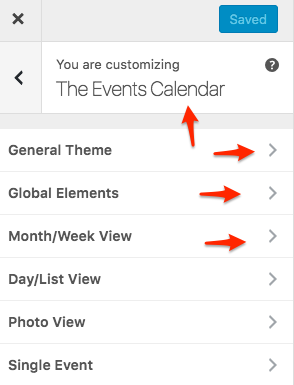
Could you try that and tell me if that impacts the colours as you would expect it to ?
If not, could you tell me which version of Avada you are using ?
Best regards,
Geoff B.
MemberGood evening Ray,
I am glad the advice has been useful to you so far.
Normally there should be many options available to customize the calendar under the “Appearance” tab (see screenshot).
But if, for some reason, that is not the case on your install, then we can tackle things with CSS.To change the font via CSS, you can try adding that to you theme’s style.css or Custom CSS box (if any):
.tribe-mini-calendar-grid-wrapper {font-family: 'Oswald', sans-serif;

font-weight: normal;

}
As for the grey, the easiest solution would have been to use the Customizer, but since that does not seem to be an option, it has to be tackled via CSS too.
Could you tell me exactly which grey element you would like to change, here are 2 elements that I think would be good candidates
.tribe-mini-calendar .tribe-events-present, .tribe-mini-calendar .tribe-mini-calendar-today {

background-color: #009343;

color: #fff !important;

}
.tribe-mini-calendar thead {
background: #009343;
}Let me know how that goes.
Best regards,
Geoff B.MemberGood evening Jack and welcome back!
Thank you for reaching out to us.
I would love to help you with this topic.The simplest way to do this would be to override the language files.
You can read all about that here: https://theeventscalendar.com/knowledgebase/how-to-override-plugin-language-files/You might need to update you .po file using the pot file found in each plugin’s /lang/ folder before you do that.
As an alternative, you can also use the following snippet and paste it in your theme’s functions.php: https://theeventscalendar.com/knowledgebase/change-the-wording-of-any-bit-of-text-or-string/
Let me know how that goes.
Best regards,
Geoff B.MemberGood evening Marlies,
Thank you for your understanding.
Let me know if you need help implementing the workaround.
Other than that, stay tuned, you will be contacted when the fix is released in an update.
Best regards,
Geoff B.
MemberGood evening Denon and welcome back!
Thank you for reaching out to us.
We are sorry to hear about the event titles not displaying properly on your site. Yikes!
I would love to help you with this topic.As a first troubleshooting step, could you please provide us with your complete system information in a private reply using the instructions found in the following link?
https://theeventscalendar.com/knowledgebase/sharing-sys-info/
Is there a way, a setting, to easily move that off the photo? Quite frankly, who ever made the decision to put the event title on the feature photo, not sure what they were thinking. It should be set apart from the photo.
1) How can I move this?
This is not typically the case. Without seeing your website it’s hard to know what is going on.
But I am pretty confident we can fix this to your liking once you send us with your system information (which should contain a link to your website).2) This really needs to be changed in a new release.
Again, a great plug in, but there’s just some design features implemented that just shouldn’t be the way they are. ?
I must say that I am very surprised that this would happen on your install.
I am pretty sure that what you are experiencing is not standard design.So hang in there as we iron this out!
Best regards,
Geoff B.
MemberGood evening Erin and welcome back!
Thank you for reaching out to us.
I would love to help you with this topic.Can you let me know how to change the text, “View X Events” to “More” on the month view in calendar?
Absolutely, there are 3 ways to achieve this:
- Change the string in the language file of your website while using the free Poedit software. You can read about that process here: https://theeventscalendar.com/knowledgebase/how-to-override-plugin-language-files/
- You can use the following snippet in your theme’s functions.php: https://theeventscalendar.com/knowledgebase/change-the-wording-of-any-bit-of-text-or-string/
- You can do a template customization to be able to use any string you want. You might want to read our Themer’s guide to get a sense of how that works.
Let me know if that helps.
Have a great day!
Geoff B.
MemberHello Justin,
Thank you for writing back.
You actually need the Community Events and Community tickets to be able to handle your first requirement.
Can the plugins be configured to allow end users (customers) to log into their accounts and upload their own events and create tickets for retail in our woocommerce shop?
This is the only way to achieve this (unless your needs have changed).
We do not offer a “pick your bundle” option for now unfortunately, but it looks like you will not need it in your situation (based on my answer above).
The good news however is that we do offer a discount for purchasing the Community Manager Bundle 3 times.
By purchasing a business license you get access to that bundle for 3 sites.You can read all about it here: https://theeventscalendar.com/bundles/bundle-community-manager/
Best regards and let me know if you have any other question.
Geoff B.
MemberGood evening Natalia,
Thank you for the calendar link.
This allowed me to run some extra tests.Unfortunately, I was not able to reproduce the issue at this point.
This leads me to inquire about a couple of things to investigate this further:- Could you please try updating to the latest version of our plugins to see if that helps ?
- It looks like the duplicate events are no longer present on your site, did you change something ?
- Could you please send me a copy of your WordPress theme / child theme in a .zip file link (via Dropbox or Google Drive) so that I can run some tests on my end ?
Please ensure you are using the latest files as found on your actual website.
This way I will get access to any updates you might have made. - As suggested before, it would really be helpful to have access to your complete system information in a private reply.
Here is a screenshot to help get the complete details
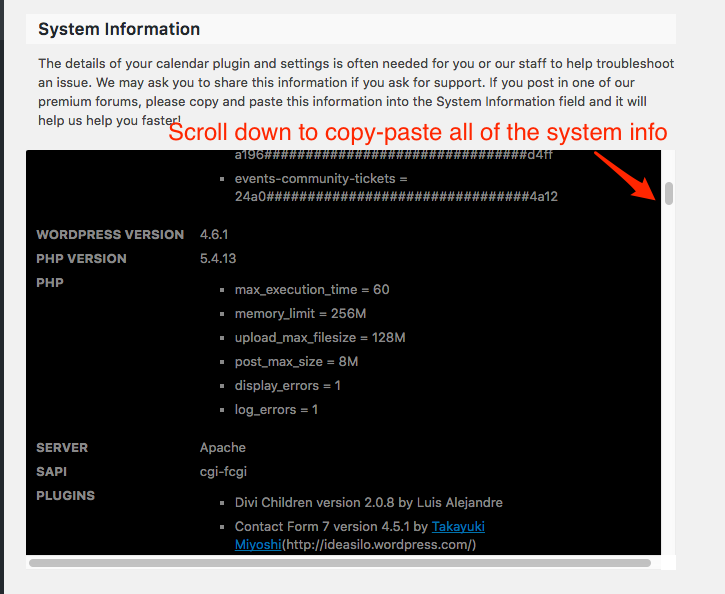
Hang in there as we figure this out.
Best regards,
Geoff B.
-
AuthorPosts