
Home › Forums › Calendar Products › Events Calendar PRO › Styling Colours of Events widget
- This topic has 8 replies, 4 voices, and was last updated 9 years, 10 months ago by
Ray.
-
AuthorPosts
-
September 30, 2016 at 8:37 am #1171021
Ray
ParticipantHi,
I am looking to add some styling to the Events widgets that appear in both the sidebar and full width pages. I have attached examples to show how they currently look. I tried adding different levels of styling via the Admin control panel but it doesn’t carry over much of the template theme styling.
1) I would like to change the colour of the blue to be the same green as the text in the examples (for both widgets)
2) Is it possible to change the overall colour grey colour to be a green – behind the month and the ‘Sat 01’ icon underneath? Again this applies to both widgets.
3) I would also like to change the font to the same as the one above the calendar in my examples. The more condensed font version.
Overall it would be good to change as much of the colour as possible.
Many thanks.
September 30, 2016 at 11:25 am #1171169Geoff B.
MemberGood afternoon Ray and welcome to the Events Calendar Support forum!
Thank you for reaching out to us.
I would love to help you with this topic.Before we begin, I would like to recommend you keep an eye on your server’s PHP version.
As it stands, WordPress officially supports down to 5.2.x, but recommends at least 5.6+From personal experience, I would say that 5.4.x+ is fine. In any case, if you start observing unexpected behaviours on your site, I would certainly consider it.
As per your questions, there are 2 things you need to check first (before looking for other solutions):
- Can you tell me what your setting is under Events -> Settings -> Display for Default stylesheet used for events templates ? I would recommend full styles, since the 2 other ones are typically harder to work with
- If you click on Appearance > Customize , can you see the “the Events Calendar” tab ?
Normally these 2 things should enable you to change most of the colours to your liking.
We could then address any remaining unchanged colour individually.As per the fonts, could you send me URLs of all the views you would like to change them ?
Have a good week-end,
Geoff B.
October 3, 2016 at 1:25 am #1171710ParticipantHi Geoff,
Thanks for the advice. I’ve changed to ‘Full Style’ and this has helped remove the light blue highlighting – thanks. I can also see the ‘Event’s Tab’ in the Appearance – Customise section and it has the branding colour (Green) – which is fine.
It would be good to be able to change the fonts and perhaps change some of the grey to one of the branding colours (green or orange) too if possible. The links below show the 2 pages where the widgets appear that I would like to style. I assume that if we change the widgets the main Events page 9When I create it) would follow these style?
There is only one event on the calendar at the moment (1st October)
http://test.experiencechippingnorton.com/
http://test.experiencechippingnorton.com/play/Many thanks,
Ray
October 3, 2016 at 10:20 pm #1172073MemberGood evening Ray,
I am glad the advice has been useful to you so far.
Normally there should be many options available to customize the calendar under the “Appearance” tab (see screenshot).
But if, for some reason, that is not the case on your install, then we can tackle things with CSS.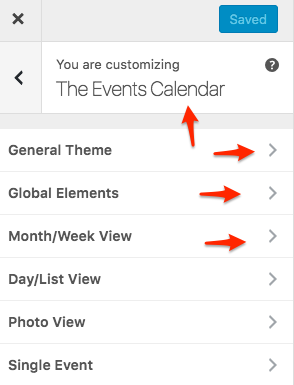
To change the font via CSS, you can try adding that to you theme’s style.css or Custom CSS box (if any):
.tribe-mini-calendar-grid-wrapper {font-family: 'Oswald', sans-serif;

font-weight: normal;

}
As for the grey, the easiest solution would have been to use the Customizer, but since that does not seem to be an option, it has to be tackled via CSS too.
Could you tell me exactly which grey element you would like to change, here are 2 elements that I think would be good candidates
.tribe-mini-calendar .tribe-events-present, .tribe-mini-calendar .tribe-mini-calendar-today {

background-color: #009343;

color: #fff !important;

}
.tribe-mini-calendar thead {
background: #009343;
}Let me know how that goes.
Best regards,
Geoff B.October 4, 2016 at 3:03 am #1172161ParticipantHi Geoff,
I managed to change the font – thank you.
The Customise section does have the options shown but they don’t change the grey colour of the widgets.
I’ve added the custom code for the grey but it didn’t change anything. Only the code for the font seemed to work. If we could change any element of the calendar widgets it would be top dark grey bar that has the name of the month (change to green).
Also, the dark grey that indicates which day it is and change this to green too.
Cheers,
Ray
October 4, 2016 at 10:58 pm #1172567MemberGood evening Ray,
Thank you for your answer. I am sorry this approach was not more successful.
I retested these rules in Avada and they totally should work. As it turns out, I cannot see them on your site for some reason (even when not taken into account, they should at least appear somewhere when the site is inspected with Google Chrome).
Can you make sure you include the following under Avada > Theme options > Custom CSS
.tribe-mini-calendar thead {
background: #009343 !important;
}
.tribe-mini-calendar .tribe-events-present, .tribe-mini-calendar .tribe-mini-calendar-today { background-color: #009343 !important; color: #fff !important; }Let me know how that goes.
Best regards,
Geoff B.October 4, 2016 at 11:00 pm #1172568MemberHi again Ray,
My bad, I just noticed that you are not using Avada.
Could you please send me a copy of your WordPress theme / child theme in a .zip file link (via Dropbox or Google Drive) so that I can run some tests on my end ?
Please ensure you are using the latest files as found on your actual website.
This way I will get access to any updates you might have made.Best regards,
Geoff B.
October 26, 2016 at 9:35 am #1183266Support Droid
KeymasterHey there! This thread has been pretty quiet for the last three weeks, so we’re going to go ahead and close it to avoid confusion with other topics. If you’re still looking for help with this, please do open a new thread, reference this one and we’d be more than happy to continue the conversation over there.
Thanks so much!
The Events Calendar Support Team -
AuthorPosts
- The topic ‘Styling Colours of Events widget’ is closed to new replies.