

Forum Replies Created
-
AuthorPosts
-
Geoff B.
MemberGood evening Russel,
I am super glad you found a solution to your need.
Well done!For now, I am going to close this thread.
Have a great weekend!
Geoff B.
MemberGood evening Robert,
I am sorry that you were not successful in seeing the attendee info.
To the best of my knowledge this can happen in the following cases:
- Somebody tampers with the quantity after the tickets are in the cart
- A plugin or the theme is interfering.
By the sound of it, it looks like there is some type of conflict at play.
This is usually because of:- A conflict with another plugin
- A conflict with your WordPress theme
- A template customization for the Events Calendar that requires updating
A first quick test is to simply temporarily revert back to a default WordPress theme such as twenty-sixteen to see if the issue persists.
The next step would be to go through our testing for conflicts procedure (preferably in a staging/dev environment or local install of your WordPress website) and let us know what you find out.
Basically the goal here is to revert back to a bare WordPress installation to see if the problem persists. It also allows us to pinpoint what the cause of the issue is.
But, before you do that, there are 2 things I would advise:
- Make a backup of your database
- Consider activating a “Maintenance Page” plugin if you are doing this on your live site (to minimize impact on your visitors)
I realize this is not much fun to do, but it should allow us to get to the bottom of this.
Let me know how that goes.
Best regards,
Geoff B.MemberGood evening John,
Thank you for writing back.
Actually, I thought that the first CSS rule would hide the one under the event.
But maybe we are talking about a different thing ?Would it be possible to send me a screenshot of what you mean ?
Have a good weekend,
Geoff B.
MemberGood afternoon Veruska,
Yes, you simply need to make sure of the 2 following things:
- Enter your license key for Event Aggregator under Events -> Settings -> Licenses (there is nothing to upload)
- Deactivate the Facebook events plugin.
Better yet, there is a step-by-step guide here: https://theeventscalendar.com/knowledgebase/moving-to-event-aggregator/#transition
Let me know how that goes.
Best regards,
Geoff B.MemberGood afternoon Callum and welcome to the Events Calendar Support forum!
Thank you for reaching out to us.
I would love to help you with this topic.However it seems like the example is gone from your site.
Could you provide me with the URL of a published dummy event ?I will need to double-check, but I believe the only reason why the other browsers are not kicking in is cache-based.
Either your browser cache needs to be refreshed or, more likely, your caching plugin’s cache needs to be refreshed.
Have a good weekend,
Geoff B.
MemberThis reply is private.
MemberGood evening Jonathan and welcome back!
Thank you for reaching out to us.
I would love to help you with this topic.Full disclosure, I am not sure what will be the impact of redirecting the calendar slug to a page.
The reason for this being the very nature of the code.But, the best way to find out is to give it a shot!
As for embedding the full calendar on a page, we have a set of shortcodes just for that: https://theeventscalendar.com/knowledgebase/embedding-calendar-views-tribe_events-shortcode/
Let me know how that goes.
Have a great day!
Geoff B.
MemberGood afternoon Mark and welcome back!
Thank you for reaching out to us.
We are sorry to hear about the text being white on white in the Community events form. Yikes!
I would love to help you with this topic.To be able to help you better, I would need to be able to look at https://event500.com/things-to-do-near-me-events/community/add.
Would it be possible to provide me temporary access (in a private reply) so that I can see it ?
Have a good weekend,
Geoff B.
January 27, 2017 at 1:06 pm in reply to: What's the required date format when using tribe_create_event? #1225376MemberGood afternoon Sabrina and welcome back!
Thank you for reaching out to us.
I am super stoked that you found the solution to your issue.
Kudos to you!
You are welcome back in our support forums any time 🙂
For now, I am going to close this thread.
Have a great weekend!
Geoff B.
MemberGood afternoon Lee and welcome back!
Thank you for reaching out to us.
We are sorry to hear about the view disappearing on you. Yikes!
I would love to help you with this topic.With that in mind, I just went to https://www.discoverjacksonnc.com/events/ and the calendar displays perfectly. Did anything change on your end ?
Other than that, when such glitches happen, I usually recommend temporarily changing the default view, saving and re-enabling the desired default view.
Have a good weekend,
Geoff B.
MemberThis reply is private.
MemberGood afternoon Alexander,
As promised I talked with Dev.
I seems like this might be a glitch.
I am going to investigate this further.It sounds like it has something to do with the way WPML handles translation of custom post types in its latest version. I will need to run some downgrading tests.
Let me dig into this and get back to you.
Have a good weekend,
Geoff B.
MemberGood afternoon Tom,
I am super stoked that this worked for you!
You are welcome back in our support forums any time 🙂
For now, I am going to close this thread.
Have a great weekend!
Geoff B.
MemberHello again Robert,
Good news! I actually found the answer I was looking for.
When you use tickets on posts, the only way to access the attendee information and sales report is within the “Edit Post” page itself.
Look for the “Ticket” section and click on the link (see screenshot)
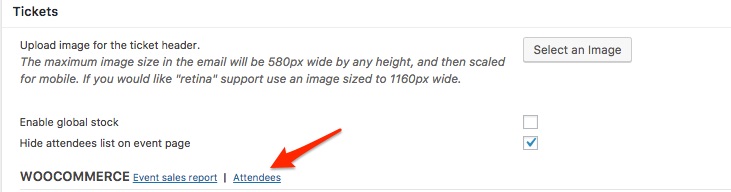
Let me know if that helps.
Have a great day!
Geoff B.
MemberGood evening Robert,
Thank you for writing back and for the screenshots.
This helped me realize that you are using the “standalone” version of tickets (in a post, instead of in an event).
With that in mind, I ran some tests.
Alas, I was unable to complete the purchase process with your theme installed.This is because it uses deprecated WordPress functions. As such WordPress versions starting at 4.3x will likely break in different ways.
I would recommend taking a look at this when you get a chance (you could turn WP debug on).
On my end, I need to complete a few more tests.
I should get back to you tomorrow about this.
Best regards,
Geoff B.
-
AuthorPosts