

Forum Replies Created
-
AuthorPosts
-
Geoff B.
MemberGood evening Bobbi and welcome back!
Thank you for reaching out to us.
I would love to help you with this topic.As a first troubleshooting step, could you please provide us with your complete system information in a private reply using the instructions found in the following link?
https://theeventscalendar.com/knowledgebase/sharing-sys-info/
Secondly, would it be possible to have:
- A link to such an event on your site ?
- A screenshot of the recurrence rules for that event ?
Hang in there.
Geoff B.
MemberGood evening Jeremy and welcome back!
Thank you for answering back.
Here are a couple of things I would recommend to get one step closer to resolution.
- As a first troubleshooting step, could you please provide us with your complete system information for http://resisttwincities.org/ in a private reply using the instructions found in the following link?
https://theeventscalendar.com/knowledgebase/sharing-sys-info/
We currently only have the one for https://www.globaltwincities.com
- Secondly, could you try playing around with the Events template setting under Events -> Settings -> Display to see if that helps ?
Hang in there!
Best regards,
Geoff B.
MemberGood afternoon Peter,
Thank you for your patience.
I believe my colleague Brooks actually suggested to also include WordPress’ built-in JQuery version, not to necessarily to remove your theme’s version completely.
As you can guess, we have to stick with what WordPress provides. In fact, we work very hard at sticking to WordPress coding standards and practices.
Since your theme steers away from those practices, you are left with a few options:
- Try declaring both jQuery versions in your theme (which might cause some conflicts – so make sure to test thoroughly). But it’s worth a shot.
- Try declaring scripts in a conditional manner. In other words, your jQuery version should not be declared on Calendar related pages and archives
I wish I had a better answer for you, but for now it’s the best one I have.
Let me know how that goes.
Best regards,
Geoff B.MemberThis reply is private.
MemberIt truly was a pleasure 🙂
Cheers,
Geoff B.March 25, 2017 at 10:27 am in reply to: How to show the custom fields after the default rsvp fields? #1260057MemberThis reply is private.
MemberThis reply is private.
MemberThis reply is private.
MemberGood afternoon Billy,
Thank you for the info and sorry for the delay writing back.
I went ahead and took at your installation.
As it turns out, all the import options are indeed available (see screenshot)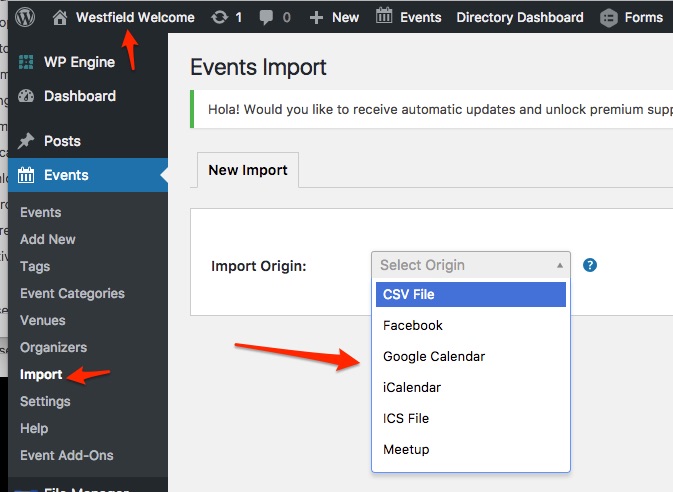
I am not sure if something changed on your end. But the good news is that it works.
Perhaps some browser or site caching issue ?If you are still not seeing it on your computer, I would recommend trying with a private browsing window to see if that helps.
Best regards,
Geoff B.
March 25, 2017 at 9:31 am in reply to: List view is starting on tomorrow's date rather than today #1259982MemberGood afternoon Thad,
I am super stoked to hear that!
You are welcome back in our support forums any time 🙂
For now, I am going to close this thread.
Have a great weekend!
Geoff B.
MemberGood afternoon Chris,
I am super stoked that this did the trick as a workaround for now.
I am going to switch this ticket to “Pending fix”.
Have a good weekend,
Geoff B.
MemberGood afternoon Justin,
Fantastic!
You are welcome back in our support forums any time 🙂
For now, I am going to close this thread.
Have a great weekend!
Geoff B.
MemberGood afternoon Ryan,
I am super stoked that this did the trick for you.
You are welcome back in our support forums any time 🙂
For now, I am going to close this thread.
Have a great week!
Geoff B.
MemberGood morning afternoon Adrien,
I am super stoked this was helpful to you.
You are welcome back in our support forums any time 🙂
For now, I am going to close this thread.
Have a great weekend!
Geoff B.
MemberGood morning Ryan,
As promised, I ran this by our coding staff and here is their answer.
'key' => _EventStartDate,PHP is so kind, this would probably work (albeit it ought to throw a notice or warning) – it ought to be:
'key' => '_EventStartDate',(strings should be quoted)and second, that change he is making is touching the main query for the venue page (ie, the venue query itself)
venues don’t have start dates/times, only the events they might be associated with do … so by filtering to venues with an event start date he’s effectively stopping WordPress from locating the correct venue (edited) which is the real cause of the 404
here’s what I’d suggest he do to avoid this: at the top of the method, add an extra check against
$wp_query->get( 'post_type' )and confirm the query relates to _events_ and bail out if it doesn’tLet me know if that helps.
Have a great day!
Geoff B.
-
AuthorPosts