

Forum Replies Created
-
AuthorPosts
-
Geoff
MemberSure thing!
I went ahead and submitted a refund for Order #1194837. You should see the funds back in your account within 5-10 business days.
In the meantime, please make sure you are using the License Key that was provided in Order #1194835 instead — that will be the active license that unlocks the importing features for you. 🙂
Cheers!
GeoffMemberHi Mike,
The maximum number of columns in Photo will always be three, but they should grow wider as the screen gets wider.
The important thing to note is that the columns will only grow to the maximum width of the page template it is in.
So, for example, the calendar’s default page template is set yo a maximum of 1000px. You can change that by adding some css to your theme’s style.css file:
#tribe-events-pg-template {
max-width: 2000px /* adjust to your liking */
}
That will increase the space and allow the columns to grow further as the page grows in width.
Cheers!
GeoffNovember 21, 2016 at 8:24 am in reply to: Important question about Subdomains, login, and city seperation #1195342MemberHi Ronald,
I really appreciate the feedback here! I’m a little surprised we haven’t heard a request for this before, but I can see how it would be a handy feature and it is awesome to know you would want to see that included in the plugin.
I am afraid that we are fairly limited as far as how much support we can provide for custom development questions like this. That said, I’m happy to help you as best I can!
1. How can the COMMUNITY logins/registrations between sub-domains be linked without having them register for each domain?
2. Can a social login be implemented to community events?
I think your second question answers the first. To my mind, WordPress does not have a built-in tool for being able to use the same credentials between sites. However, there are a number of plugins that will accomplish that. In fact, here’s a quick search of plugins to help get you started with choosing one.
3. Do we need licenses for each sub-domain?
If you’re running a WordPress multisite installation, then you might want to consider the Multisite License option for our products. That will grant you network-level control of the plugins across the entire network using a single license. Otherwise, yes, you would need a separate license for each subdomain if you want the benefits of support and automatic plugin updates for each one.
Does this help answer your questions? Please let me know. 🙂
Cheers!
GeoffMemberHi Kerry,
Thanks for getting in touch and sorry to hear not all purchasers are receiving the ticket email.
The good news is that I was able to send and receive a ticket email on my test site, so it looks like things should be working.
Emails not being sent can happen for number of reasons. Let’s start off with some questions I’m hoping you will help me answer:
- Has anyone been able to receive tickets in their inbox, or is this happening for everyone all the time when they purchase a ticket?
- Is it possible that the email landed in the recipient’s junk/spam folder?
- Are the purchasers receiving the order confirmation emails from WooCommerce? Or are they only not receiving the ticket?
Let’ start with those. As a heads up, you can always re-send the ticket email manually by clicking on the order in WooCommerce > Orders, then clicking on “Order Actions” and selecting the “Tickets” option (screenshot) to trigger a new email to be sent.
Thanks so much!
GeoffNovember 21, 2016 at 7:50 am in reply to: Fatal error: Class 'Tribe__Events__Aggregator' not found #1195317MemberHey Sally,
(Love the avatar — soooo awesome!)
I’m happy to hear all is working well after reinstalling the plugins. Wonder if it was a corrupted file on download or something. Either way, nice work and thanks for following up to let us know!
Cheers,
GeoffMemberHi Torsten,
Hope you had a great weekend and that you’re doing well. 🙂
WordPress has an option for people to register for your site directly on the login screen:
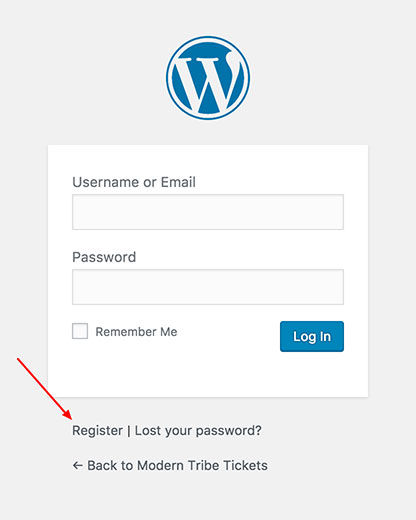
That will allow folks to register to your site as Organizers. Is that what you’re looking for? Please let me know. 🙂
Cheers!
GeoffNovember 21, 2016 at 7:42 am in reply to: check that the paid plugin event aggregator will work with my tickets provider #1195311MemberHey Matt,
Thanks for getting in touch and I hope you had a great weekend!
I tried importing from the URL you shared and it does not appear that Event Aggregator was able to read anything from it.
If you can confirm with your ticketing provider whether the URL is the correct one or if there is another one, I’d be happy to try again to see if it does the trick.
Cheers and thanks!
GeoffMemberHi Gerhard,
Hey, thanks for reaching out!
Excellent question. Event Aggregator is indeed going to take the place of Facebook Events (in addition to iCal Importer) down the road.
Right now, both import events from Facebook. I would say the process is cleaner in Event Aggregator and has some a few more options for importing and managing imported events, but they ultimately achieve the same result at the end of the day.
Would you like me to refund your Facebook Events purchase so you can snag Event Aggregator instead? Let me know and I’d be happy to do just that.
Thanks!
GeoffP.S. Ha! A few of us love calling it the Alligator as well. ?
MemberHi @nnyorker,
Oh shoot, so sorry for the confusion here! Event Aggregator is actually a service that is built right into The Events Calendar — in other words, no download or installation is needed.
Once you have the license key (which is sounds like you have), plug it into the Events > Settings > Licenses screen of The Events Calendar and it will activate the importing options for Event Aggregator on Events > Import.
I see you purchased Event Aggregator twice. Would you like me to refund one of them? If so, will you please let me know the Order Number of the one you would like refunded? I’d be happy to process that for you.
Cheers,
GeoffMemberHi Johan,
Hope you had a great weekend!
That H2 heading is located in the single-event.php file, which you can locate here:
/wp-content/plugins/the-events-calendar/src/views/single-event.phpThe heading is located on Line 37:
<?php echo tribe_events_event_schedule_details( $event_id, '<h2>', '</h2>' ); ?>You can make the change directly there, but the safer way to do it is to override the template in your theme to make sure your changes do not get lost on future plugin updates:
- Make a new folder in your theme called tribe-events
- Add the single-event.php file in that folder
Now that the theme is in your theme, you can make the changes you need and they’ll be reflected in the calendar. 🙂
Will that do the trick for you? Please let me know!
Cheers,
GeoffMemberHi @snorton,
Nice catch! That does indeed look like a bug.
I’ve created a ticket in our system to make sure we address this in an upcoming maintenance release. While I do not have a timeframe for when it will be knocked out, I have attached this thread to the ticket and we’ll be sure to follow-up with you when it’s ready. I’ve also marked this tread as Pending Fix.
In the meantime, you can use this snippet to change the page title:
Thanks so much for the heads up!
GeoffNovember 21, 2016 at 7:08 am in reply to: Fatal error: Allowed memory size of 277872640 bytes – On Import #1195295MemberHi Michael,
Awesome and nice work! I’m glad to hear all is working well and I appreciate you letting us know. Definitely feel free to reach back out if that pops up again and we’d be happy to look into it with you.
Cheers!
GeoffMemberHi @Armin,
Phew, glad to hear you were able to fix things up. Thanks a ton for letting us know and definitely feel free to open a new thread if any other questions pop up — we’d be happy to help. 🙂
Cheers!
GeoffMemberAwesome! Glad to hear all is working smoothly, Stephen. Thanks for following up to let us know. 🙂
Cheers and have a great day!
Geoff
MemberYES! That is awesome, Kindra! Serious props to you for making it work — that is not an easy customization and you nailed it. 🙂
Thanks so much for following up to let me know it went well and I hope you had a great weekend as well.
Cheers!
Geoff -
AuthorPosts