

Forum Replies Created
-
AuthorPosts
-
Geoff
MemberMy pleasure! Always happy to help and I’m stoked to hear this does the trick.
I’ll go ahead and close this thread but let us know if any other questions come up and we’d be happy to help. 🙂
Cheers!
GeoffMemberHowdy Tim,
Thanks for writing in!
The two plugins that would be required for ticket purchases are:
- Event Tickets – This allows you to create RSVPS (free tickets) for events and provides the foundation for ticket sales.
- Event Tickets Plus – This allows you to create paid tickets for events and to accept payments using WooCommerce.
Note that neither plugin actually collects sales — that is done entirely through WooCommerce which has its own settings for which payment gateways it is compatible with:
https://woocommerce.com/product-category/woocommerce-extensions/payment-gateways/
While I do not have a demo of the WooCommerce checkout process for you, WooCommerce is indeed a free plugin and you can set it up on your site as a test to see if it has the mobile payment gateways you would like.
Does this help answer your question? Please let me know. 🙂
Cheers!
GeoffMemberHi Murilo,
Thanks for getting in touch and for checking out our plugins — I hope The Events Calendar and Events Calendar PRO are both a good fit for your site. 🙂
Yes, it is possible to edit the colors on the calendar. You can do that with CSS or, if you have Events Calendar PRO installed, then you can change the color settings in the WordPress Customizer, under Appearance > Settings.
Our Themer’s Guide is a great place to see all the ways in which the calendar can be customized:
https://theeventscalendar.com/knowledgebase/themers-guide/
And, lastly, there is a plugin that we didn’t create but that works very well with The Events Calendar to color code events by category:
Does this help answer your question? Please let me know. 🙂
Cheers!
GeoffMemberHello @jacobrmcdaniel,
Thanks for getting in touch and sorry about the trouble here with exporting the attendee report.
I just tried exporting a report of my own from a test site at it seemed to include all the information for each ticket sold for the event — here’s a link to the CSV file it generated for me.
Would you be willing to share a few more details with me so I can try to pinpoint the issue:
- Identify the information that was exported and what was missing from it
- A copy of the CSV file that was generated
- A screenshot of the settings for the tickets in the event (example)
Thanks so much!
GeoffMemberHi @shreinmedia,
Leaving the field blank will enable you to sell an unlimited number of tickets:
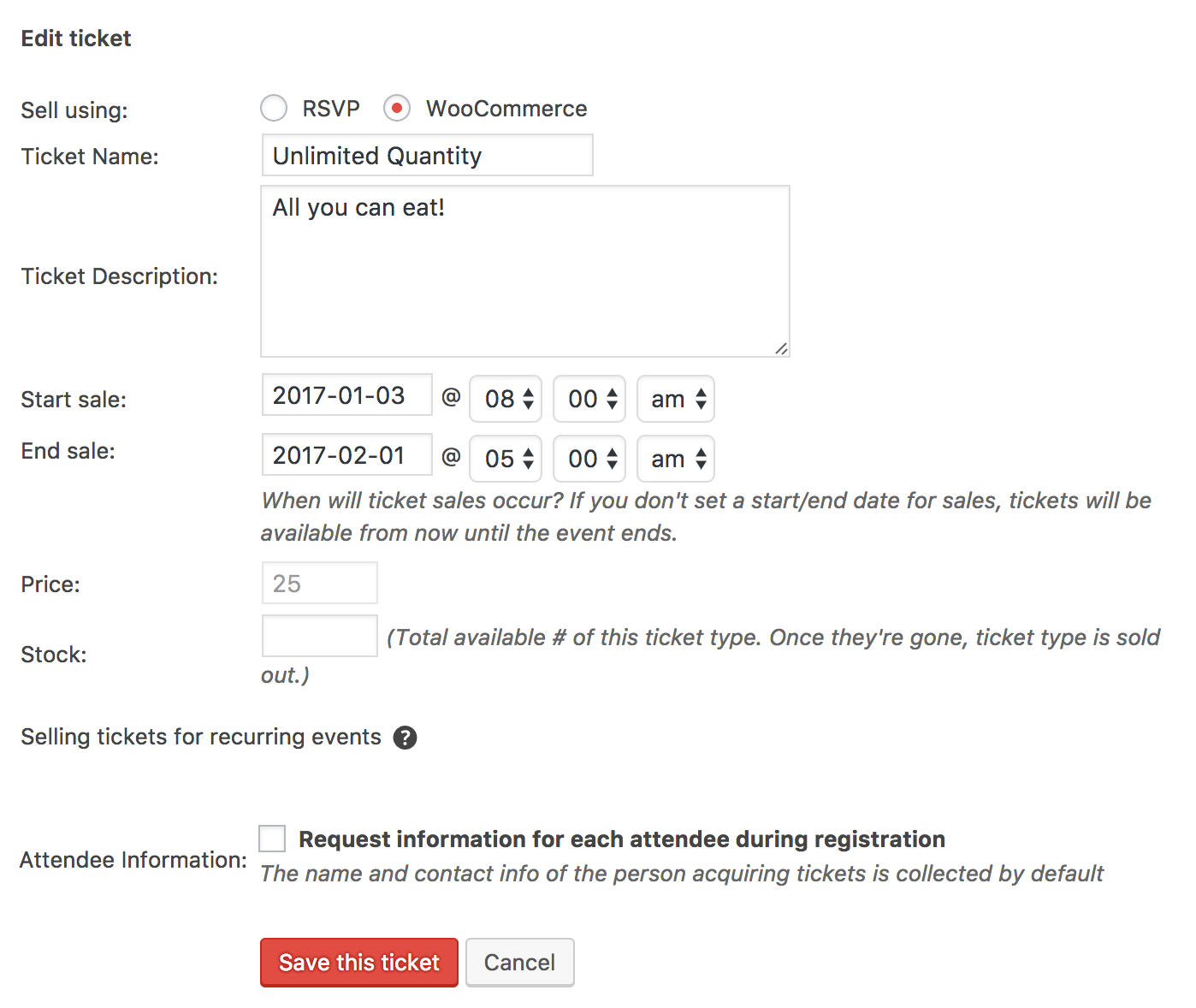
I will say that the UI is not super clear once the ticket is saved because it will always appear in the reports that there is a Zero quantity in stock, but there will indeed be unlimited tickets available.
Cheers!
GeoffJanuary 4, 2017 at 7:55 am in reply to: change Calendar Day view as Mon Tue Wed instead of Monday Tuesday etc. #1213127MemberHi Isuru,
Yes, this is possible in the Events > Settings > Display screen of the plugin. That will allow you to change the date formats used by the calendar.
Cheers!
GeoffMemberHi Brittani,
Hey there and thanks for getting in touch!
We’d be happy to help — but I do want to note that our pre-sales forum is used to answer questions about purchasing our premium plugins.
If you’re looking for technical support, it would be awesome if you could post your question to our <u>WordPress.org support forum</u>.
Or, if you already have an active license for one of premium plugins, will you please log into your account and post your topic to our premium support forum instead?
In the meantime, I would suggest two things:
- Heading to Events > Settings > Display and selecting the default calendar template if it is not already being used
- Testing the calendar with a default WordPress theme to confirm whether this could be a conflict with the theme being used (instructions)
Thanks so much!
GeoffJanuary 4, 2017 at 7:46 am in reply to: The Basics – trying to customize single event layout #1213113MemberNice work! I’m so glad to hear everything is working smoothly and I appreciate you following up to let us know. Definitely keep us posted if any other questions come up and we’d be happy to help. 🙂
Cheers!
GeoffMemberHey Stuart and happy new year right back at ya! 🙂
Good question and, funny enough, I’ve been working with tax settings in WooCommerce this past week on a totally unrelated project — they can be tricky!
You can indeed remove tax from Tickets in WooCommerce. The way that WooCommerce is set up though, you will need to do that after the ticket has been created.
Once the ticket has been created in the event editor, head over to the Products screen in WooCommerce, click on the ticket that was created, and give it a tax status of None:
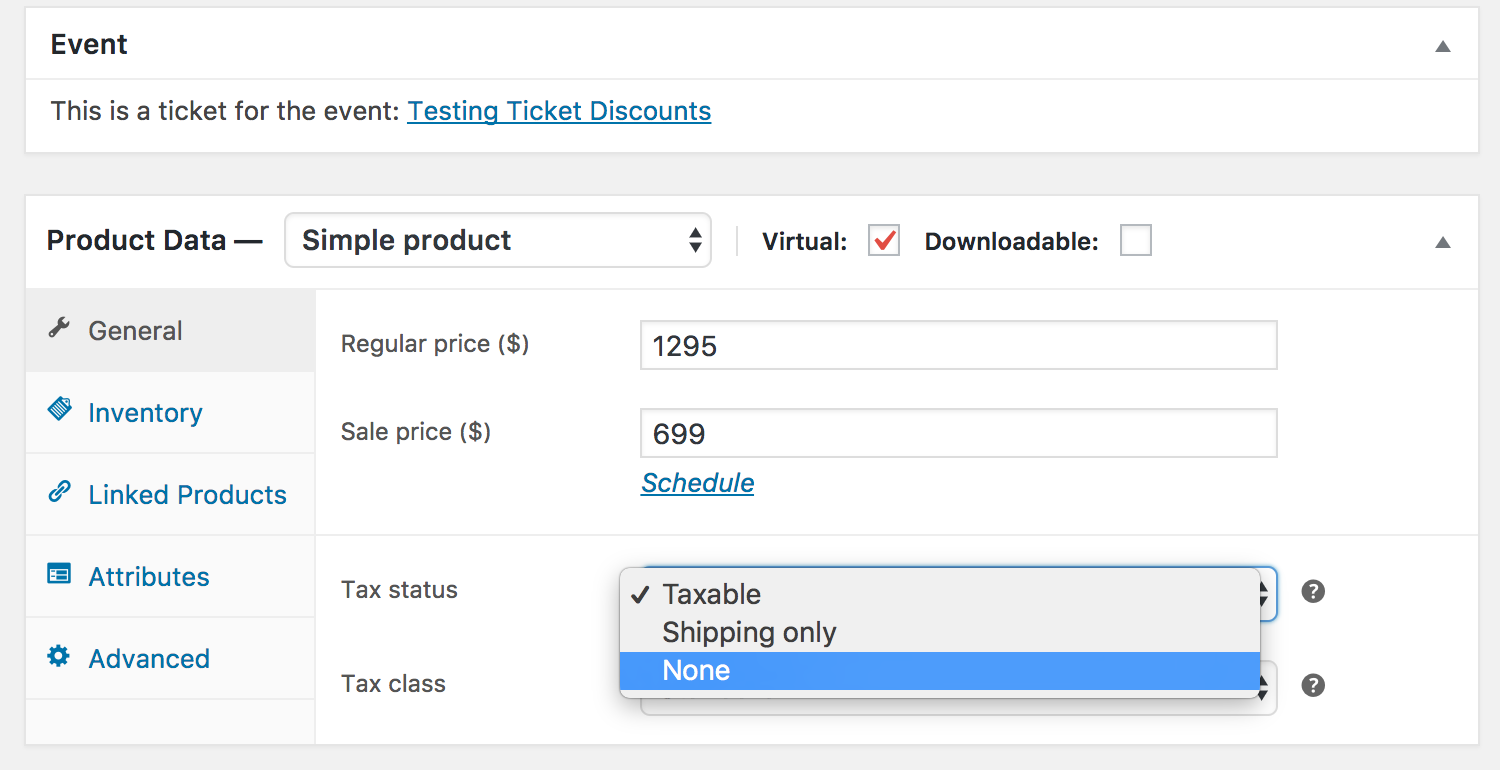
Save your changes from there and you should be good to go!
Does this help answer your question? Please let me know. 🙂
Cheers!
GeoffJanuary 4, 2017 at 7:26 am in reply to: Issues after updating the events calendar, events calendar pro & filter bar #1213102MemberHey Liz,
Thanks for the extra information! This is helpful for sure.
Those files are still in the plugins and here’s where you can find them…
For The Events Calendar:
- resources/tribe-events-full.min.css → src/resources/tribe-events-full.min.css
- views/modules/bar.php → src/views/modules/bar.php
For Filter Bar:
- views/filter-bar/filter-view-vertical.php → src/views/filter-bar/filter-view-vertical.php
So, basically, all your files should be nestled in the src directory of the plugin. We created the src directory I believe in late 2015, so it’s been there for a little while now, but you are right that it used to be one level up.
If you’ve updated the plugins (which you have), then you will have indeed lost your customizations. As a best practice, we encourage folks to use our templating system for overriding files rather than editing them directly in the plugin because it ensures that those changes will remain intact in future updates. Please let your developer know about it and they should be able to re-apply the changes but this time in a way that prevents lost changes.
Cheers!
GeoffMemberHello Giacomo, thanks for following up!
Binding multiple events to a single ticket is a great idea but, sadly, that is not supported by Event Tickets Plus. While you can have multiple ticket products per event, each ticket can inly be associated with a single event.
You are absolutely welcome to try the products. All our plugins include a refund policy that allows you to return them within 30 days of purchase for a full refund.
Cheers!
GeoffMemberHi Dean,
I went ahead extended both license through November 1, which one year from the oldest purchase date of the two licenses that were purchased.
I am happy to do this for you, but please note that this and the last request were meant to be one-time courtesies. As a practice, exchanging a one-year license for another (regardless of use) more than 8 months after it was purchased and then extending that second license for another year is outside our refund policy, which we feel is very fair.
Cheers,
GeoffMemberHowdy Ryan! Thanks for following up.
If I go with your software to manage things, how can I convert (or have help) converting standard woo-orders for MBLV21 Passes into this system?
I have not worked with MBLV21 personally but if you’re converting WooCommerce orders, then it’s likely that seeking support from WooCommerce is the best route since Event Tickets Plus merely registers tickets as a WooCommerce product once created.
A feature that you would consider adding?
We’re certainly up for considering any new ideas that customers (or in your case, potential customers) would find valuable! We have a feature request forum for such topics. I can say we are looking more into event promotion as a whole, but I do not have any specifics for what that entails–or whether this specific feature would be included in that.
Cheers!
GeoffMemberThis reply is private.
MemberMy pleasure! I’ll go ahead and close this thread but let us know if any other questions come up and we’d be happy to help. 🙂
Cheers!
Geoff -
AuthorPosts