

Forum Replies Created
-
AuthorPosts
-
Geoff
MemberHi Mira, thanks for following up!
Do you still have the CSS in your stylesheet? I tried looking for it but it doesn’t appear to be there and when I add it directly to the browser, the Photo View seems to work (screenshot).
Will you please double-check that for me and let me know? Thanks!
Geoff
MemberHi there, Glenn! Nice to see you again. 🙂
So sorry for the trouble here with Photo View. There seems to be a glitch with iOS Safari causing this and maybe other browsers as well.
Try adding this CSS to your theme’s style.css file or using a plugin like Simple Custom CSS as a workaround:
.tribe-events-list.tribe-events-photo #tribe-events-photo-events {

opacity: 1;

}
Does that do the trick for you? Please let me know.
Thanks,
GeoffMemberGreat questions!
Uninstalling the plugin will not cause any data to be lost, so that unfortunately will not work. The Bulk Delete plugin, however, can wipe out an entire post type which effectively cleans the slate for you to do a fresh CSV import. Another option is to try the Event Rocket plugin, I will warn that it is no longer maintained and may not do the trick, but it does include an option to nuke all calendar data from the database.
And, yes, we absolutely do have a list of freelancers who we’d recommend: https://theeventscalendar.com/knowledgebase/find-a-customizer/
Is there anything else I can do to help with this question on duplicated events? Let me know. 🙂
Cheers,
GeoffMarch 15, 2016 at 7:48 am in reply to: Make last day of recurrence end at a different time? #1089050MemberHi Rob,
Thanks for following up!
It seems like there is some other issue happening here because that URL redirect is incorrect. I tried looking at the recurring event I set up on my test site, viewing all instances in the series, then clicking on the first instance and it correctly goes to the first event in the series–whereas the first instance on your site clearly redirects to the second instance. Very strange!
Will you please do two things for me?
- Try flushing your permalinks. You can do this by heading to Settings > Permalinks from the WordPress dashboard, then simply clicking the Save Changes button (even though you are not changing anything). Does the first instance in the series still redirect to the second?
- If so, then will you please check your installed plugins to see if you have any that affect or manage redirects on your site? I’d be happy to review that list as well if you head to Events > Settings > Help, copy the system information at the bottom of the screen, and paste the content here as a private reply.
Let’s see where those take us. If those do not work or tell us something, then we will try deleting the recurring event and publishing a new one in its place.
Thanks!
GeoffMemberAwesome! Feel free to hit us up if any other questions pop up–we’d be happy to help. 🙂
Geoff
MemberHi Jay,
Good question. Events Calendar PRO is not needed for Community Events to work. In other words, Community Events will work just fine without Events Calendar PRO installed.
Does this help answer your question? Please let me know. 🙂
Cheers,
GeoffMemberHey there,
Oh shoot, so sorry about that! I’ve had a similar thing happen with other posts before and it’s annoying to say the least.
There is a setting (under Events > Settings > General) to remove duplicate venues and organizers, but I’m afraid that deleting duplicate events has to be done manually. You might want to consider trying a plugin like WP Bulk Delete to help with the lift–I know I’ve used it to do a mass delete of events before and it worked very well.
Will this help you as well? Please let me know.
Cheers,
GeoffMarch 14, 2016 at 8:33 am in reply to: Make last day of recurrence end at a different time? #1088475MemberHey Rob–nice to see you again.
Man, I have to say this was not as easy as I would have expected, but I did get it to work. Here’s a screenshot of the recurrence settings I used to get a three-day event where the third instance has a different end time than the first two:
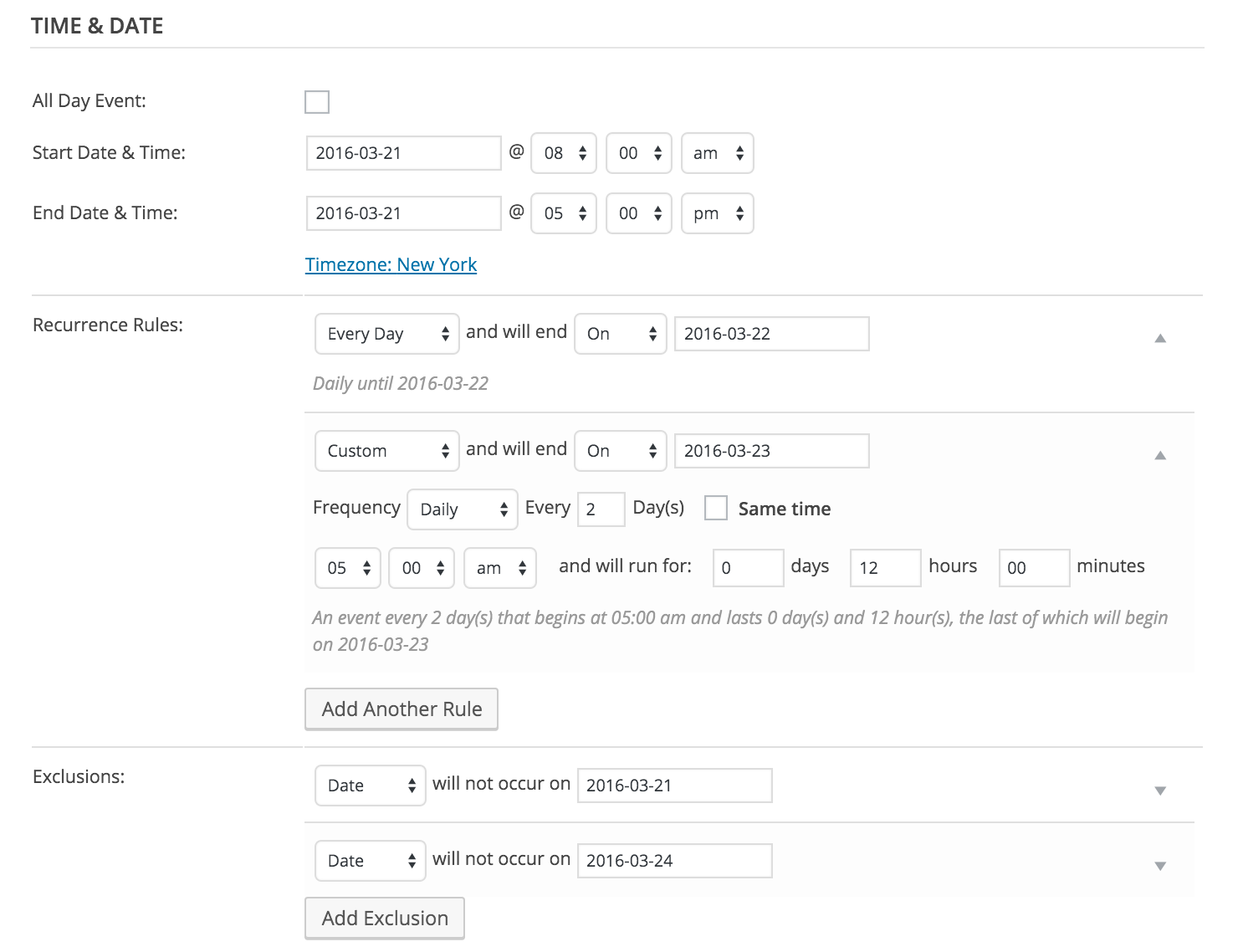
Does that do the trick for you as well? Please let me know. 🙂
Cheers,
GeoffMemberHi Mira,
Sorry for the issues. There seems to be a glitch with iOS Safari causing this and maybe other mobile browsers.
Try adding this css as a workaround:
.tribe-events-list.tribe-events-photo #tribe-events-photo-events {

opacity: 1;

}
Add that css to your theme’s stylesheet or through a plugin such as Simple Custom CSS.
Let me know if that helps.
Cheers,
GeoffThanks
MemberHi Ivan and welcome to the forums! I hope you’ve been enjoying the plugins so far. 🙂
Good question. The reason you aren’t able to tell which date the ticket is for is because tickets unfortunately do not support recurring events at the moment. In other words, tickets for a recurring series all share the same pool of tickets, regardless of what event that ticket was purchased from.
The good news is that we are indeed working on tickets to support recurring events and are tentatively planning on it to release in version 4.2. We are on the cusp of releasing 4.1 and will likely have 4.2 ready in 6-8 weeks from there, barring any unforeseen circumstances.
Sorry for the bad news, but does this help answer your question? Please let me know.
Thanks,
GeoffMemberAwesome, so glad to hear that! Thanks for following up and letting us know so that we could correct the snippet on our end as well–super helpful. 🙂
Let us know if any other questions pop up in a new thread and we’d be happy to help.
Cheers!
GeoffMemberHi Matt and thanks for following up!
Awesome, that’s a great first step to see if things start improving. The cleanup will indeed scrub recurring instances 3 months in both directions per the range set in Events > Settings > General (screenshot). In other words, past instances will automatically be scrubbed once they are a certain age and future instances will only be created for the future period entered and none will be automatically created after that.
Thanks!
GeoffMemberAwesome, so glad that did the trick! Nice work making the switch–not everyone is comfortable making those types of edits and you nailed it on the first try.
I’ll go ahead and close this thread but please do feel free to let us know if any other questions pop up and we’d be happy to help. 🙂
Cheers!
GeoffMemberHi Debora and sorry for the trouble here!
Those notices look like general PHP warnings, which are typically displayed when a WordPress site is in Debug Mode. Do you happen to know if your site is in Debug Mode? You can read more about how to check that here in the WordPress Codex.
Let me know and we can go from there. 🙂
Thanks!
GeoffMarch 11, 2016 at 12:13 pm in reply to: Change the default view for categories to List view #1087913MemberHi Sally,
So sorry for the trouble here! The snippet was indeed a little outdated and I was able to fix it up into something that will do the trick.
Give this a try instead and let me know if it helps. 🙂
https://gist.github.com/theeventscalendar/593130a4a059561eb9b0
-
AuthorPosts