
Home › Forums › Ticket Products › Event Tickets Plus › Make last day of recurrence end at a different time?
- This topic has 12 replies, 2 voices, and was last updated 10 years, 7 months ago by
Geoff.
-
AuthorPosts
-
March 12, 2016 at 3:13 pm #1088203
Rob
ParticipantHow do I make the last day of a daily, three-day recurrence end at a different time?
I have an event that recurs on August 25th and 26th from 10am to 5pm. But on the 27th, the same event HAS to end at 2pm (so organizers can prepare for another event). We don’t want attendees showing up after 2pm that day because they’ll be turned away.
I’ve tried using the custom settings and exclusions to pull this off, but nothing seems to do it.
How do I make this happen?
March 14, 2016 at 8:33 am #1088475MemberHey Rob–nice to see you again.
Man, I have to say this was not as easy as I would have expected, but I did get it to work. Here’s a screenshot of the recurrence settings I used to get a three-day event where the third instance has a different end time than the first two:
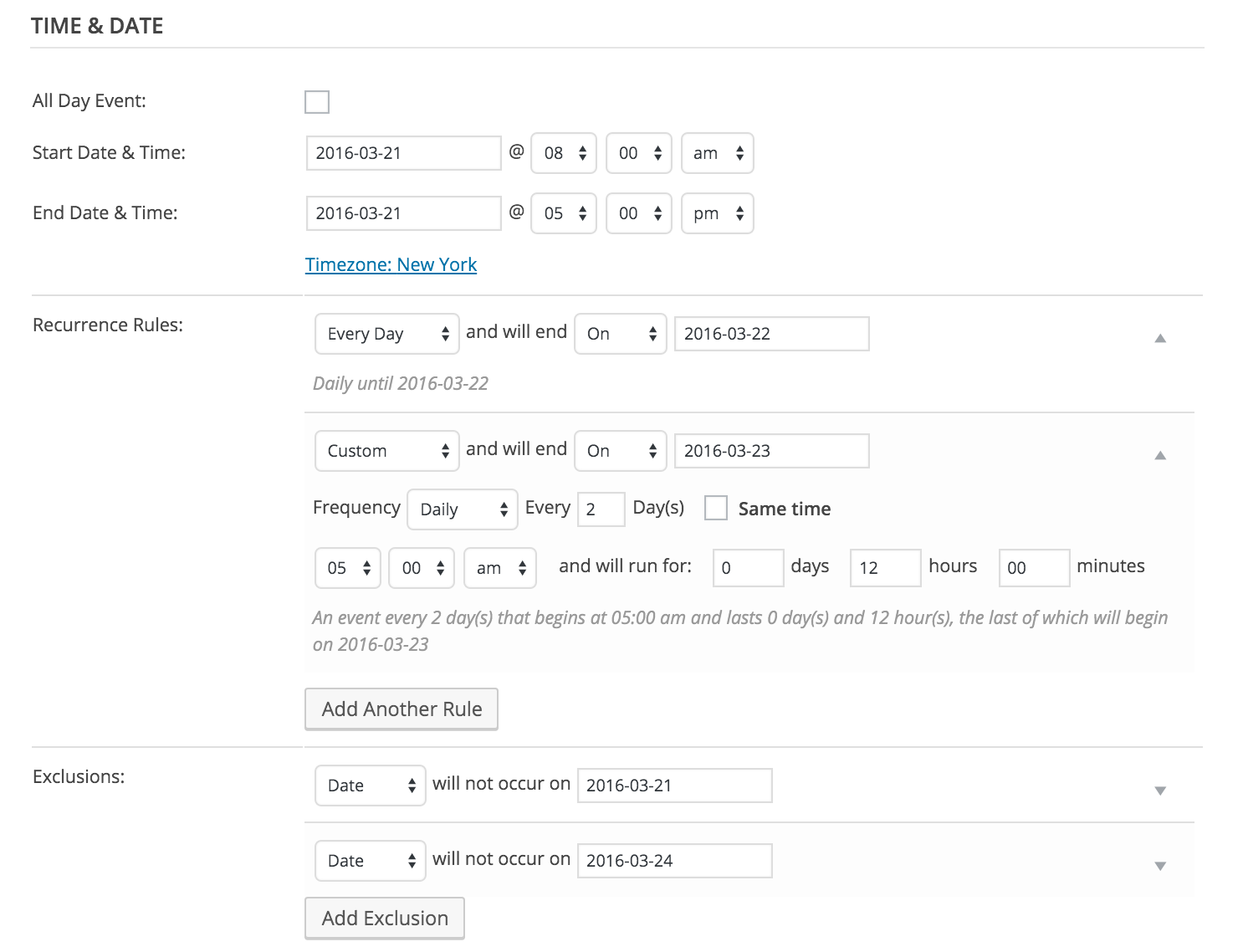
Does that do the trick for you as well? Please let me know. 🙂
Cheers,
GeoffMarch 14, 2016 at 10:10 am #1088527ParticipantThis reply is private.
March 14, 2016 at 10:10 am #1088528ParticipantThis reply is private.
March 15, 2016 at 7:48 am #1089050MemberHi Rob,
Thanks for following up!
It seems like there is some other issue happening here because that URL redirect is incorrect. I tried looking at the recurring event I set up on my test site, viewing all instances in the series, then clicking on the first instance and it correctly goes to the first event in the series–whereas the first instance on your site clearly redirects to the second instance. Very strange!
Will you please do two things for me?
- Try flushing your permalinks. You can do this by heading to Settings > Permalinks from the WordPress dashboard, then simply clicking the Save Changes button (even though you are not changing anything). Does the first instance in the series still redirect to the second?
- If so, then will you please check your installed plugins to see if you have any that affect or manage redirects on your site? I’d be happy to review that list as well if you head to Events > Settings > Help, copy the system information at the bottom of the screen, and paste the content here as a private reply.
Let’s see where those take us. If those do not work or tell us something, then we will try deleting the recurring event and publishing a new one in its place.
Thanks!
GeoffMarch 15, 2016 at 8:03 am #1089056ParticipantThis reply is private.
March 15, 2016 at 8:30 am #1089075MemberThanks Rob!
I notice you have The Events Calendar 4.0.7 installed but Events Calendar PRO 4.0.6. Would you be willing to update PRO to 4.0.7?
From there, please try deleting the recurring event we set up together and creating a new one altogether using the same settings we did before. It would also be helpful to try using a slightly different title and slug for this so we have a fresh URL to work with.
Thanks so much!
GeoffMarch 15, 2016 at 1:21 pm #1089316ParticipantThis reply is private.
March 16, 2016 at 11:15 am #1089837MemberActually, you can grab the latest copy of PRO (we just released 4.1 last night) by heading to My Account > Downloads here on this site and then installing the plugin to the dev site manually. There’s certainly no need for two licenses.
Please give that a shot, then lets take a look at the system for the dev site from there.
Thanks!
GeoffMarch 16, 2016 at 3:16 pm #1090026ParticipantThis reply is private.
March 17, 2016 at 8:01 am #1090272MemberHi Rob,
We actually have a handy tutorial on the very question of using one license for a dev and live site that articulates the process way better than I could here:
https://theeventscalendar.com/knowledgebase/using-one-license-for-your-live-and-dev-sites/
Are you able to manually install those updates to the dev site once you’ve downloaded them from your account here on the site? That will ensure that everything has the correct version number and that no errors are triggered upon install.
Thanks!
GeoffMarch 18, 2016 at 10:47 pm #1091267ParticipantThanks for all your help. I finally got it to work. See http://www.westernlegendsroundup.com/quilt-show/ where I’ve got them listed at the bottom, using a shortcode with tags, and displaying the different time span for the last day.
-
This reply was modified 10 years, 7 months ago by
March 19, 2016 at 7:30 am #1091324MemberHeck yeah and nice work, Rob! That’s an awesome way to do it and one I hadn’t considered. Thanks so much for following up and sharing. 🙂
Cheers!
Geoff -
AuthorPosts
- The topic ‘Make last day of recurrence end at a different time?’ is closed to new replies.