

Forum Replies Created
-
AuthorPosts
-
Geoff
MemberAwesome, thanks for following up, @thamesidemedia!
I’ll go ahead and close this thread but let us know if any other questions come up and we’d be happy to help. 🙂
Cheers!
GeoffMemberHi Lorraine,
Thanks for getting in touch!
Licensing can be very tricky for a setup like this and it’s very true that we may not be adequately accounting for some variables in how we approach licensing. In either case, we’re always willing to work with you and others to find a way that works.
In this case, it appears you are managing multilingual with a multisite WordPress network. Is that correct?
If so, then the correct license level would be a Multisite License.
However, I completely hear and understand how the cost of a Multisite License can be prohibitive in cases where you may only be running two subdomains on the network. And I totally understand why you would prefer to manage multiple languages as subdomains on a network rather than a single site.
For that reason, the Business License you have will indeed work and enable automatic updates. The messaging may appear to give you mixed signals about that, but I can assure you that you are covered. That messaging is definitely one area where we can improve.
Does this help clarify things a bit? Please let me know and I’d be happy to answer any follow-up questions about our multisite licensing as best I can.
Cheers and happy Friday!
Geoff
MemberHowfy @thamesidemedia,
Ah yes, sorry about that. We’ve had feedback on both fronts where there is strong favor for displaying in-progress events or strong opposition to it.
It is an interesting idea nonetheless. I went ahead and created a ticket in our system to check it out further to see if we might be able to create an extension that would allow you to choose how in-progress events are treated. No promises that we’ll be build it, but we’ll certainly look at it.
Did you have any other questions about the way in-progress events are handled by widgets? Please let me know and I’d be happy to help as best I can.
Cheers!
GeoffMemberThis reply is private.
MemberHi Melinda and happy Friday!
Great question — and I love the new business name, by the way. 🙂
You can register your plugin license to the new site instead of the old one if you would like and can do it right her eon our site.
Here are step-by-step instructions for how to move the license from the old site to the new one:
https://theeventscalendar.com/knowledgebase/moving-your-license-keys/
Will that work for you? Please let me know.
Cheers!
GeoffMemberHi @neumarkt4you,
Oh yeah, I see exactly what you mean.
Try pasting this snippet to your theme’s style.css file or on the Appearance > Customize > Additional CSS screen:
.tribe-image-upload-area .choose-file {
<span class="Apple-converted-space">  </span>width: 100%;
}
This seemed to do the trick when I tested it on your site. Does it work for you as well? Please let me know. 🙂
Cheers!
GeoffMarch 10, 2017 at 7:25 am in reply to: Invalid License Key After New Purchase of Events Calendar PRO #1252321MemberHa! I would be lying if I said I have not done the same thing at some point in the past. 🙂
So glad things are working smoothly and I appreciate you following up to let us know. I’ll go ahead and close this thread, but definitely let us know if any other questions pop up.
In the meantime, cheers to you and happy Friday!
Geoff
MemberOh fantastic! I would just digging into this one myself and was stoked to see you had already pinned it down to a theme conflict before I got the chance to ask some questions. Very nice work and thanks for updates on your excellent research.
I’ll go ahead and close this thread but let us know if the theme developer comes back with any questions we can answer and we would be happy to help as best we can. 🙂
Cheers!
GeoffMemberHey Mark,
Thanks for getting in touch!
That’s a great question. I actually had to play around with the ticket settings a bit to check for sure, but I am afraid that assigning a specific ticket range is not a supported feature.
You can indeed set a SKU when creating paid tickets using Event Tickets Plus, but that does not affect the ticket number that is assigned.
That said, there is a ticket number assigned to each ticket that is purchased and it is assigned to the attendee who is registered for the event. That number is unique and sequential. Here’s a screenshot where you can see two tickets purchased for the event and how one is HM-1 and the next is HM2:
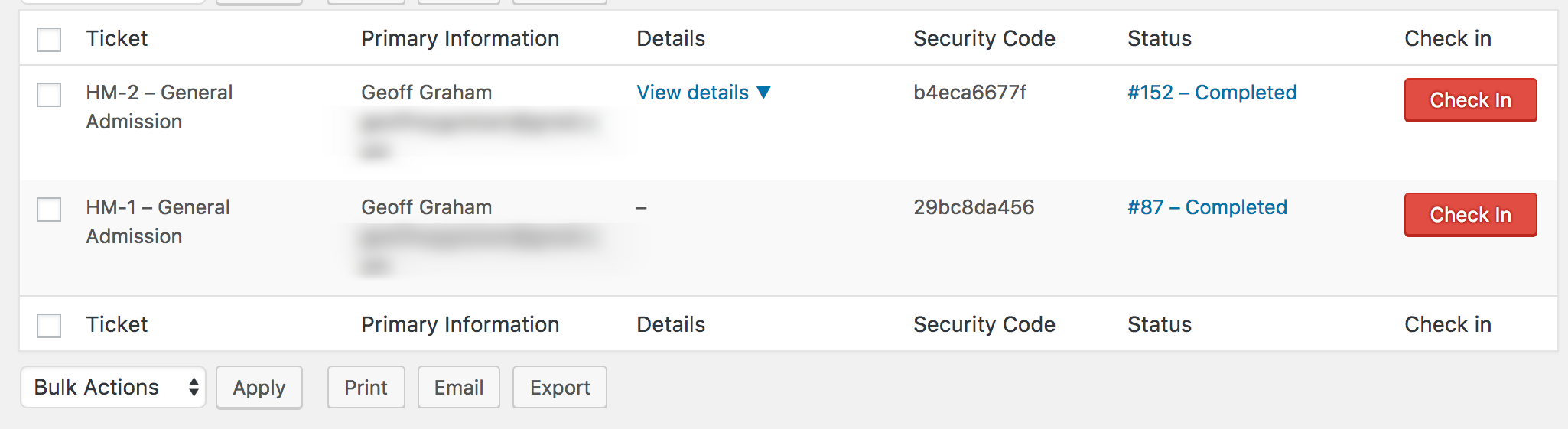
Does this help answer your question? Please let me know. 🙂
Cheers!
GeoffMemberHi Randy,
Thanks for getting in touch — glad to see you’re considering Events Calendar PRO for your project and I hope it’s a great fit!
The plugin will absolutely continue to work after the year-long license is up. You simply lose access to future plugin updates or access to the support forums here on our site.
That said, I do want to note that our plugins work best together when they are all running the same version. For example, if you are running The Events Calendar 4.4.4 (latest), then you will want to run Events Calendar PRO 4.4 or above as well. Otherwise, you will likely notice functional differences or incompatibilities. In other words, I would suggest not updating The Events Calendar after your Events Calendar PRO license expires to ensure compatibility.
Does this help answer your question? Please let me know.
Cheers!
GeoffMemberHi Kunle,
Great question!
Automatic updates are actually a feature of WordPress rather than our plugins. WordPress has provided documentation to disable automatic updates for plugins here:
https://codex.wordpress.org/Configuring_Automatic_Background_Updates
For example, you can add this line the wp-config.php file, which is located in the parent folder where you have WordPress installed on your server:
define( 'AUTOMATIC_UPDATER_DISABLED', true );That will disable all automatic updates.
It could be possible that your host is powering automatic updates instead of WordPress. If you notice that automatic updates are still happening even with that code in the wp-config.php file, then I would suggest reaching out to them for guidance on how to disable the updates from their end.
Does this help answer your question? Please let me know. 🙂
Thanks,
GeoffMemberThis reply is private.
MemberHi Crystal,
Our plugins are built in a way that that they should all run at the same version number. So, for example, if you are running The Events Calendar 4.4.4 (latest), then you will want to install Community Events 4.4.2 (latest) to ensure full functionality. Otherwise, yes, it is likely you will run into issues like the Javascript error you mentioned — in fact, I know we noodled with the Javascript dependencies in 4.4 and that would certainly have an impact on older versions.
If you would prefer not to use the latest version of Community Events, you can always go back to an older version of The Events Calendar instead. We keep all the past versions openly available here:
https://wordpress.org/plugins/the-events-calendar/developers/
Cheers!
GeoffMemberExcellent! Happy to that helps and I appreciate you following up to let me know — definitely keep us posted if any other questions pop up and we’d be happy to help. 🙂
Cheers!
GeoffMarch 9, 2017 at 10:11 am in reply to: Change the event time options to include quarter hours #1251900MemberNo worries at all, Dave! Glad to hear that works and I appreciate you following up to let me know.
I’ll go ahead and close this thread but let us know if any other questions come up and we’d be happy to help. 🙂
Cheers!
Geoff -
AuthorPosts