

Forum Replies Created
-
AuthorPosts
-
Geoff
MemberExcellent! So glad that did the trick and I appreciate you following up to let me know. I’ll go ahead and close this thread but please let us know if any other questions come up and we’d be happy to help.
Have a great day and weekend!
GeoffMemberHi @sagewebmaster,
Thanks for following up — and no worries at all about the mistake. We all make them and I want you to know that we’re here to help when you need it.
we’ve also been experiencing a conflict with the Restrict Widgets plugin.
Thanks for letting us know! Have you reached out to the Restrict Widgets support team as well? I’ll certainly take this and share it with the team so we can look into it further but my hunch is that the Restrict Widgets plugin may also require changes on its end in order to properly integrate. For example, I just installed the plugin on my test site and was able to use the interface with both it and Events Calendar PRO activated. If you can provide me a few more details on the issue then I can keep trying to replicate the issue while you check in with the Restrict Widget team in the meantime.
Thanks!
GeoffMemberThis reply is private.
MemberHi Hans,
Will you please head to Events > Settings > Tickets and check that the following options are selected and saved?
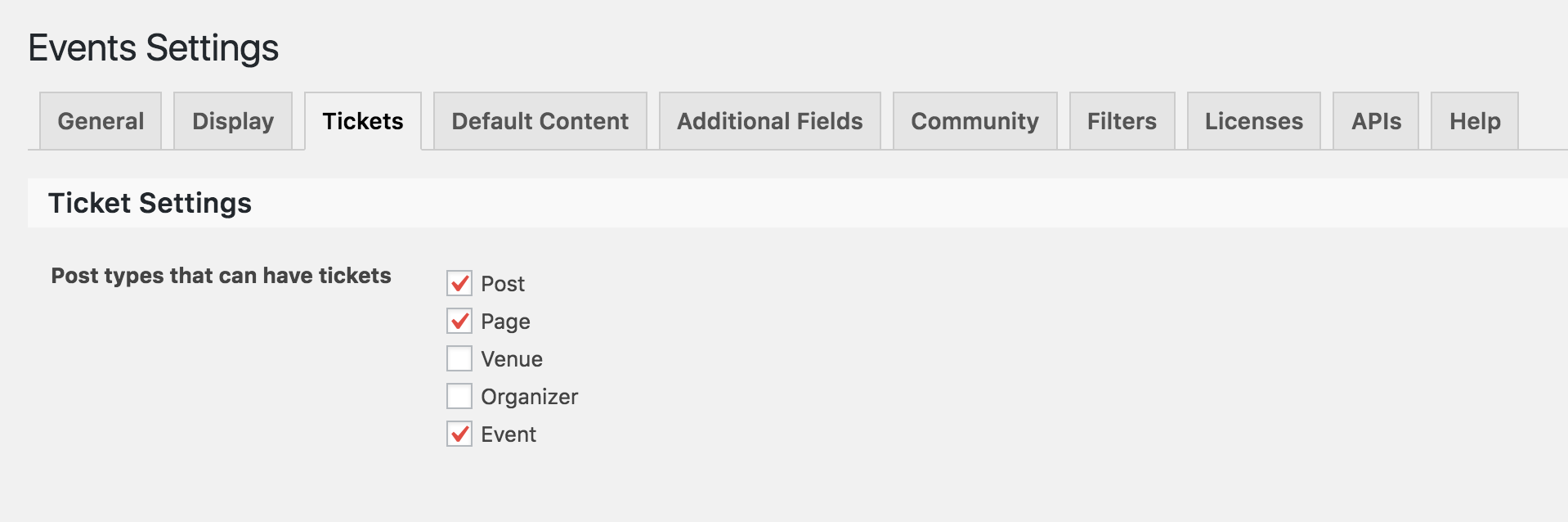
This will ensure that tickets are enabled for Post, Pages and Events which should allow you to start seeing the ticket options in the Event editor (screenshot).
Let’s start there and see what we find. 🙂
Thanks!
GeoffMemberHi @sagewebmaster,
I’m really sorry to hear that there have been bugs and conflicts. As a developer myself, I know it’s frustrating to manage sites where themes and plugins are not fully compatible with one another. That’s definitely one of the best and worst things about developing in WordPress: the fact that there are so many great resources available but that are built by different developers whose code may very well be correct but does not complement the code of another developer.
That said, we do our best to make The Events Calendar (as well as our other plugins) integrate with as many other third-party themes and plugins as possible. In fact, I see that we patched a conflict with the Black Studio TinyMCE Widget based on a report you shared in another thread.
While we’re committed to doing our part to make The Events Calendar as friendly to work with other plugins, sometimes it’s a double-edged sword in the sense that changes have to made in the other themes and plugins as well.
We hold ourselves to the WordPress standard when it comes to writing code and make sure the our plugins are bug-free in a default WordPress environment. Just to confirm, did you experience any bugs or issues in those conditions? If so, those are things we definitely want to tackle right away because that clearly indicates an issue on our end. Otherwise, the issue could be due to the way the theme or other plugins are trying to interact with our plugins — which is something we’d be more than happy to help troubleshoot with you.
It sounds like you’ve already made the decision to move on and I’m bummed to hear that. At the same time, I do want you to know I am happy to look into this and work with you on a solution if you are still willing to.
For example, I would like to start this “Event has passed” issue by looking at the end-of-day cutoff setting for the calendar because that determines when a day is considered over and can trigger notifications like this based on the time that is set. I would also like to check out your WordPress timezone settings and the timezone settings for the event to make sure they match up.
Let me know if that’s something you would be willing to do and I’d be happy to look into this with you. In the meantime, I really am sorry for the trouble so far but hope this at least helps clarify a few things.
Thanks,
GeoffMemberHey Eric, thanks for reaching out!
You know, I saw another thread like this recently and it turned out that Facebook Events does have trouble processing scheduled imports from more than 25 Facebook pages. I remember testing this out with the customer on that thread and we found that the timeouts stopped happening when the number of scheduled Facebook imports was down from 100 to something around 25 or so.
That’s the bad news. The good news is that we are in the processing of releasing a new product called Event Aggregator that we’re planning to ship in about a month and it will take the place of the Facebook Events plugin. What makes it different is that the imports will take place on our servers instead of yours and scale much better for massive data imports like this.
We’re currently in beta and, while we know there are a few bugs left to iron out, I’d highly encourage you to give Event Aggregator a shot — we’re looking for feedback from power users such as yourself and I could see you help make the product even more polished for the official release — plus, this will get your hands on the product sooner to start importing more events. 🙂
Is that something you’re interested in? If so, please provide your email address at the bottom of this screen and we’ll hook you up.
Thanks!
GeoffMemberHi Tac and nice to see you again — hope all is well!
You can actually use the snippet provided in this post to change the wording:
So, it will looks something like this:
function tribe_custom_theme_text ( $translation, $text, $domain ) {
$custom_text = array(
'Out of stock!' => 'Sold out',
);

// If this text domain starts with "tribe-", "the-events-", or "event-" and we have replacement text
if( (strpos($domain, 'tribe-') === 0 || strpos($domain, 'the-events-') === 0 || strpos($domain, 'event-') === 0) && array_key_exists($translation, $custom_text) ) {
$translation = $custom_text[$translation];
}
return $translation;
}
add_filter('gettext', 'tribe_custom_theme_text', 20, 3);
Will this help you get started? Please let me know. 🙂
Cheers,
GeoffMemberHi @Ankit and welcome to the forums!
Yes, the refund process is entirely dependent on the e-commerce plugin you are using with Event Tickets Plus. For example, if you are using WooCommerce, then you are definitely able to initiate a refund from the WordPress admin only.
Does this help answer your question? Please let me know. 🙂
Cheers!
GeoffSeptember 8, 2016 at 7:52 am in reply to: Restrict Events List widget to certain categories #1161497MemberHi Steve, hope you’re having a great day so far!
Yes, that is indeed possible and it is a feature of Events Calendar PRO. With Events Calendar PRO installed and activated, it will enable additional features in the Events List widget that allow you to filter events in the widget by specific options, including categories.
Here’s a rundown of all the options and a side-by-side comparison of the widgets:
https://theeventscalendar.com/knowledgebase/configuring-the-list-widget/
Does this help answer your question? Please let me know. 🙂
Cheers!
GeoffSeptember 8, 2016 at 7:49 am in reply to: Shortcode support of near location and excluding category #1161493MemberHey David,
That’s a great question, though I’m afraid that neither shortcode offers support for filtering events by distance.
We’re actually in the process of restructuring the way we do shortcodes (due to come out in the 4.3 release) and, while those changes also won’t offer geolocation filtering options, they will make it more of a possibility for adding that sort of feature down the line. I’ll note this with the team because it’s a great idea.
Sorry for the bad news, but does this at least help answer your question? Please let me know.
Thanks,
GeoffMemberThis reply is private.
MemberHey Melissa,
Ha, “cheers” is my favorite sign-off. 🙂
I did a little more digging and it looks like the license for Events Calendar PRO is currently licensed to this URL: 162.144.177.77
Are you perhaps running the plugin on a development site or server other than agavarestaurant.com?
If you are, then you will want to remove the license key from that site and move it over to the other one. I think the system is recognizing that it is already being used in one place while you’re trying to use it in another and removing it from the 162.144.177.77 site will do the trick.
Let’s see if that does indeed work!
Geoff
MemberHi Mike, thanks for chiming in.
The file to customize is located at:
/wp-content/plugins/event-tickets/src/views/tickets/email.phpThe snippet in the post you shared will only apply to WooCommerce since it filters a WooCommerce-specific function. The same thing could be accomplished for RSVPs but it will need to be applied to a different function.
Cheers!
GeoffSeptember 8, 2016 at 7:20 am in reply to: Microdata Errors with Event Pages in Webmaster Tools #1161467MemberMatthew, as always, you are awesome. Thanks for chiming in. 🙂
Ben, I’m going to go ahead and close this thread but please do feel free to open a new thread here (if you have a license) or in the WordPress.org forum if any other questions come up.
Geoff
MemberThis reply is private.
-
AuthorPosts