

Forum Replies Created
-
AuthorPosts
-
Geoff
MemberHi Paul,
Great question! The $89 price is the same for both new and renewal licenses and covers a year of access to plugin updates and support.
We do often provide a steep discount on renewals (sometimes up to 30%), but I cannot guarantee whether that will be available one year from now.
Does this help answer your question? Please let me know.
Cheers!
GeoffMemberHi Anthony,
Great question! You can absolutely install the plugins on both sites, but the license can only be active on a single site at a time. The plugins will work whether or not the license is entered, but automatic updates will be enabled only for the site with the license.
Here’s more information on how to use a single license on both a staging and production site together:
https://theeventscalendar.com/knowledgebase/using-one-license-for-your-live-and-dev-sites/
Does this help answer your question? Please let me know. 🙂
Cheers!
GeoffSeptember 28, 2016 at 10:58 am in reply to: Force the day view to show a specific date to start #1169953MemberHi Francisco,
Great question, though I’m afraid that The Events Calendar does not allow you to force a redirect to the first available day that contains events. You can manually link to a specific day on the calendar, but the option to dynamically recognize the next day with events is not currently supported.
Sorry for the bad news, but does this help answer your question? Please let me know.
Thanks,
GeoffMemberHi Amie,
Absolutely! Community Events adds a front-end submission form that people can use to submit events to The Events Calendar. You can require people to log in to submit events and determine whether or not you want to moderate submissions before they are published.
Does this sound like what you’re looking for? Please let me know. 🙂
Cheers!
GeoffMemberNever hurts to ask for sure!
Sorry again for the bad news but definitely keep an eye open on our promotions page and we’ll be sure to update it when something comes up.
Cheers!
GeoffMemberNo worries at all, Mark! Thanks for following up and I’m glad to hear all is working well.
Cheers,
GeoffMemberHey Mark, I see you were able to sort out out the answer to your question in another thread. I’ll go ahead and close this thread. 🙂
Cheers!
GeoffMemberNo worries at all! Glad to hear everything is working well. 🙂
Cheers,
GeoffMemberHi Hassan,
Yes, that is possible. In fact, you can give that a try by visiting this event on your phone and clicking the iCal Export or Google Calendar button to add the event to a calendar from the phone:
http://wpshindig.com/event/startup-happy-hour/2016-09-30/
Will that work for you?
Cheers!
GeoffMemberHi Joani,
There is a setting to change the default view of the calendar:
- Navigate to Events > Settings and click on the Display tab
- Make sure that Month is selected in the “Enable event views” option
- Set the “Default view” option to “Month”
Here’s a screenshot of those options:
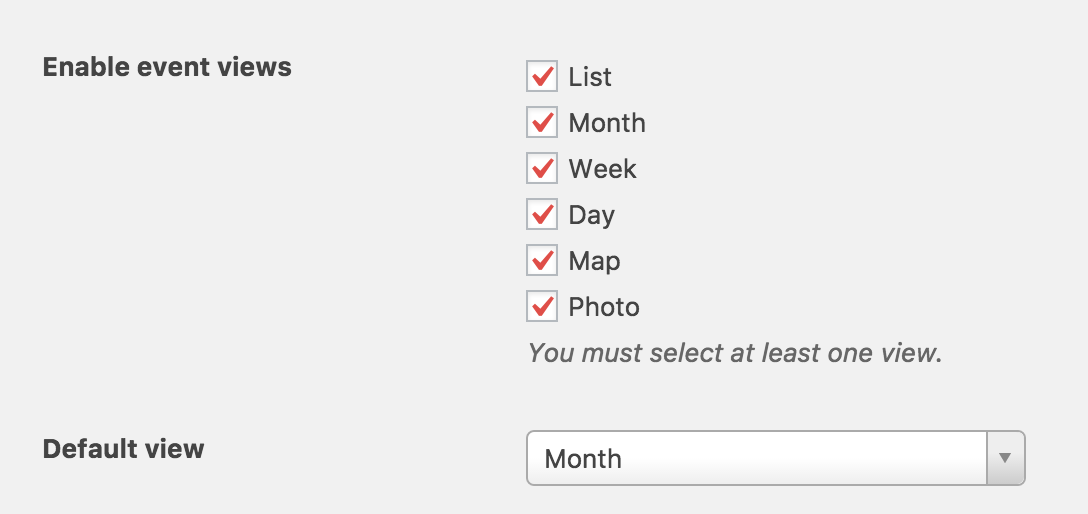
Does that help you enable the Month view in the calendar? Please let me know. 🙂
Cheers!
GeoffMemberHello Joani and welcome to the forums!
Yes, our Community Events add-on provides functionality for allowing people to submit events to your calendar. You can require people to be logged in to submit events and choose whether you want to moderate submissions before they are published.
Does this help answer your question? Please let me know. 🙂
Cheers!
GeoffMemberHi Leigh and welcome back!
I know exactly what you mean — it would be really awesome to do a build-your-own-bundle sort of thing, but I’m afraid our system does not allow for that at the moment. I did an additional check on our existing bundles and I’m afraid that none of them are an exact fit for the combination of plugins you’re looking for
We often run promotions. Though none are happening at the moment, we do have a page that we update when they are available and I’d definitely suggest watching it for the best deals:
https://theeventscalendar.com/deals-coupons-discounts/
Does this help answer your question? I know it’s not the best news, but please let me know.
Cheers,
GeoffMemberSure thing!
I’ll go ahead and close this thread but definitely let us know if any other questions come up as you consider iCal Importer (or Event Aggregator) and we’d be more than happy to help.
Cheers and have a great day!
Geoff
MemberSuer thing, happy to help and glad to hear that did the trick!
I’ll go ahead and close this thread but let us know if any other questions pop up and we’d be happy to help. 🙂
Cheers,
GeoffSeptember 28, 2016 at 8:07 am in reply to: Events Calendar Pro integrating with The Newsletter #1169802MemberYes, you are correct. It’s possible that the two plugins work right out of the box but, if so, that would be a happy coincidence since we haven’t built in any specific integrations for The Newsletter into our plugins.
Any other questions I can help with? Just let me know. 🙂
Cheers!
Geoff -
AuthorPosts