

Forum Replies Created
-
AuthorPosts
-
January 8, 2018 at 2:33 pm in reply to: Default Mobile View not working, Yoast SEO conflict #1420863
Crisoforo
KeymasterThis reply is private.
KeymasterUnfortunatelly if you want to customize further you need to add a custom stylesheet. However we do have multiple color options on the customizer as I’m not quite sure exactly which option is the one you want to change you might want to double check on the ‘The Events Calendar’ inside of the customizer.
Other wise you can also disable the styles generated by default from the plugin on:
Events > Settings > Display
So you can add a custom set of styles for your site, let me know if you have any other questions or if there is anything else I can do for you.
Best
CrisoforoKeymasterHey!
Welcome to the forums. I’m going to assist you to find a solution for your problem.
Based on your description of the issue I’m not really exactly sure what section is but if you can provide a more detail screenshoot like full size it might be more useful.
On the other side you can overwrite how templates work using our Themer’s guide and then modifying the files to change or display a different label or message that suits more to your specific needs.
Please let me know if you have any other questions about this issue or if there’s anything else I can do for you.
Thanks,
CrisoforoKeymasterHey Thanks for sharing the details!
You can customize your styles for the Widgets using our guide “Styling events widgets“. In this way you can change how the widgets CSS are generated by overwriting them you have a chance to keep with you styles even if plugins gets updated as it will use your styles on the theme instead.
Let me know if you have any questions about our guide or anything else related or if there’s anything else I can do for you.
Thanks,
CrisoforoKeymasterHey!
Thanks for reaching out to the forums.
Based on the description of your issue it seems like the events are being stored in cache still, this usually is done using a feature from WordPress called transients. You can delete all the transients by using a plugin called Transients Manager. After that you can go to:
Tools > Transients
And then click on the button Delete Transients with an Expiration and Delete Expired Transients. After that make sure to remove the cache from any other Cached plugin that you might have installed and take another look.
Please let me know if you have any other questions about this issue or if there’s anything else I can do for you.
Thanks,
CrisoforoKeymasterHi!
Welcome to the forums and let me give you some guidance on your questions, concerns.
- Would you mind try to expand a little bit more on your question here, or share a screenshot about this. In the meantime we suggest to test for any conflicts to verify this is not being caused by a third party plugin or theme.
- At the moment there’s no admin settings to change how the fields are displayed but you can change this by overriding the single events view and displaying your fields as you see it with tribe_get_custom_field function, take a look at the Themer’s guide in order to know a little bit more about how the override of templates works.
- At the moment is not possible on any widget, but you can select to display only “Featured Events” and mark the events you want to display there as Featured.
- Yes you can use the same API Key but having a different one will allow you to visualize better how the data is consumed on each different location.
Please let me know if you have any other questions about this issue or if there’s anything else I can do for you.
Thanks,
CrisoforoKeymasterHi!
Thanks for reaching out to the forums. It seems like you might be facing some conflicts on the permalinks can you make sure to follow this guide for fixing 404 errors. Another thing to look for is any page or site that has the “event/” slug from any post, page or category as this one might conflict with the single events URL structure, also try to change the default slug structure to test if this is non a slug conflict.
Please let me know if you have any other questions about this issue or if there’s anything else I can do for you.
Thanks,
CrisoforoKeymasterHey!
Thanks for reaching out to our forums, you can change how the events calendar is styled we have three different type of styles that you can change directly from the admin panel:
Events > Settings > Display
This will help you to give you a start point to add your custom styles around each section, we have a detailed article about the customization of the templates as well that might be helpful for you. Another recommendation is to test for any possible conflict on your site to see if there’s no other plugin causing the issue.
Please let me know if you have any other questions about this issue or if there’s anything else I can do for you.
Thanks,
CrisoforoKeymasterHey!
Welcome to the forums and thanks for reaching out. Would you mind expanding a little bit on what exactly are you trying to add or if you are using a plugin to generate the breadcrumbs, so we can understand a little bit more your problem and provide a better guidance on this problem.
In the meantime I can provide a link to the Themer’s Guide to customize the templates on the Calendars Plugin.
Please let me know if you have any other questions about this issue or if there’s anything else I can do for you.
Thanks,
CrisoforoJanuary 7, 2018 at 10:20 am in reply to: How do I get first day of the week to be Sunday instead of Monday? #1419946KeymasterThanks for reaching out and welcome to the forums, based on your questions you can change this setting via the WordPress default settings you need to go to:
Settings > General
Or
/wp-admin/options-general.php
Then go to the bottom and you should be able to locate the section where you can change the default start date of the week and this will update how the calendar starts as well.
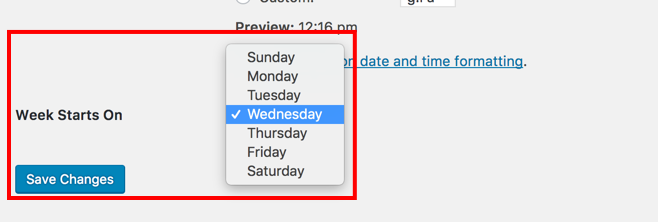
After that you only need to Save the Changes and you should be all set.
Please let me know if you have any other questions about this issue or if there’s anything else I can do for you.
Thanks,
CrisoforoJanuary 7, 2018 at 10:14 am in reply to: Year not displaying next to month name in Month View #1419944KeymasterThanks for reaching out, and we are here to give you a hand with your problem.
Based on the description of your issue you are looking in a way to customize the month views, we have a useful guide for Themer’s that you might find useful, however I also give a test on a clean environment with default WordPress theme and seems like the calendar is displaying:
- Events for {Month} {Year}
Which means your theme or any other plugin is causing this problem, we suggest for you to test for any possible conflict with any theme or plugin.
Also as you asked for a way to customize the title, as mentioned above you can follow the Themer’s guide along to do this or you can use the filter:
tribe_events_title
As follows to change the title before is printed in screen.
function tribe_events_title_month( $title ) {
 return $title;
}

add_filter( 'tribe_events_title', 'tribe_events_title_month' );
Please let me know if you have any other questions about this issue or if there’s anything else I can do for you.
Thanks,
CrisoforoKeymasterHi David!
Thanks for reaching out and report this problem however at the moment some our Users are experiencing this problem and we have internally created a ticket for this where the Developers are looking for a solution to this problem, in the meantime you still can have updates on the plugin manually, we have a useful guide that you can follow along to make this process more easier.
I’m going to set the status of this ticket as pending fix and once we have an update for this one we are going to check in with you again to let you know about the new status of this ticket.
Please let me know if you have any other questions about this issue or if there’s anything else I can do for you.
Thanks,
CrisoforoKeymasterHi there.
Based on your screenshoot it seems like you have others plugins as well adding more items into your columns, there are two ways you can edit this columns one is by using a filter like this one, into your functions.php file.
function tribe_events_manage_admin_columns( $columns ) {
    $list = [ 'title', 'author', 'tags', 'comments', 'date', 'tickets' ];
    foreach ( $list as $item ) {
        if ( isset( $columns[ $item ] ) ) {
            unset( $columns[ $item ] );
        }
    }
    return $columns;
 }

add_filter( 'manage_tribe_events_posts_columns' , 'tribe_events_manage_admin_columns' );
Is going to remove all columns from the default of the events you can update the variable list with the columns that you want to remove so it match your needs.
The other solution you can do it directly from the admin panel by clicking in the Screen Options button on the top right corner of the screen.
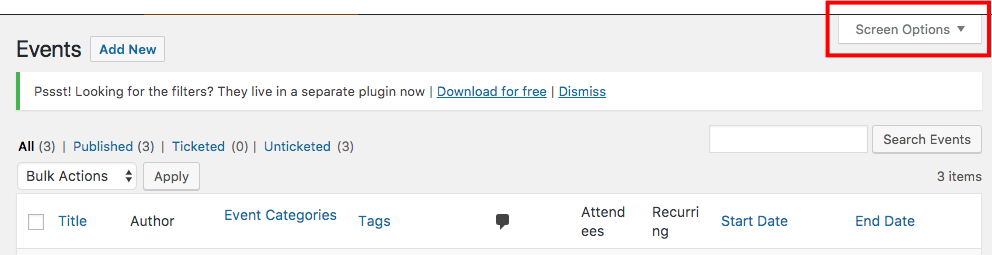
Then select the columns you want to display and click on Apply.

Please let me know if you have any other questions about this issue or if there’s anything else I can do for you.
Thanks,
CrisoforoKeymasterHi there.
I would like to give you a hand on this one however I’m not really sure what exactly are you trying to change, if you can share a more detail message like what sections you want to change or attaching a screenshot highlighting the parts that you want to change I can give you a more accurate answer.
Also if you are looking for customize your template make sure to take a look at the Themer’s guide and also to the conflicts guide to make sure is not a plugin or theme conflict causing this problem.
Please let me know if you have any other questions and will send you another update once we have more details from your issue.
Thanks,
CrisoforoKeymasterHey!
Thanks for reaching out, this is something more related with WordPress rather than the Events Calendar Plugin, but you can add a new link to logout from the account in your current theme as follows:
<?php if ( is_user_logged_in() ) : ?>
<a href="<?php echo wp_logout_url(); ?>">Logout</a>
<?php endif; ?>
This will only display a Logout link if the user is logged in, you can add this snipped of code on the template you would like to display the link, and add custom CSS class to edit to match your style guide.
Please let me know if you have any other questions about this issue or if there is anything else I can do for you.
Thanks,
Crisoforo -
AuthorPosts