

Forum Replies Created
-
AuthorPosts
-
Courtney
MemberHi Barbara
We’ve got an extension to do this for you. Check it out at https://theeventscalendar.com/extensions/remove-export-links/ and let me know if it works.
Thanks
Courtney 🙂MemberHi there Mike!
Thanks so much for getting in touch! I’m afraid that we’re not equipped to provide technical support for current plugin users here in our pre-sales forum. We’d be more than happy to assist you at one of the following locations:
• If you’re using one or more of our free plugins such as The Events Calendar and Event Tickets, you can request assistance on the WordPress.org support forum for the affected product.
• If you’re a current license holder for one of our premium offerings, please log in to your account and submit a post to the appropriate forum for the affected product. Please include your System Info https://theeventscalendar.com/knowledgebase/sharing-sys-info/ so we can better help you.If you can, please take the time to confirm in your post that you’ve run through our Testing for Conflicts steps prior to contacting us–this will save us a step and help us to get your issue resolved that much quicker! 🙂
Thanks again, and we’ll see you in the forums!
Courtney 🙂August 30, 2018 at 7:59 am in reply to: what does Up to 100 scheduled imports per day mean? #1609707MemberHi Jim
https://theeventscalendar.com/knowledgebase/event-aggregators-import-limits-work/ can help you with this a little further. It is based upon the number of scheduled imports you have queued up, not the number of events imported.
Does that make sense?
Thanks
Courtney 🙂MemberHi Jin
I visited your site and it looks like both The Events Calendar and Events Calendar Pro are up to the current versions.
Can you disable both plugins, then enable TEC followed by ECP (and activate it) and see if the message goes away then?
Thanks
Courtney 🙂MemberHi Charles
You definitely can do that. https://theeventscalendar.com/knowledgebase/using-the-end-of-day-cutoff/ is our guide to change that setting.
Please let me know if that works for you.
Thanks
Courtney 🙂MemberHey Amanda
Unfortunately, this sounds like a support question for WooCommerce. https://woocommerce.com/contact-us/ should help with those questions.
We don’t handle much with the e-commerce plugins other than our integration with them.
Thanks
Courtney 🙂MemberHi Deb
I do hope this is an easy fix too. Unfortunately, I think you’ll need to reach out to your theme developer. The way that your events preview is definitely a customization that we didn’t include within our plugins. It looks like it will be really nice, once it’s resolved. WP Shindig Demo Site https://wpshindig.com/events/list is an example of how our list view typically displays on most themes.
Please keep me posted if your theme developer as a solution.
Thanks
Courtney 🙂MemberHey there
Sorry you are experiencing some difficulties with this.
Head to Appearance » Menus
Then in the “Events” dropdown, select “Events” again. You may need to see the “View All” tab to find it.
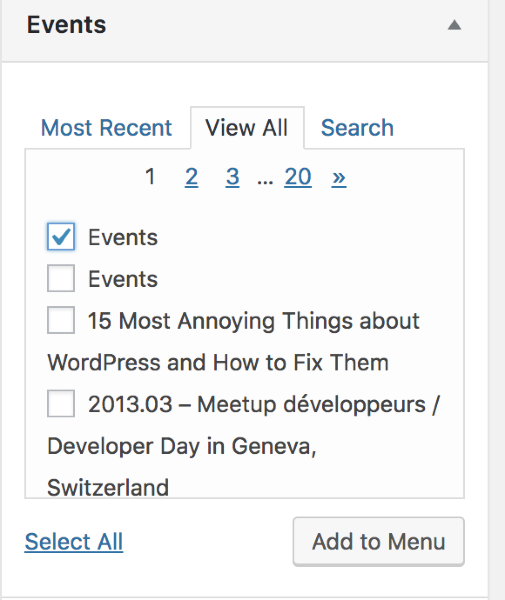
Please let me know if you get that working.
Thanks
Courtney 🙂August 29, 2018 at 7:08 am in reply to: New Events – I can see the preview but when I publish the page it doesn’t load #1608725MemberHi David
Please follow our Testing for Conflicts Guide https://theeventscalendar.com/knowledgebase/testing-for-conflicts/.
You might find your plugin conflict quickly by using Plugin Detective https://wordpress.org/plugins/plugin-detective/.
We recommend conducting these tests on a staging server (https://theeventscalendar.com/knowledgebase/creating-using-wordpress-staging-site/).
If you are unable to do so, please install the Health Check plugin so that you can effectively disable all plugins without website visitors noticing any changes. See https://make.wordpress.org/support/handbook/appendix/troubleshooting-using-the-health-check/#troubleshooting for how to do this.
Please share or reshare in your System Info https://theeventscalendar.com/knowledgebase/sharing-sys-info/ as well after your tests so that we can better diagnose the issues you are having.
Please let me know if the issue still persists after these tests.
Thanks
Courtney 🙂MemberHi Mandie
Congrats! We’re eager to see how your project turns out.
https://theeventscalendar.com/knowledgebase/downloading-and-installing-the-plugin/#download-premium is our guide for how to install the plugin. Please let me know if you get this working.
Also check out https://theeventscalendar.com/knowledgebase/important-settings-events-calendar-events-calendar-pro/ after you’ve gotten the plugin installed as a quick start to setting your site up.
Thanks
Courtney 🙂MemberHi Ethan
Thanks for the suggestion.
If you think that is something you would like as a feature I encourage you to visit our User Voice Page and either upvote an existing request or make a new request there.
You can suggest it at http://tribe.uservoice.com.
We will be sure to notify you there.
Is there anything else I can help you with?
Thanks
Courtney 🙂August 29, 2018 at 6:36 am in reply to: Need a refund for a package that was purchased but not usable on our site. #1608691MemberHey There
So sorry that the others were not a good fit for you.
We do offer 30 day refunds if you find the plugin does not meet your needs. It’s just a matter of submitting a refund request form at https://theeventscalendar.com/knowledgebase/refund-policy/.
Thanks
Courtney 🙂August 29, 2018 at 6:00 am in reply to: Event Aggregator – Importing events from other urls #1608658MemberHi Regina
You can see a full list of the types of import sources that Event Aggregator supports at https://theeventscalendar.com/knowledgebase/import-from-feed-or-url/#select-source.
I viewed your link and wasn’t able to find a source from them that fits the types we support. It doesn’t appear that their site is running our The Events Calendar plugin to use the “Other URL” feature.
You could reach out to them to request if they have a sharable source, such as a Google Calendar link.
Is there anything else I can help you with?
Thanks
Courtney 🙂MemberSo sorry for the delay. I’ve been out ill for a week.
Can you manually share your System Info https://theeventscalendar.com/knowledgebase/sharing-sys-info/ from the staging site?
Did you see the event editor staging when all other plugins/themes were disabled?
What differences do you see in plugins/themes that are not active on the live site vs staging?
Thanks
Courtney 🙂MemberHey Torsten
Can you add the following code to your child theme, or in Appearance » Customize » Additional CSS?
.tribe-events-back {
    display: none
}
That should hide the All Events link.
In the meantime, I’ll ask one of our translation team members to check this out a bit more.
Can you confirm if this happens when you deactivate all other plugins but those related to The Events Calendar and use a default theme, such as Twenty Seventeen https://wordpress.org/themes/twentyseventeen/?
Thanks
Courtney 🙂 -
AuthorPosts