Can’t add ‘Events’ to menu

Home Forums Calendar Products Events Calendar PRO Can’t add ‘Events’ to menu

Viewing 4 posts - 1 through 4 (of 4 total)
  • Author
    Posts
  • #1608254
    surf
    Participant

    Hi, I bought Events Calendar Pro – I have The Events Calendar plugin also installed.
    I am trying to add a menu link to the calendar page.
    Your guides on how to do this are 3 years old and do not work.

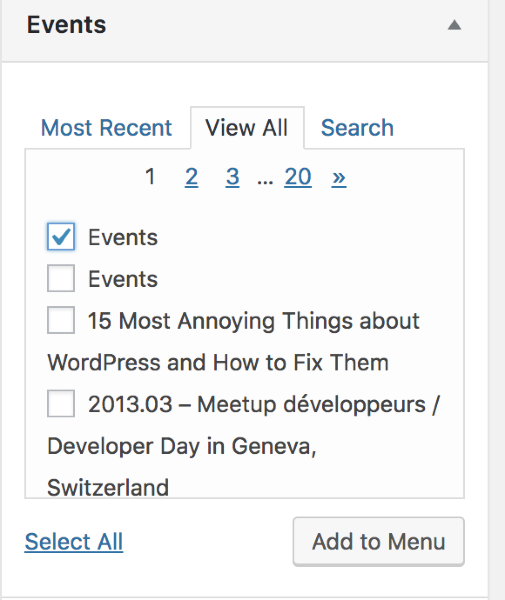
    When I go to Appearance > Menus ; and click on the ‘Events’ I only get a message that says: No Items

    I can’t find anywhere to add the calendar to the menu.
    Please help.

    #1609532
    Courtney
    Member

    Hey there

    Sorry you are experiencing some difficulties with this.

    Head to Appearance » Menus

    Then in the “Events” dropdown, select “Events” again. You may need to see the “View All” tab to find it.

    Please let me know if you get that working.

    Thanks
    Courtney 🙂

    #1609997
    surf
    Participant

    Hi, I discovered the problem, and you may want to make a note of it on your demo’s.
    The ‘Events’ page only shows up in the ‘Events’ dropdown (to add to menu) if there is an event created.
    Nothing shows up until an event has been created.

    It looks like you had a ‘demo’ event included before – but it has since been removed.
    I first installed ‘The Events Calernar’ Plugin through WordPress – then installed the ‘Pro’ version by downloading it from your website.
    No demo content was included to ‘activate’ the menu.

    #1610198
    Courtney
    Member

    Ah, good catch. I’ll be sure to update that article with your suggestion.

    Glad you got this working. I’ll close out the thread for now, but do let us know if you run into any other issues.

    Thanks
    Courtney 🙂

Viewing 4 posts - 1 through 4 (of 4 total)
  • The topic ‘Can’t add ‘Events’ to menu’ is closed to new replies.