

Forum Replies Created
-
AuthorPosts
-
Courtney
MemberSure thing. Let me know if this works for you.
Thanks
Courtney 🙂January 12, 2018 at 12:15 pm in reply to: Cheatin’ uh? Sorry, you are not allowed to create posts as this user. #1425111MemberHi Wendy
Likely there are settings within that plugin to allow your own account to access the events editor. Can you look for that?
Thanks
Courtney 🙂MemberHi Jennifer
Those performance stats should very much be well within your expected limits. Can you look for Javascript errors on the editor page? Using Your Browser to Diagnose JavaScript Errors. With it working on staging and not on live, something is definitely off.
Let me know what you find there.
Thanks
Courtney 🙂MemberHi Holli
Can you forward your email to
support [at] theeventscalendar [.] com
Our records indicate that you purchased a 1 year license in November 2016 which would mean that they expired in 2017. The only way to get an update is to have a current license.
Thanks
Courtney 🙂January 12, 2018 at 11:28 am in reply to: Show availability for two ticket types and course options #1425042MemberHi Mike
The way Event Tickets Plus would display looks more like this on the front end:

On the editor side, you can add multiple ticket types and use a share capacity to set a total number of tickets available, and a number available per ticket type.

Seeing the ticket types within the editor look like this:

I do believe this will achieve your goals. We do offer 30 day refunds if you find the plugin does not meet your needs. It’s just a matter of submitting a refund request form at https://theeventscalendar.com/knowledgebase/refund-policy/.
I hope this helps clarify.
Thanks
Courtney 🙂MemberHi John
To hide events from the /events page, you’ll need to view Event Options on the right side of the Event editor. Select Hide from event listings
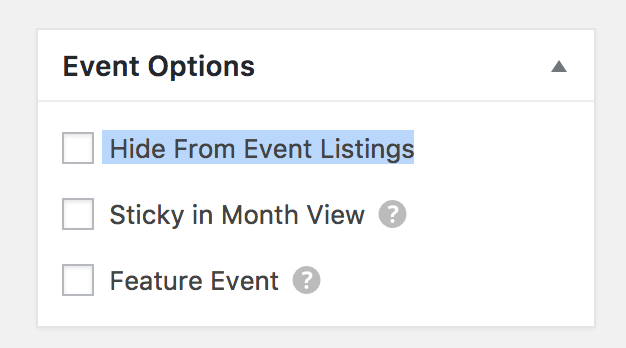
You can still use the shortcode method to display events. You could use this with categories as a way to filter down to specific categories as well.
Let me know if this works for you.
Thanks
Courtney 🙂MemberGreat James. Happy to help.
Thanks
Courtney 🙂January 11, 2018 at 12:30 pm in reply to: The Events Calendar has license field and notice for Event Aggregator #1424018MemberAwesome. Thanks again. 🙂
MemberHi there Ryan
https://theeventscalendar.com/knowledgebase/csv-files-options-and-examples/ has examples for all of our options for CSV files. Can you give these a shot and let me know how it goes?
Thanks
Courtney 🙂MemberHi Brett
That export file is a .ics link, which means that the end calendar is going to just have a path to continue fetching & synching any upcoming events to the source.
Are you trying to import this .ics file into another The Events Calendar powered site? If so, you can import further than 30 days by going to Events » Settings » Imports » Import Date Range Limit. Notice the fine print here though – constantly searching for an unlimited date range ahead could have a negative impact upon your site’s speed.
Each place that you import this file into may have its own settings for how far ahead it will scan for events.
Does this help?
Thanks
Courtney 🙂MemberHi Chelsea
Glad to see we’ve answered most of your questions. Let’s get that last one cleared up.
DOES IT PULL FROM OTHER SITES OTHER THAN FACEBOOK? AS LONG AS WE HAVE TO URL?
Yes. You can see the full list of options on Event Aggregator https://theeventscalendar.com/product/event-aggregator/. We can import from Google Calendar, iCal, .ics links, Meetup, FB pages, and sites running The Events Calendar 4.5 and newer.
Is there anything else I can help you with?
Thanks
Courtney 🙂MemberHi Charlie
We do offer 30 day refunds if you find the plugin does not meet your needs. It’s just a matter of submitting a refund request form at https://theeventscalendar.com/knowledgebase/refund-policy/.
We do not have trial versions of our product. However, you can use a .csv file to upload manually to get an idea of the interface for free.
https://theeventscalendar.com/knowledgebase/csv-files-options-and-examples/
Is there anything else I can help you with?
Thanks
Courtney 🙂MemberHi James
Are you wanting a discount to use on a school’s website? If so, you can apply for our non-profit discount by completing the form at https://theeventscalendar.com/apply-for-npp.
⚠️Please Note: Licenses granted through this program do not include access to support.
If you need in-depth support,
please consider purchasing a regular license.
Is there anything else I can help you with?
Thanks
Courtney 🙂MemberHey Bryan
Can you confirm that you’ve added the Event Aggregator license to your site after purchase? Events » Settings » Licenses.
When you go to Events » Help » Event Aggregator System Status (bottom of page), are all options showing “green”?
If the options are all green, the next step would be to delete transients. We’ve got a quick overview of this at https://theeventscalendar.com/favorite-developer-plugins/.
Please let us know if we can assist you further with this.
Thanks
Courtney 🙂MemberHi Bryan
We’ll continue to assist you at https://theeventscalendar.com/support/forums/topic/can-i-import-my-entire-google-calendar/.
Thanks
Courtney -
AuthorPosts