
Home › Forums › Calendar Products › Events Calendar PRO › Two Calendars/One Site
- This topic has 9 replies, 2 voices, and was last updated 8 years, 8 months ago by
johnconfer.
-
AuthorPosts
-
January 8, 2018 at 9:29 am #1420518
johnconfer
ParticipantI have the Pro Version on a site and I want to have two different calendars. I did what the info said, but it’s putting the events on both calendars. I want the one set of events to be on one calendar and the others to be on the other calendar. If I add them, then it puts them on both calendars. How can I seperate the events to the corresponding calnedar? Also, only one of the calendars is supposed to have events go on the home page (featured events), but both calendars are putting the events on the home page. Need help.
This is the calendar that is supposed to have the featured events on the home page. http://lascolinasorg.flywheelsites.com/events/
This is the calendar that is supposed to have the other events that will never be featured events. http://lascolinasorg.flywheelsites.com/lca-calendar/
January 8, 2018 at 12:29 pm #1420730Courtney
MemberHi John
Unfortunately, I am unable to view the links that you shared with your site’s maintenance mode prompt to log in to view pages. You can send me a login for just viewing, not the full wp-admin dashboard, as a private reply here.
We do offer Calendar View Shortcodes and Widget Shortcodes. I’m not sure which info you were following. What I’d suggest is to use shortcodes to display either only featured events or only not-featured events.
Example: [tribe_events view=”list” tribe-bar=”false” featured=true] would display only featured events.
Does that make sense?
Thanks
Courtney 🙂January 8, 2018 at 12:40 pm #1420757ParticipantThis reply is private.
January 10, 2018 at 10:34 am #1422722MemberHi John
Is either of your links the default events page?
Would using the shortcode that specifies only or without featured events work?
[tribe_events view="month" tribe-bar="false" featured=true]
[tribe_events view="month" tribe-bar="false" featured=false]
Thanks
Courtney 🙂January 10, 2018 at 1:49 pm #1422995ParticipantThis page: http://lascolinasorg.flywheelsites.com/events/ is the main events page that we want to have the upcoming three events show up on the home page.
This page http://lascolinasorg.flywheelsites.com/lca-calendar/ is the other calendar that has internal events within the LCA and they want these events to only show up on this calendar and not the other one (the main events calendar on this page http://lascolinasorg.flywheelsites.com/events/) or the home page events area.
January 12, 2018 at 10:57 am #1425008MemberHi John
To hide events from the /events page, you’ll need to view Event Options on the right side of the Event editor. Select Hide from event listings
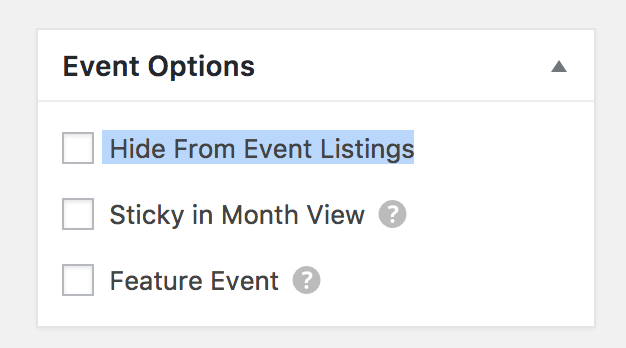
You can still use the shortcode method to display events. You could use this with categories as a way to filter down to specific categories as well.
Let me know if this works for you.
Thanks
Courtney 🙂January 12, 2018 at 1:39 pm #1425191ParticipantCourtney,
If if choose that on the “LCA Events” calendar, it hides it from the home page view, but then it also hides it from the calendar view. Meaning it won’t show up on the calendar at all.
January 16, 2018 at 1:04 pm #1427986MemberI see John
In that case, I’d recommend you use shortcodes for both. You can filter each down to show just the categories you want. You are able to show multiple categories on each shortcode.
It isn’t ideal, but it will get you working. You can then omit the main events calendar link from menus and instead go to a page you’ve created with the shortcode it contains.
If you think that is something you would like as a feature I encourage you to visit our User Voice Page and either upvote an existing request or make a new request there.
You can suggest it it http://tribe.uservoice.com.
Is there anything else I can help you with?
Thanks
Courtney 🙂February 7, 2018 at 8:36 am #1446413Support Droid
KeymasterHey there! This thread has been pretty quiet for the last three weeks, so we’re going to go ahead and close it to avoid confusion with other topics. If you’re still looking for help with this, please do open a new thread, reference this one and we’d be more than happy to continue the conversation over there.
Thanks so much!
The Events Calendar Support Team -
AuthorPosts
- The topic ‘Two Calendars/One Site’ is closed to new replies.