Forum Replies Created
-
AuthorPosts
-
Cliff
MemberHi Susan. Thanks for the link; it always helps.
Normally we don’t provide styling customizations, but here’s some quick help for individual events (e.g. http://www.e-table.asia/event/all-you-can-eat-bbq-night/2015-12-07/)
1) The Date’s font-size is 36px, which is coming from /wp-content/uploads/wp-less/dt-the7/css/custom-5cc4a2a8ce.css?ver=2.2.0
h2,
.h2-size,
.entry-title.h2-size,
h1.entry-title {
color: #dd0000;
font: normal normal 600 36px / 42px "Raleway", Helvetica, Arial, Verdana, sans-serif;
text-transform: none;
}
I’m not sure if you added this, since it’s from ‘wp-less’ and has ‘custom’ in the file name, but you might want to edit it if it is from your own customizations.
If you don’t know how/why this styling is working, you could choose to add new styling, such as:
.tribe-events-schedule h2 {
font-size: 16px;
}
Currently, your event title is 33px (from our plugin’s CSS) so setting the above to 16px or something else smaller than 33px should work for you (assuming you choose not to edit the ‘wp-less’ / ‘custom’ styling).
2) You can reference https://theeventscalendar.com/knowledgebase/tec-with-jetpack/ for widget visibility.
3) I’m not sure exactly what you’re wanting the Google Map to look like, but here’s some CSS that might help you figure out how to get it how you want it:
.tribe-events-meta-group {
max-width: 25%;
}
.tribe-events-meta-group-gmap {
min-width: 50%;
}
You can add custom CSS code via your child theme’s style.css file or via a plugin like Simple Custom CSS or, my favorite, Jetpack. Jetpack supports regular CSS and the LESS and Sass pre-processors. (Or use the ‘wp-less’ one you seem to already be using.)
For more in-depth customizations, you can reference our Themer’s Guide.
I hope this helps. Please let me know how things go for you.
MemberGreg, thanks for the additional details.
FYI: In this forum we try to keep our threads focused on just one issue to ensure we answer each question. Please keep this in mind for the future and start a new thread for each unrelated issue. Thanks for your understanding.
For your issues with Avada styling, you’ll need to ask your theme support those questions.
Regarding wanting to see a print-friendly list of upcoming events, that’s not a feature we include.
You could link to http://cpmr-atlantic.org/events/list/ and use one of the WordPress Print Friendly plugins on that page. And/Or you could add some custom print page styling via @media print.
You might also want to vote for this existing feature request: Make it possible to print calendar or add your own separate feature request if that doesn’t match your idea.
I hope this information helps. Please let me know if there’s anything else I can do for you.
MemberGlad to hear your issue is solved. I was glad to help!
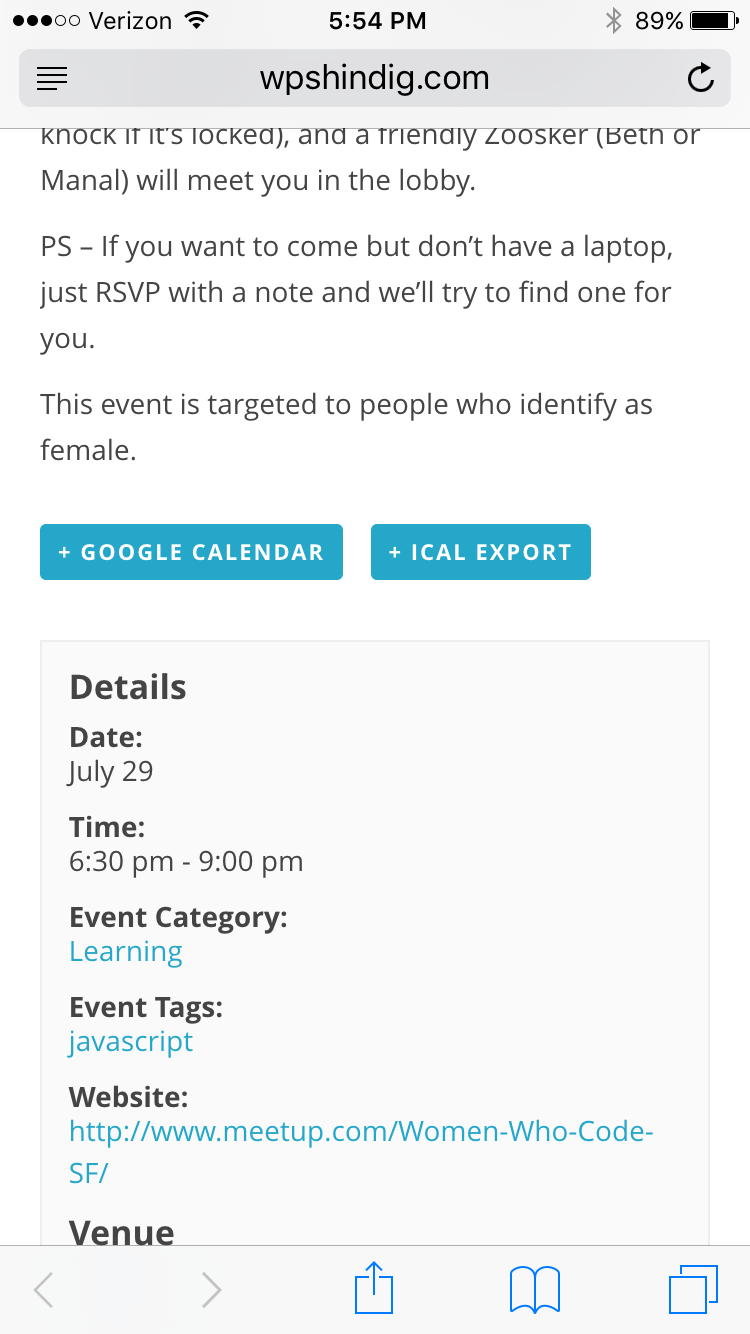
MemberAlex, I tested http://wpshindig.com/event/womens-javascript-study-group/ and it works just how you’re wanting, I think.
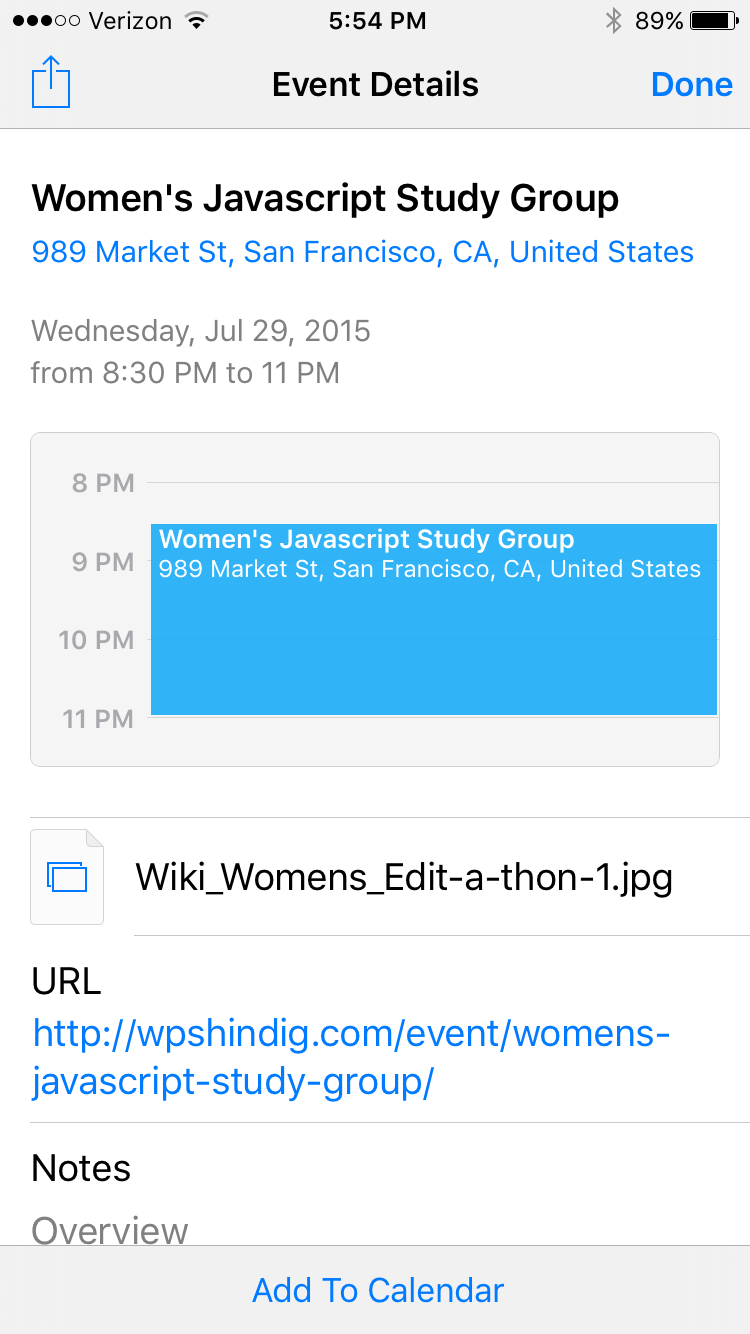
Here are some screenshots:
1) http://wpshindig.com/event/womens-javascript-study-group/ view on iPhone 6 Safari

2) View of tapping “iCal Export” button

There was no file downloaded or app to select to open in.
Please test the link above on your iOS device.
MemberYani, thanks for letting me know my previous reply answered your question! Have a great one.
MemberKandace, we think your site may have a filter on home_url somewhere that you’re unaware of or forgot you added.
Here’s a code snippet to add to your child theme’s functions.php file — please try it and let me know if it resolves the issue with the missing slash in the events URLs.
Gist: https://gist.github.com/cliffordp/11e08a24b1952984b146
This code isn’t tested because we can’t replicate your issue, but please try it and report back.
Thank you.
MemberMario, that link’s Filter Bar is utilizing our Event Categories and Tags.
If you use that site’s filtering, you’ll see the URL changes to something like ….org/latest/?action=tribe_geosearch&tribe_paged=1&tribe_event_display=map&tribe_eventcategory%5B%5D=167&tribe_tags%5B%5D=35
You might want to just buy it and try it, since we have a pretty great Refund Policy.
You can buy one or many of our add-ons and thoroughly test them.
Let me know if you have any follow-up questions.
MemberThanks for those details.
Would you mind grabbing your system information and pasting it here? Make sure to use the “Set as private reply” checkbox to protect your private information from the public.
You can find the system info by going to WP Admin > Events > Settings, clicking on the “Help” tab, and scrolling down to the “System Information” box. (Or by going to [yoursite]/wp-admin/edit.php?post_type=tribe_events&page=tribe-events-calendar&tab=help)
That will give me a lot of extra information to help diagnose the problem.
Thanks.
November 25, 2015 at 5:50 pm in reply to: Single event view ‘previous event’ link incorrectly points to the oldest event #1030985MemberDavid, I’ve set the status of this thread to Pending Fix and I previously logged this forum thread as one to be updated once a fix is released. This is a manual process, but you should receive such an update whenever this time comes in the future.
Thanks!
MemberKandace, could you please send me a screenshot of the slug at wp-admin > Events > Settings > slugs, like I did here:

Thank you.
MemberHans, I’m glad to hear that.
Regarding the free/core plugin’s translations, please read through https://theeventscalendar.com/knowledgebase/translating-the-events-calendar/ and let me know if you have any further questions on this topic.
Thanks.
November 20, 2015 at 9:51 pm in reply to: Month calendar highlighting wrong current day (solved) #1028820MemberHi Mark. Thanks for the details.
I tested Chrome, Firefox, and Safari on my Mac and didn’t notice any difference in the day highlighted.
I tested with my WordPress timezone set to Chicago, and I tested right before midnight (when I’d figure it to be more likely to have a wrong day highlighted) and it worked fine in all 3 browsers.
Please make sure you have the latest versions of all your browsers and of our free/core plugin and all our add-ons that you’re using.
Please also clear your browser cache.
If you still continue experiencing this issue, could you try temporarily activating the default Twenty Fifteen theme and seeing if the issue persists?
If disabling the theme fixes it, we have narrowed the issue down to a theme conflict. Do you have any theme overrides for the Events Calendar? If so could you try disabling them by renaming your [themename]/tribe-events/ folder to ‘tribe-events-bak’. Did that fix it?
If the issue persists in the default Twenty Fifteen theme, then we have a different set of debugging steps. Please keep the Twenty Fifteen theme enabled, and also disable any plugins other than the ones from Modern Tribe to see if that fixes it. If it does, please try re-enabling the plugins one at a time until the issue resurfaces. When it does resurface, can you let me know which plugin caused that to happen?
MemberThanks for all that helpful information.
I searched for that function in iCal Importer directory and found it in use in this file: /wp-content/plugins/the-events-calendar-importer-ical/vendor/iCalcreator_3.0/iCalcreator.php

Reference for ‘timezone_string’ option: http://codex.wordpress.org/Option_Reference
I wonder if you edit this file’s code and test with it if you’ll notice any differences…
If you’re able to do that, please let me know what you discover.
Thanks so much!
November 20, 2015 at 9:39 pm in reply to: Single event view ‘previous event’ link incorrectly points to the oldest event #1028816MemberSorry, but we don’t provide ETAs. I know that can be dissatisfying sometimes, but it’s better than us suggesting a date and then not meeting it due to it taking longer than expected or due to getting pushed back to make room for higher priority items. Thank you for your understanding.
MemberHi Moize.
Sorry to hear about this issue.
Would you please send me a screenshot of that event’s wp-admin “WooTickets” settings area so I can see how your tickets are setup?
-
AuthorPosts