
Home › Forums › Calendar Products › Events Calendar PRO › Adding directly to iCal
- This topic has 6 replies, 3 voices, and was last updated 10 years, 8 months ago by
Support Droid.
-
AuthorPosts
-
November 17, 2015 at 3:07 pm #1027193
Paul
ParticipantHello,
I’ve just installed Events pro and am generally quite happy with it. One thing I’m confused about is the “iCal Export”. The Google Calendar button works as an “add to calendar” functionality, but “iCal Export” downloads a file to my phone.
Is there a workaround for iCal Export to add the event directly to the phone’s (or computer’s) native calendar? Everyday users are unlikely to download anything to add it to their calendar.
Thank you for your help,
PaulNovember 17, 2015 at 4:50 pm #1027231Cliff
MemberHi Paul.
I believe you’re requesting the same thing as one of our existing feature requests: https://tribe.uservoice.com/forums/195723-feature-ideas/suggestions/3777092-subscribe-to-calendar-via-ical
Please do add your vote there.
This allows us to gauge interest in this particular feature request, which helps us prioritize our development efforts.
Thank you.
November 19, 2015 at 3:44 pm #1028301ParticipantHello Cliff,
Thank you for the response. While the thread definitely seems to be related, I think what I was asking is slightly different. My desired user behavior: as a user I click on iCal, and instead of downloading a file, the event is just added to my phone’s calendar.
The other thread seems to be focused on continually syncing our calendar to native calendars.
Thank you,
AlexNovember 20, 2015 at 7:58 am #1028663MemberPaul, this is the current functionality.
Do you not see these buttons on your Event Single page?
 November 29, 2015 at 12:27 pm #1032197Participant
Hi Cliff,
We see these buttons, but when we press to Export, the expected experience is to have the event added to the phone’s native calendar (as it automatically adds the event to Google Calendar. What it does instead is downloads a document to my phone and I need to select an application to open it in. There is no option to open this in iCal, making the functionality useless for this purpose. I’m looking for a seamless way to add this without having to download the document.
Thank you,
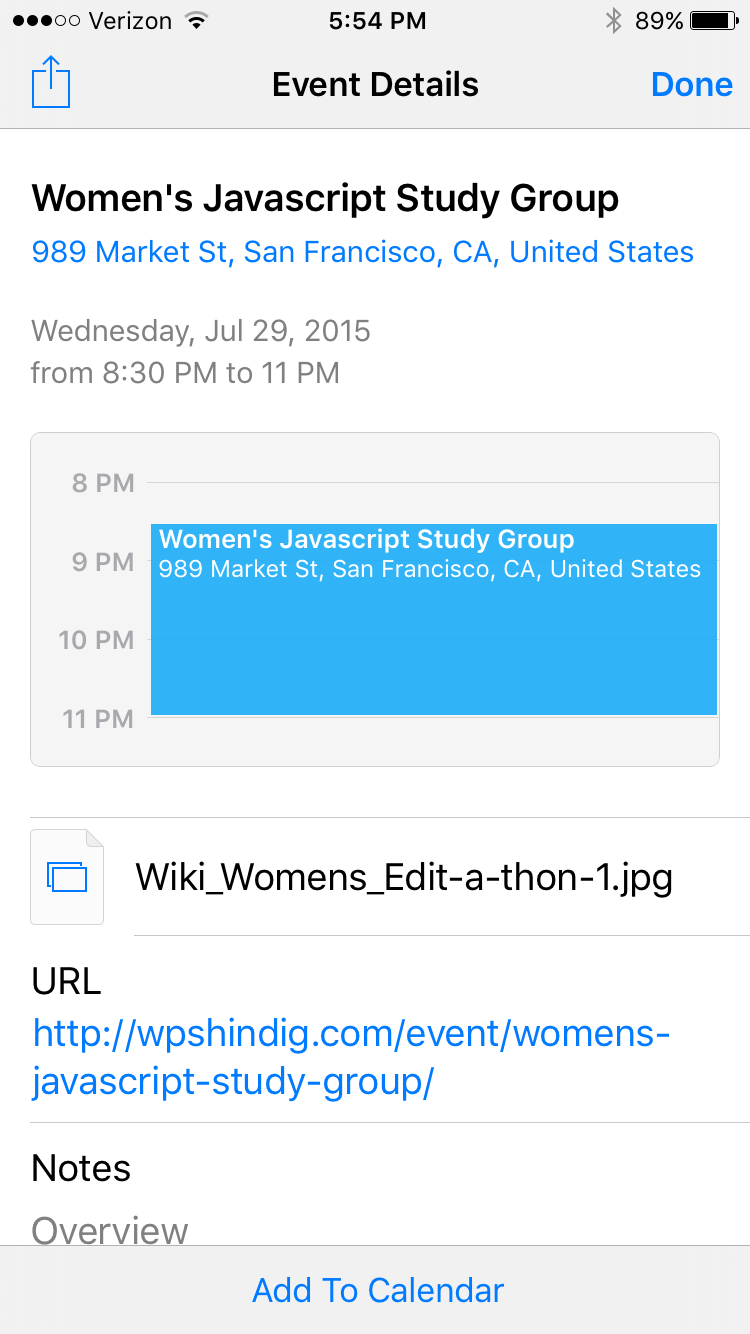
AlexDecember 1, 2015 at 3:59 pm #1033497MemberAlex, I tested http://wpshindig.com/event/womens-javascript-study-group/ and it works just how you’re wanting, I think.
Here are some screenshots:
1) http://wpshindig.com/event/womens-javascript-study-group/ view on iPhone 6 Safari

2) View of tapping “iCal Export” button

There was no file downloaded or app to select to open in.
Please test the link above on your iOS device.
February 18, 2016 at 8:32 am #1075874KeymasterThis topic has not been active for quite some time and will now be closed.
If you still need assistance please simply open a new topic (linking to this one if necessary)
and one of the team will be only too happy to help. -
AuthorPosts

- The topic ‘Adding directly to iCal’ is closed to new replies.