

Forum Replies Created
-
AuthorPosts
-
August 21, 2017 at 9:50 pm in reply to: How can we hide the display of Tickets Available & Public Attende list #1338400
Cliff
MemberHi, Anand.
Unfortunately, the image you tried to attach didn’t come through. However, I think I’ll still be able to answer your questions:
1)
You could hide the available tickets via CSS, such as:
body.single-tribe_events .tribe-tickets-remaining {
display: none;
}
Some users asked how to hide the remaining amount only until there are a small number remaining (to create a sense of urgency toward selling out per ticket). This code should accomplish that:
https://gist.github.com/cliffordp/94f37421a00db6f7a96368aa23a8d8bb
2)
At the wp-admin event edit screen, uncheck this box: https://cl.ly/0H0A2I2d1k2B
If you want it unchecked for all events, you could try this code snippet:
https://gist.github.com/cliffordp/6bed854b4f7fef231d15cc8625e5dab3
Please let me know how this goes for you.
MemberHi, Stephen.
Sure, this could be accomplished via a CSS media query. However, we do not provide CSS customizations, per our Scope of Support / Terms, because the CSS solution would be different for each user’s site, based on whichever theme and other plugins they may have active at any given time.
You can add custom CSS code via your child theme’s style.css file, via WordPress 4.7’s Customizer CSS settings, or via a third-party plugin (not guaranteed or supported by us), like:
- SiteOrigin CSS (helps you visually build CSS selectors via its Inspector and Visual Editor, if that’ll help you)
- Simple Custom CSS
- Jetpack (supports regular CSS and the LESS and Sass pre-processors)
If you’re not a CSS expert, Jetpack’s Custom Design reference may prove helpful.
If you are struggling to get some CSS to take effect, you’re welcome to share your custom CSS code and also a link to view it in action, and I might be able to help get you over the finish line.
Please let me know how it goes for you.
MemberHi, Joel. Thanks for your detailed request.
You can use /wp-json/tribe/events/v1/doc for self-documentation.
It looks like you’ll need to pass an array of category slugs or IDs to “categories”
Please give that a try and let me know how it goes for you.
MemberHi, Andaiye.
I looked through the code and didn’t see a way to implement this via a filter hook, although you could possibly overload the Tribe__Events__Community__Tickets__Gateway__Abstract PHP class: /wp-content/plugins/the-events-calendar-community-events-tickets/src/Tribe/Gateway/Abstract.php
And/Or you could also request this as a new feature (or maybe search to see if the idea was already posted by someone else) at our plugins’ UserVoice page.
This allows others who are interested in that feature to easily voice their support. We frequently review suggestions there to find out which ones are popular, then we implement as many of them as we can.
If you post it / find it, feel free to link to it from here in case anyone comes across this forum thread in the future.
MemberHi, Dave. Sorry you’re experiencing this.
I visited that link but didn’t see any images or question mark-type images there either: https://cl.ly/3M1m0e3n3F2E
Are you still experiencing this issue?
August 21, 2017 at 9:01 pm in reply to: Show event dates for product on that Woocommerce product's detail page #1338385MemberHi, Gary. Thanks for your detailed request.
I think you’d need to use both tribe_get_events() and maybe then using the tribe_event_inline shortcode to display each of the found events’ data.
You’d put that shortcode in your custom Product template and then run it through do_shortcode()
As far as the query to send to tribe_get_events(), you’d be in the “custom coding” realm there. If you have a code snippet you want to run past me, please share it.
If you need some coding help, you may want to ask your developer or reference our documentation and list of known customizers.
Please let me know how this goes for you.
MemberHi, Goutam. Thanks for your detailed question.
From your screenshot, it looks like you’re wanting our Filter Bar add-on.
Regarding updates, some users have had issues not seeing automatic updates available in their wp-admin area. I’d recommend Manually Updating your The Events Calendar plugin and your Events Calendar PRO plugin and, of course, we always recommend keeping up with WordPress core updates, too.
Once you verify you’re on the latest versions, please test to see if the issue is still happening for you.
MemberHi, Eric. I’m unclear if you’re asking one or two questions, but I think it’d help to clarify how the import categories work…
Notice that it says No Additional Categories…
The categories from the iCal / Gcal events get imported no matter what. The Event Category option for imports is to add additional categories of your choosing.
Please let me know if this clears this issue up for you.
MemberI had an idea… Please go to wp-admin > Events > Settings > Import tab…
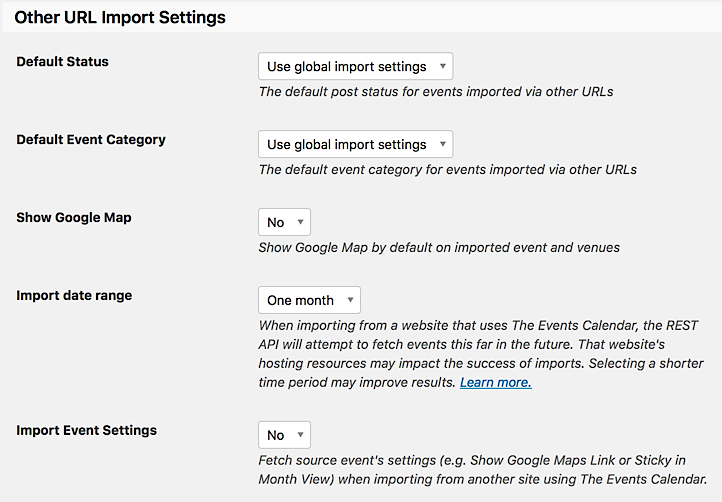
Do you have Import Date Range set to “One month”? I’d suggest changing it to “Three months” and trying your https://finearts.tcu.edu/events/category/department-of-graphic-design/ URL again. Hopefully you’ll see what you were expecting to see.
Please let me know how this goes for you.
MemberGlad to hear we’re back on track here.
I see at your https://theeventscalendar.com/license-keys/ page that you have the 1,000 import jobs per day license. Is this the volume of imports (not number of events to import) that you’re planning to need? If you are going to import from Site A to Site B once per day (even if there are 200 events in the import, ran hourly), you can downgrade to the lowest level of 100 import jobs per day.
To register your staging site, please remove the license key from that site’s settings (assuming it got copied into there), save, refresh the page, paste your license key back in, save, refresh the page, and if it is still in there like it should be, see if the site is now registered at https://theeventscalendar.com/license-keys/
===
Specific to importing categories, https://finearts.tcu.edu/events/category/department-of-graphic-design/ is the correct URL to enter. It displayed 3 upcoming events in List View when visiting it in the browser, but the import preview only showed me the first one: https://cl.ly/0f1Z472C3r1r
I wasn’t able to replicate this with our demo site’s link:
https://cl.ly/2l0g3F1e3C0G — so please follow the Testing for Conflicts Guide (steps provided previously) for both sites and try again.If it still won’t work, please share your System Information Report for both sites while they’re in Testing for Conflicts Mode.
MemberSounds good, Mike. Please do let us know how it goes. Thank you.
August 18, 2017 at 2:21 pm in reply to: Refreshing calendar view page for a specific month/category issue #1337577MemberUm, yeah, whoops. Sorry about that… I think the way I looked at it in our forum reply viewer threw me off, since it wrapped lines.
Anyway, visiting the calendar’s month view and clicking to the next month does work for me. However, directly visiting https://kehillah.org/calendars/schoolwide-calendar/?tribe_events_cat=schoolwide&tribe-bar-date=2017-09 in a new browser tab shows the no events found message.
However, I’m unable to replicate this behavior on our demo site: http://wpshindig.com/events/category/wp-meetups/?tribe_events_cat=wp-meetups&tribe-bar-date=2017-09
Therefore, since this isn’t currently a known issue, I’d suggest following these recommended troubleshooting steps for your own site:
There might be some new updates available. Could you please make sure all your Modern Tribe plugins (and WordPress core) are at their latest versions?
- Downloads / Version Numbers
- License Keys
- TEC Automatic Updates
- or TEC Manual Updates
- WordPress core updates
Once you verify you’re on the latest versions, please test to see if the issue is still happening for you.
If it is, please follow our Testing for Conflicts Guide (basically switch to Twenty Seventeen theme and deactivate all plugins and custom code other than Modern Tribe plugins) and see if that helps narrow down the cause of this.
Of course, we always recommend restorable database and file backups before modifying anything on your site.
If it doesn’t, please enable WP_DEBUG and WP_DEBUG_LOG (which will create a file on your server at /wp-content/debug.log if there are any WP_DEBUG messages) and share any debug messages you see while trying to replicate this issue and doing other things on your site relevant to this ticket (such as visiting your site’s home page, events page, single-event pages, and anything else you can think to do).
Then, please share your System Information (while in Testing for Conflicts Mode) in a Private Reply. That will give me a lot of extra information to help troubleshoot this.
You might also see if you can spot any console errors at your site. (If needed, you may reference our KB article Using Google Chrome Developer Tools.)
Let us know what you find out.
Thanks.
MemberHi, Elliot.
We likely cannot provide the full solution for you, per our Scope of Support / Terms. <span style=”font-size: 0.875rem;”>However, if you tell me which metabox(es) and/or share annotated screenshots, I may be able to point you in the right direction.</span>
Also, whether for now or in the future… if you need some coding help, you may want to ask your developer or reference our documentation and list of known customizers.
MemberHi. Sorry you’re experiencing this.
This isn’t currently a known issue so I’d suggest following these recommended troubleshooting steps for your own site:
There might be some new updates available. Could you please make sure all your Modern Tribe plugins (and WordPress core) are at their latest versions?
- Downloads / Version Numbers
- License Keys
- TEC Automatic Updates
- or TEC Manual Updates
- WordPress core updates
Once you verify you’re on the latest versions, please test to see if the issue is still happening for you.
If it is, please follow our Testing for Conflicts Guide (basically switch to Twenty Seventeen theme and deactivate all plugins and custom code other than Modern Tribe plugins) and see if that helps narrow down the cause of this.
Of course, we always recommend restorable database and file backups before modifying anything on your site.
If it doesn’t, please enable WP_DEBUG and WP_DEBUG_LOG (which will create a file on your server at /wp-content/debug.log if there are any WP_DEBUG messages) and share any debug messages you see while trying to replicate this issue and doing other things on your site relevant to this ticket (such as visiting your site’s home page, events page, single-event pages, and anything else you can think to do).
Then, please share your System Information (while in Testing for Conflicts Mode) in a Private Reply. That will give me a lot of extra information to help troubleshoot this.
You might also see if you can spot any console errors at your site. (If needed, you may reference our KB article Using Google Chrome Developer Tools.)
Let us know what you find out.
Thanks.
August 18, 2017 at 2:11 pm in reply to: Why isn't media queries working on ccs document on child theme? #1337573MemberHi, Jesus.
We generally don’t help with CSS, but I can take a quick look for you.
Could you please provide a link to a page where you’d expect this CSS to be taking effect? Each site is different so I won’t be able to assist here without it.
-
AuthorPosts