
Home › Forums › Calendar Products › Events Calendar PRO › Aggregator Add-on
- This topic has 15 replies, 2 voices, and was last updated 9 years, 1 month ago by
Terrie Harbour.
-
AuthorPosts
-
August 14, 2017 at 9:37 am #1335018
Terrie Harbour
ParticipantHello,
We recently purchased the multisite license and aggregator add-on for our http://tcufinearts.wpengine.com/ website. We want to be able to automatically sync the events that are in the main Fine Arts website and trickle down into each unit with the aggregator add-on. For example, the http://tcufinearts.wpengine.com/graphic-design/ website should only have the Graphic Design events imported into their website install.
We are having a hard time figuring out what URL to use with the aggregator add-on. Can you please advice?
Thanks in advance,
WordPress team at TCUAugust 14, 2017 at 7:19 pm #1335278Cliff
MemberHi, WordPress Team.
If you have main.domain.com as the main site in the network and then design.domain.com as a subsite, and marketing.domain.com as a different subsite… then you would:
- add your Event Aggregator license key to main.domain.com
- then go to wp-admin > Events > Import > Other URL > design.domain.com/events/
- then do it again for marketing.domain.com
Please let me know if you have any follow-up questions on this topic.
August 15, 2017 at 7:05 am #1335426ParticipantHello,
We are not having trouble adding the aggregator plugin. We are having trouble figuring out what URL to use so we can import calendar events from the main site into a subsite. Can you please answer that question?
Thanks in advance,
MayraAugust 15, 2017 at 7:10 am #1335431ParticipantI forgot to mention that we are using the subdirectory structure and we have tried the URL tcufinearts.wpengine.com/events and that did not work
August 15, 2017 at 8:13 am #1335468ParticipantAlso,
This is the error I get when I try your approach
August 15, 2017 at 10:24 am #1335608MemberSorry my reply wasn’t clear to you.
(Please note that attachments do not come through via email replies.)
I understand you want to import into tcufinearts.wpengine.com/events (subsite). What is the main site you want to import from?
Also note that both sites need to be running the latest (or near-latest) version of The Events Calendar.
August 17, 2017 at 9:42 am #1336923ParticipantThis reply is private.
August 17, 2017 at 10:10 am #1336949ParticipantCliff,
I accidentally clicked on the “Correct Answer” button because it just shows up out of nowhere. Sorry about that! There’s no un-do button though. So please disregard that.
-Mayra
August 17, 2017 at 8:04 pm #1337173MemberNo worries. I set unmarked it as correct, and I set it to a Private Reply (which cannot be done via email replies) because of the screenshots.
I tried importing from http://wpshindig.com/events/category/wp-meetups/ and Event Aggregator’s preview of the events displayed as expected.
Additionally, your screenshot looked quite odd, with duplicating input boxes on that wp-admin screen and other things. Here’s how mine looks: https://cl.ly/2H1Z1J0M1x1F
===
On both the site you’re importing from and the site you’re importing to… I’d suggest following these recommended troubleshooting steps:
There might be some new updates available. Could you please make sure all your Modern Tribe plugins (and WordPress core) are at their latest versions?
- Downloads / Version Numbers
- License Keys
- TEC Automatic Updates
- or TEC Manual Updates
- WordPress core updates
Once you verify you’re on the latest versions, please test to see if the issue is still happening for you.
If it is, please follow our Testing for Conflicts Guide (basically switch to Twenty Seventeen theme and deactivate all plugins and custom code other than Modern Tribe plugins) and see if that helps narrow down the cause of this.
Of course, we always recommend restorable database and file backups before modifying anything on your site.
If it doesn’t, please enable WP_DEBUG and WP_DEBUG_LOG (which will create a file on your server at /wp-content/debug.log if there are any WP_DEBUG messages) and share any debug messages you see while trying to replicate this issue and doing other things on your site relevant to this ticket (such as visiting your site’s home page, events page, single-event pages, and anything else you can think to do).
Then, please share your System Information (while in Testing for Conflicts Mode) in a Private Reply. That will give me a lot of extra information to help troubleshoot this.
You might also see if you can spot any console errors at your site. (If needed, you may reference our KB article Using Google Chrome Developer Tools.)
Let us know what you find out.
Thanks.
August 21, 2017 at 9:18 am #1338150ParticipantHi Cliff,
Updating the plugin really did the trick. I was able to successfully import events from https://finearts.tcu.edu/events/ link but I need to only import the events by category. For example, I only want to import from this https://finearts.tcu.edu/events/category/department-of-graphic-design/
I’ve tried adding the “department-of-graphic-design” as they keyword and I’ve tried the URL https://finearts.tcu.edu/events/category/department-of-graphic-design/ with no success.
P.S. I want to note that we usually create a staging environment for testing. This redirects us to a different URL. We get an error that the license does not apply to this URL. The aggregator plugin does not work in our staging site. Could we get around this somehow?
Thanks for your help and patience!
MayraAugust 21, 2017 at 4:26 pm #1338337MemberGlad to hear we’re back on track here.
I see at your https://theeventscalendar.com/license-keys/ page that you have the 1,000 import jobs per day license. Is this the volume of imports (not number of events to import) that you’re planning to need? If you are going to import from Site A to Site B once per day (even if there are 200 events in the import, ran hourly), you can downgrade to the lowest level of 100 import jobs per day.
To register your staging site, please remove the license key from that site’s settings (assuming it got copied into there), save, refresh the page, paste your license key back in, save, refresh the page, and if it is still in there like it should be, see if the site is now registered at https://theeventscalendar.com/license-keys/
===
Specific to importing categories, https://finearts.tcu.edu/events/category/department-of-graphic-design/ is the correct URL to enter. It displayed 3 upcoming events in List View when visiting it in the browser, but the import preview only showed me the first one: https://cl.ly/0f1Z472C3r1r
I wasn’t able to replicate this with our demo site’s link:
https://cl.ly/2l0g3F1e3C0G — so please follow the Testing for Conflicts Guide (steps provided previously) for both sites and try again.If it still won’t work, please share your System Information Report for both sites while they’re in Testing for Conflicts Mode.
August 21, 2017 at 8:30 pm #1338379MemberI had an idea… Please go to wp-admin > Events > Settings > Import tab…
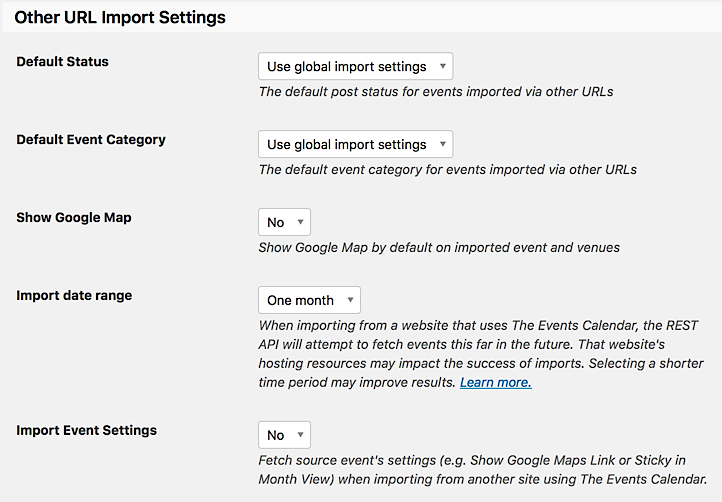
Do you have Import Date Range set to “One month”? I’d suggest changing it to “Three months” and trying your https://finearts.tcu.edu/events/category/department-of-graphic-design/ URL again. Hopefully you’ll see what you were expecting to see.
Please let me know how this goes for you.
August 22, 2017 at 9:04 am #1338548ParticipantHi Cliff,
Your suggestion worked perfectly for Graphic Design until I started importing into the rest of the Fine Art units. For example, the Department of Theatre only imported two events both of them were far into the year. It imported the “Fiddler on the Roof” and the “Love, Loss, and What I Wore” events.
Fine Arts events: https://finearts.tcu.edu/events/category/department-of-theatre/
Department of Theatre: https://finearts.tcu.edu/theatre/events/As for the license issue, I think we should downgrade then. It sounds like we over bought. Thanks for bringing this to our attention!
Thanks,
MayraAugust 22, 2017 at 8:43 pm #1338881MemberIn that case, please complete our Refund Request Form and link back to this thread for reference. Also specify which Event Aggregator license you’d like to have when submitting the refund form.
When I previewed importing from https://finearts.tcu.edu/events/category/department-of-theatre/, I see this: https://cl.ly/060A3N273518
Although that first https://finearts.tcu.edu/event/the-playwrights-stage/ event isn’t there, the rest are.
If you change the “Refine” date to be further in the past than just today, maybe it’ll then show up. Please try it and let me know what you experience.
September 13, 2017 at 9:36 am #1348695Support Droid
KeymasterHey there! This thread has been pretty quiet for the last three weeks, so we’re going to go ahead and close it to avoid confusion with other topics. If you’re still looking for help with this, please do open a new thread, reference this one and we’d be more than happy to continue the conversation over there.
Thanks so much!
The Events Calendar Support Team -
AuthorPosts
- The topic ‘Aggregator Add-on’ is closed to new replies.