

Forum Replies Created
-
AuthorPosts
-
Cliff
MemberHi, Lawrence. Sorry you’re experiencing this.
I logged a bug with our developers, but I’m unsure when it might get attention.
I marked this thread as Pending Fix, which means it should receive a reply once the applicable fix has been released. I cannot guarantee when it will be fixed as it’s in the development team’s hands now. They need to assign it, code it, test it, and schedule it for release.
I apologize for this issue and appreciate your understanding and patience.
In case it might be helpful, I’d suggest following these recommended troubleshooting steps for your own site:
There might be some new updates available. Could you please make sure all your Modern Tribe plugins (and WordPress core) are at their latest versions?
- Downloads / Version Numbers
- License Keys
- TEC Automatic Updates
- or TEC Manual Updates
- WordPress core updates
Once you verify you’re on the latest versions, please test to see if the issue is still happening for you.
If it is, please follow our Testing for Conflicts Guide (basically switch to Twenty Seventeen theme and deactivate all plugins and custom code other than Modern Tribe plugins) and see if that helps narrow down the cause of this.
Of course, we always recommend restorable database and file backups before modifying anything on your site.
If it doesn’t, please enable WP_DEBUG and WP_DEBUG_LOG (which will create a file on your server at /wp-content/debug.log if there are any WP_DEBUG messages) and share any debug messages you see while trying to replicate this issue and doing other things on your site relevant to this ticket (such as visiting your site’s home page, events page, single-event pages, and anything else you can think to do).
Then, please share your System Information (while in Testing for Conflicts Mode) in a Private Reply. That will give me a lot of extra information to help troubleshoot this.
You might also see if you can spot any console errors at your site. (If needed, you may reference our KB article Using Google Chrome Developer Tools.)
Let us know what you find out.
Thanks.
MemberHi, Ryan. These resources may be helpful:
- http://tangerinemoons.com/using-wordpress-w3-total-cache-modern-tribes-event-calendar/
- https://theeventscalendar.com/knowledgebase/caching-basics/
- https://theeventscalendar.com/knowledgebase/problems-with-minification/
Please let me know if you have any follow-up questions on this topic.
MemberHi, Ms. Johnson. Thanks for your interest in our plugin suite.
Community Events (CE) is what you’re looking for. Events Calendar PRO is not needed in addition but does add some features to CE if active.
I believe you’re requesting the same thing as one of our existing feature requests:
- https://tribe.uservoice.com/forums/195723-feature-ideas/suggestions/3762678-charge-for-event-submission-and-premium-featured-e
- https://tribe.uservoice.com/forums/195723-feature-ideas/suggestions/12882729-limit-users-to-upload-a-specific-amount-of-events
Please do add your vote(s).
This allows us to gauge interest in this particular feature request, which helps us prioritize our development efforts.
Last but not least, we have a pretty great Refund Policy so you can buy one or many of our add-ons and thoroughly test them.
I hope this info helps. Let me know if you have any follow-up questions.
MemberI’m glad updating the plugins manually worked for you.
Automatic updates only work when install in a non-multisite environment… unless you have the Multisite-level license. I’ve added this thread to an internal ticket regarding this issue, which is being discussed internally.
For now and the foreseeable future, you’ll need to go the route of manual updates.
October 11, 2017 at 1:46 pm in reply to: Would like to change the way events are displayed on hover #1362243MemberGotcha. The “arbitration” part of the domain was spelled incorrectly before. Sorry I didn’t notice that before.
Regarding hovering on events at that URL, are you saying you want to add the event’s Featured Image in the hover? Or are you wanting something different or in addition to that?
Again, a screenshot and/or video would help.
October 11, 2017 at 1:40 pm in reply to: Single Woocommerce ticket "product" for event with multiple ticket types #1362242MemberYou’re welcome 🙂
Do let me know how this goes for you whenever you get to it again.
Please note that threads get Closed automatically after a couple weeks of inactivity. If it does get Closed, please open a new thread, adding your current problem description and also linking back to this thread.
Thank you!
October 11, 2017 at 10:55 am in reply to: Single Woocommerce ticket "product" for event with multiple ticket types #1362185MemberGreat explanation.
I was thinking you could do something via code like this: get just one of the WooTickets per single event and change only that one’s visibility in the Shop.
Now, knowing that the ticket names (i.e. Product’s post titles) are significantly different, you could also filter the name to be something programmatic, like “Tickets for {Event_Name}”
This idea intrigued me so I wanted to provide you a working code snippet along these lines. It turned out to be more of a doozie than I expected, but I think this is a pretty robust snippet that should keep you from having to do anything manually per event other than create tickets:
https://gist.github.com/cliffordp/c012f2945a22867a3af2c2878e06fffd
Please let me know how this goes for you.
MemberGreat to hear, Jeff.
Thanks for letting us know.
October 10, 2017 at 3:38 pm in reply to: Single Woocommerce ticket "product" for event with multiple ticket types #1361818MemberI think I fully understood; sorry if my reply wasn’t clear.
I think this is possible via a code snippet instead of needing to do something manual, like you’ve proposed.
Could you please share the code you have in place to change tickets’ visibility by default?
MemberI see.
This is because your theme does have styling for such fields.
If you need a theme, you’re welcome to try out WPShindig’s theme: http://wpshindig.com/download-mt-demo-theme/
Otherwise, you’ll need to add the styling yourself or ask your theme author for support on this topic.
MemberCharles, I had someone with Windows 10 and Outlook 2016 (at least this version: https://cl.ly/3r391C1w0Z2l) try it out and it imported all day events accurately.
However, there is a known issue about error messages like
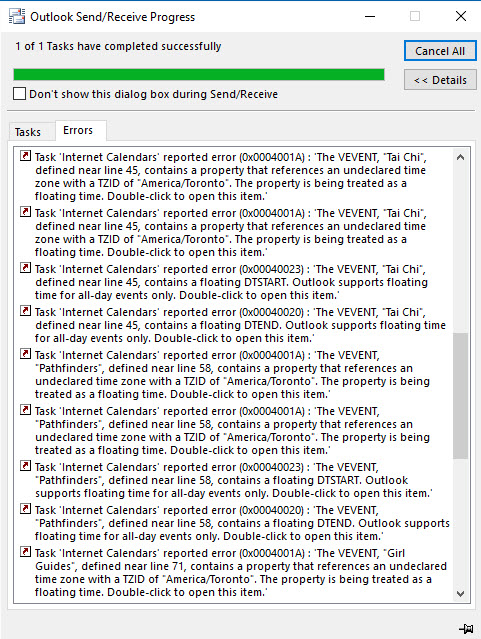
I’ll file this thread along with that internal bug report. This thread should receive a reply once the applicable fix has been released. I cannot guarantee when it will be fixed as it’s in the development team’s hands now. They need to assign it, code it, test it, and schedule it for release… All that being said, there could be errors within Outlook (doing non-standard things), which we’ve seen on occasion.
I apologize for this issue and appreciate your understanding and patience.
MemberHi, Gurdeep.
I believe you’re requesting the same thing as one of our existing feature requests: https://tribe.uservoice.com/forums/195723-feature-ideas/suggestions/9788196-shared-media-library-for-community-events-submissi
Please do add your vote there.
This allows us to gauge interest in this particular feature request, which helps us prioritize our development efforts.
Thank you.
MemberHi. I visited your link, but I didn’t see the “Next” link, only the “Previous” link. Is this what you’re experiencing as well?
There might be some new updates available. Could you please make sure all your Modern Tribe plugins (and WordPress core) are at their latest versions?
- Downloads / Version Numbers
- License Keys
- TEC Automatic Updates
- or TEC Manual Updates
- WordPress core updates
Once you verify you’re on the latest versions, please test to see if the issue is still happening for you.
MemberHi, Lisa.
The free The Events Calendar and our paid add-ons currently do require WordPress. However, we’ll be releasing a version that does not require having your own WordPress site.
e have a pretty great Refund Policy so you can buy one or many of our add-ons (all of which require WordPress) and thoroughly test them.
I hope this info helps. Let me know if you have any follow-up questions.
MemberHi, Kent.
We definitely invested in accessibility, but we don’t claim any specific level. Basically, it’s better than it was.
You might want to run an accessibility checker like http://wave.webaim.org/ or alternatives for our demo site–wpshindig.com–and see if things are up to your requirements.
Last but not least, we have a pretty great Refund Policy so you can buy one or many of our add-ons and thoroughly test them.
I hope this info helps. Let me know if you have any follow-up questions.
-
AuthorPosts