Forum Replies Created
-
AuthorPosts
-
Brook
ParticipantHowdy Frank,
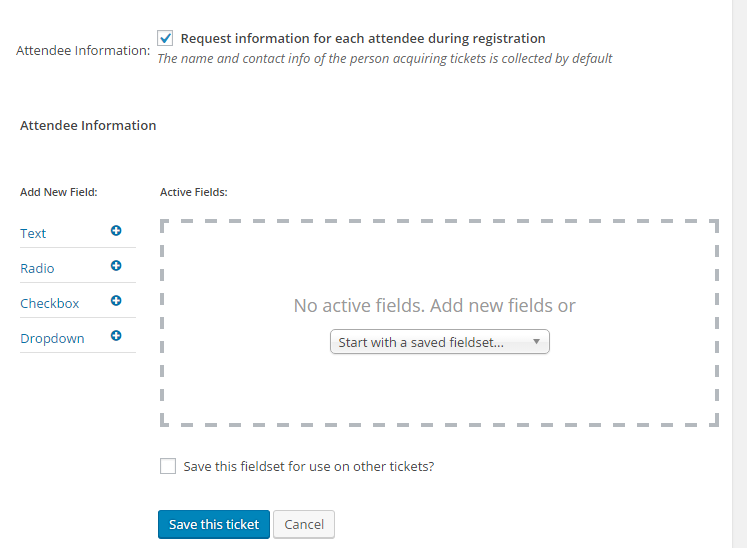
I am stoked you are interested in this new feature. Basically there are four field types allowed: Text, Radio, Dropdown, and checkbox.

This is certainly a new feature for us. In the interest of giving you some background info we have started by releasing these fields so you can easily collect data with tickets. We’re still working on good ways to make this data useful for folks, such as bulk exports, attachign it to printed checking lists, etc. At the moment there is no easy way to export all of the data you collect in bulk, rather it is mostly only usable on an individual basis (not bulk).
We do not have demos setup for the backend areas. However, we do have a 30 day refund policy, and you can take advantage of it for any reason including that the plugin is not what you needed/expected. Would that maybe suit your needs?
Cheers!
– Brook
ParticipantHowdy ,
I am sorry your stock is disappearing. This probably the result of a bug we just discovered in the very latest version of our plugin. 🙁 Here are the details of that bug:
1) Edit a previously created event with multiple WooCommerce tickets assigned that had no sales (full stock)
2) Check "Hide attendees list on event page" and update the Event
3) The stock of tickets that had no sales prior to the update are changed to zero
In brief, checking “Hide attendees list on event page” will clear out the stock of existing tickets! This is certainly a big deal and one we are patching in our very next release, which if everything goes according to plan will be released sometime next week.
In the mean time your temporary solution and avoiding checking that box should prevent this form happening to more events. If you want, I could even walk you through how to hide that list for all events regardless of whether or not the box is checked.
Does that all make sense? Does that sound like the issue? Please let me know.
Cheers!
– Brook
April 20, 2016 at 3:25 pm in reply to: Community Events not working – "Are you sure you want to do this?" #1105101ParticipantHowdy Andrew,
I am sorry this has been affecting you so long. I am glad you reached out. On rare occassion we have seen folks with this issue, and there have been a couple of simple fixes that have worked for everyone so far:
- Temporarily try disabling W3 Total Cache
- Try flushing your permalinks. The first subheading in this guide walks you through this short procedure: Troubleshooting 404 Page Not Found error
After doing both of those things try doing a test submission. Do you still get the error? If so, you might try reenabling W3TC. A few people have been able to reenable it without issue.
Does the above help get the form working, at least temporarily?
Cheers!
– Brook
ParticipantHowdy Rafe,
Good question. The deprecated functions will be logged as E_NOTICES. However, WordPress might be setup to suppress the logging of those errors. Before you can see those error you will need to set WP_DEBUG to true. However as noted in that article you might not want these errors to be publicly visible on your site, unless it is a testing or staging site. So you might want to set “WP_DEBUG_LOG” to true and set “WP_DEBUG_DISPLAY” to false after enabling WP_DEBUG itself.
Once you have logging setup navigating around the calendar will start generating those errors. If you visit a page or do an action that involves a deprecated function, the function name and its replacement should be in your logs.
Does that sound like a plan?
Cheers!
– Brook
ParticipantHowdy David,
If you don’t mind opening a new topic each time you have a new question (unrelated to the initial one) that would be super helpful. Not only does it help keep our forums organized, but by evenly dividing questions into separate topics we have found it results in much faster responses on average due to evening the load on our team.
I would still be happy to answer your questions since you’ve already asked it, I don’t want you to wait any longer than necessary. But I’m not 100$ sure I understand. By print do you mean printing out a copy of the first/last event using a printer and paper? Or are you wondering if you can show only the first/last event on certain views? If so which views? You can clarify the above here if that’s more convenient or in a new topic.
Cheers!
– Brook
ParticipantI am sorry that was such a pain, but glad it was few enough events you could manually reimport them. I just issues a refund for the iCal importer, you should see the funds back in your account as soon as your financial institution processes them, which usually takes a few days.
Please let me know if you need anything else. Cheers!
– Brook
ParticipantThanks for your understanding Natasha! I am happy that solution works for now.
I just brought this up today on our scrum. I asked the team if they thought we we should add an address line 2 to our plugin or simply throw a space between the two. Most everyone felt we should throw in the second address line. So that’s good news! Thank you very much for bringing this to our attention. You’d be surprised at how rare it is to use multilines, this was the first instance we had hit.
Cheers!
– Brook
ParticipantYou’re welcome Bill! Please let us know if you ever need anything else.
Cheers!
– Brook
April 19, 2016 at 11:52 pm in reply to: Posting a multi-day event with specific times each day without using recurring #1104710ParticipantHowdy again Ben,
But this would only be useful for me if I could use Recurring Events to schedule one event that takes place at the same time on consecutive days. For example, Event #1, Monday-Friday, 1-5pm; or on consecutive days with different times, such as Mon-Thurs 1-5, Friday 8-4.
Recurring events can definitely do that. If you event conform to a pattern, like M-F at the same time then you can easily setup a pattern. If they do not have as much of a pattern, like Friday is on a different time, then you can add an individual recurrence on a time/date of your choosing.
Also, assuming that the above examples can be created as single events, can I then sell tickets through Events Tickets Plus to these events?
The only caveat to the above is that it will be treated as a single event when it comes to tickets. This means it is ideally suited forthings like courses, where you purchase one pass/ticket that gives you access to all days. However if you were hoping to have individual tickets for each day, where if a user wanted to attend 3 different days they would need to purchase 3 different tickets, then Recurring Events are not yet suited for your needs. We’re working on that ability, but it’s not yet ready.
Does that all make sense? Will that work for you? Please let me know.
Cheers!
– Brook
April 19, 2016 at 11:43 pm in reply to: My tickets page – Show users a list of events they purchased / RSVP #1104709ParticipantExcellent! Let me walk you through that then.
You could make this a separate plugin, or even a function within your theme. It’s really up to you, whatever suits your needs best.
For RSVPs each one is stored as a Custom Post Type in the wp_posts table. The post type is tribe_rsvp_attendees. To get a list of all events a user has RSVP’d for query every thing with that post type where the post_meta ‘_tribe_rsvp_email’ is their email. That query should get you everything needed to list their RSVPs. Deleting/cancelling an RSVP should be as simple as deleting that post with wp_delete_post() .
For tickets the purchase history page Woo provides might already be what you’re looking for. It shows a list of all purchases and gives you options to return eligible items.
Does that all make sense? Will that work for you? Please let me know.
Cheers!
– Brook
ParticipantHowdy David,
I think that event might have gotten a bit corrupted when trying to create recurrences before (while the settings still contained the big numbers). If I were you I would try creating a new event with the same details. Does that one work as expected?
- Brook
ParticipantThis is so strange. In order for this to be happening something would have to be interrupting our script after the order is completed but before the order confirmation email is sent out. That is a very narrow window to interfere.
We should test for conflicts in light of having tried most everything else. Basically what we want to do is deactivate all plugins except The Events Calendar and Event Tickets (Plus) and switch to the default Twenty Sixteen theme. Then try “purchasing” a free ticket. Did you get any email regarding this? I could definitely see a couple of your plugins that might be causing the issue, but the theme is also suspect as a malfunctioning override could be causing part of this.
If the above does not work, would you be willing to upload a copy of your database for us to try running some tests on?
Cheers!
– Brook
ParticipantWell that is certainly odd, but we’ve narrowed it down further.
Let’s clarify one thing. When a customer purchases a ticket they should get three emails by default:
- Woo Order Confirmation – The subject will be something like: “Your EventsCalendar.local order receipt from [todays date]”
- Woo Order Completed – Subject: “Your Example.com order from [todays date] is complete”
- Tickets Email – Subject: “Your tickets from Example.com”
My questions for you:
- Are your customers not receiving any of the above emails?
- Have you knowingly disabled either of the first two emails in Woo’s settings?
- Have you setup the calendar to automatically mark orders as completed? If you wouldn’t mind actually just sharing your entire system information it will answer this last question and possibly some future ones. You can find the system info by going to WP Admin > Events > Settings, clicking on the “Help” tab, and scrolling down to the ‘System Information’ box. (Or by going to [yoursite]/wp-admin/edit.php?post_type=tribe_events&page=tribe-events-calendar&tab=help) If you could copy/paste it here. Make sure to use the ‘Set as private reply’ checkbox to protect your private information from the public.
Thanks Lee!
- Brook
ParticipantHowdy Bill!
The easiest way would probably be to use the iCal Importer. You could post shared events to a Google Calendar feed. Or you could even have a dedicated site for posting shared events, and then have the other calendars import its iCal feed.
I want to be up front with you about our iCal Importer. The current version is actually suffering from a few bugs, mostly causing duplicate events. We are working hard on this right now and should most all of these problems resolved within 2 weeks. I just wanted to mention this because it is pretty unusual for such prominent bugs to be in the wild, and so it’s probably not something you would expect given your past experience with us. But rest assured we’re fixing it ASAP.
Does that sound like a good option?
- Brook
ParticipantHowdy Natasha,
I would love to help you figure this out. The truth is we basically just don’t support Address 2 boxes beyond concatenating them to the first address. We should definitely throw a space between them, and i can see a similar problem as you that there is no space. But, we do not have a separate field for Address 2 nor is any other part of our plugin setup to handle one. If you would like a separate field it would need to be a feature request: UserVoice (feature suggestion page for The Events Calendar)
As far as immediate solutions go, could you add a space after Level 1 ? Or perhaps put the full address on one line, and use any separator your prefer to separate the two parts?
Cheers!
– Brook
-
AuthorPosts