
Home › Forums › Ticket Products › Event Tickets Plus › No Ticket Purchase Confirmation Received
- This topic has 18 replies, 3 voices, and was last updated 10 years, 5 months ago by
Support Droid.
-
AuthorPosts
-
April 6, 2016 at 6:34 pm #1099318
LY
ParticipantURGENT
I am trying to test the purchase of a ticket an event after having upgraded to Events Ticket Plus and successfully created events.
The purchase has gone through successfully as I have received PayPal confirmation but the customer is not receiving any emails regarding their purchase.Please help.
April 7, 2016 at 12:39 am #1099408Brook
ParticipantHowdy Ly,
Thanks for elaborating so thoroughly on this. It makes me wonder if your WP site is able to send emails at all. Sometimes it has difficulty doing this because it’s not yet configured for your server. Could you try downloading and using this plugin? It will help you send a test email via WP. Did you receive it?
Cheers!
– Brook
April 7, 2016 at 5:57 pm #1099896ParticipantHi Brook
Wordpress seems to be sending emails ok as I am getting notifications from our contact us form.
I have also downloaded the plugin you’ve suggested and registered with the plugin maker as I had been instructed to do, but nothing happened ie nothing appeared on the main WordPress menu.April 10, 2016 at 4:09 pm #1100638ParticipantHello
Are you able to help?
I hope to hear from you.
regards
LeeApril 11, 2016 at 11:22 pm #1101195ParticipantHowdy Lee,
I am sorry for the delay. I was away this weekend and not available to continue the topic. But I am here now and will be until Friday.
That’s interesting your contact form is sending. It might not actually be using WP to send though. Since that plugin was giving you issues lets try a simpler test that involves no plugins, just a little bit of leg work:
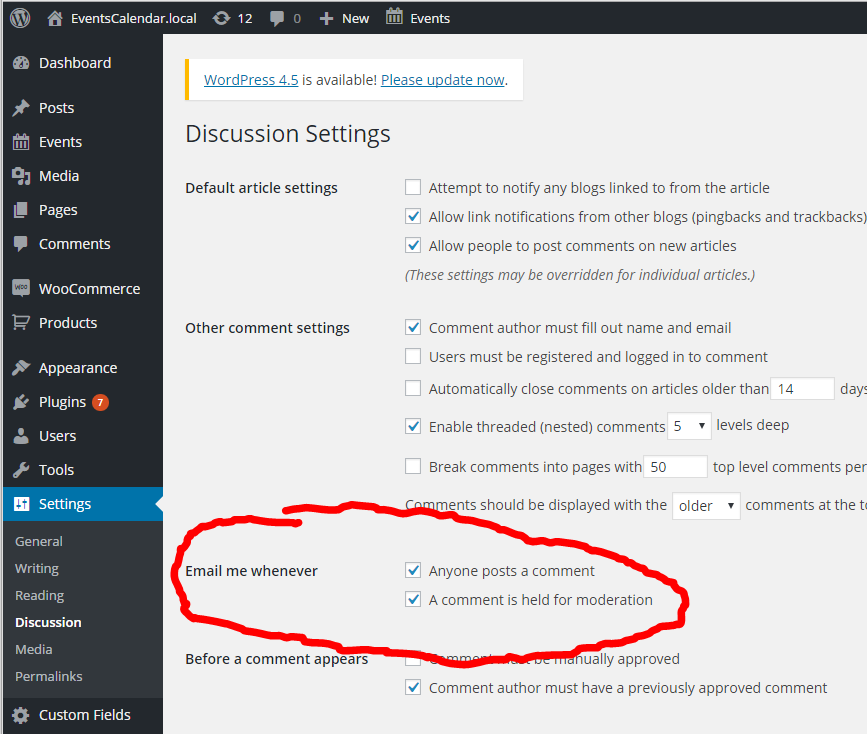
- Go to WP-Admin > Settings > Discussion and check the box “Email me whenever… Anyone posts a comment”
- Now logged into your site as a subscriber try posting a comment. Do you get an email?
Cheers!
– Brook
April 12, 2016 at 8:12 pm #1101723ParticipantHello again
I am following your instruction, but I do not see the checkbox option for “Email me whenever anyone posts a comment” in WP-ADMIN>SETTINGS>DISCUSSIONS
regards
LeeApril 12, 2016 at 8:24 pm #1101726ParticipantOops, sorry Brook I see it now and it was already selected (checked).
I have also tested adding a comment as a logged in subscriber.As admin I AM getting the email notification.
What’s next?
🙂
LeeApril 12, 2016 at 8:29 pm #1101730ParticipantHmm, that is certainly strange. Just to be sure, when you go to that page is this area just missing? Can you take a screenshot of what you’re seeing?

I wonder if perhaps your host has disabled sending email? It could explain the missing section. Would you mind also sharing you system information and letting me know who your webhost is?
Make sure to use the ‘Set as private reply’ checkbox to protect your private information from the public. You can find the system info by going to WP Admin > Events > Settings, clicking on the “Help” tab, and scrolling down to the ‘System Information’ box. (Or by going to [yoursite]/wp-admin/edit.php?post_type=tribe_events&page=tribe-events-calendar&tab=help) That will give me a lot of extra information to help diagnose the problem.
- Brook
April 17, 2016 at 2:23 am #1103546ParticipantHello Brook
The two checkboxes under ’email me whenever’ were already checked.
I hope below is what you are looking for:
http://www.smartstartready.com
SITE URL
http://www.smartstartready.com
INSTALL KEYS
event-tickets-plus = [redacted]
WORDPRESS VERSION
4.4.2
PHP VERSION
5.4.45
PLUGINS
BackWPup version 3.3 by Inpsyde GmbH(http://inpsyde.com)
bbPress version 2.5.8 by The bbPress Community(http://bbpress.org)
Breadcrumb NavXT version 5.3.1 by John Havlik(http://mtekk.us/)
Custom Sidebars version 2.1.0.2 by WPMU DEV(http://premium.wpmudev.org/)
Elegant Themes Updater version 1.0 by Elegant Themes(http://elegantthemes.com)
Event Tickets Plus version 4.1.1 by Modern Tribe, Inc.(http://m.tri.be/28)
Event Tickets version 4.1.1 by Modern Tribe, Inc.(http://m.tri.be/28)April 18, 2016 at 6:27 pm #1104009ParticipantHi Brook
I am wondering if I could connect with you via skype.
I NOW ALSO have another issue which is not being able to see the names of people who have registered to attend an event under EVENTS > ATTENDEESPlease let me know. Kind regards
April 18, 2016 at 6:32 pm #1104011ParticipantPlease get back to me soon it is becoming urgent now. :-{
April 18, 2016 at 9:05 pm #1104064ParticipantOh shucks I missed your followup comment form before in which you managed to find those settings. My bad!
Thank you for testing that out. I am sorry this is taking so long – email issues are notoriously difficult to troubleshoot.
Let’s see if any WooCommerce purchase confirmations get sent. Could you try purchasing a non ticket product from WooCommerce? If you get the email make a note of which payment gateway you do this test purchase with and then retry purchasing a ticket with the same gateway. For instance if you used “Pay by check” do you get a notification when trying to but a ticket with a check?
We’re narrowing it down bit-by-bit here. Hopefully will zero in shortly. Please let me know if you have any questions along the way.
Cheers!
– Brook
April 19, 2016 at 12:04 am #1104100Participantok. I have tested a non ticket woocommerce product and a ticketed product using paypal. On both occussions I get the following email notifications:
– 1- new customer order notification
– 2- email from paypal to buyer notifying their payment
– 3- email to supplier notifying them of new payment received from customerI look forward to hearing back from you
leeApril 19, 2016 at 10:31 am #1104422ParticipantWell that is certainly odd, but we’ve narrowed it down further.
Let’s clarify one thing. When a customer purchases a ticket they should get three emails by default:
- Woo Order Confirmation – The subject will be something like: “Your EventsCalendar.local order receipt from [todays date]”
- Woo Order Completed – Subject: “Your Example.com order from [todays date] is complete”
- Tickets Email – Subject: “Your tickets from Example.com”
My questions for you:
- Are your customers not receiving any of the above emails?
- Have you knowingly disabled either of the first two emails in Woo’s settings?
- Have you setup the calendar to automatically mark orders as completed? If you wouldn’t mind actually just sharing your entire system information it will answer this last question and possibly some future ones. You can find the system info by going to WP Admin > Events > Settings, clicking on the “Help” tab, and scrolling down to the ‘System Information’ box. (Or by going to [yoursite]/wp-admin/edit.php?post_type=tribe_events&page=tribe-events-calendar&tab=help) If you could copy/paste it here. Make sure to use the ‘Set as private reply’ checkbox to protect your private information from the public.
Thanks Lee!
- Brook
April 19, 2016 at 3:21 pm #1104560ParticipantThis reply is private.
-
AuthorPosts
- The topic ‘No Ticket Purchase Confirmation Received’ is closed to new replies.