Attendee meta demo

Home Forums Welcome! Pre-Sales Questions Attendee meta demo

Viewing 3 posts - 1 through 3 (of 3 total)
  • Author
    Posts
  • #1104828
    Frank
    Guest

    Hi,

    This new feature is a leap forward, but I don’t see any screenshot or demo… Is ther a way to know more : what kind of fields are available? How does it shows back-end, front-end? Is there a way to test this feature to see if it’s right for us?

    Thanks

    #1105111
    Brook
    Participant

    Howdy Frank,

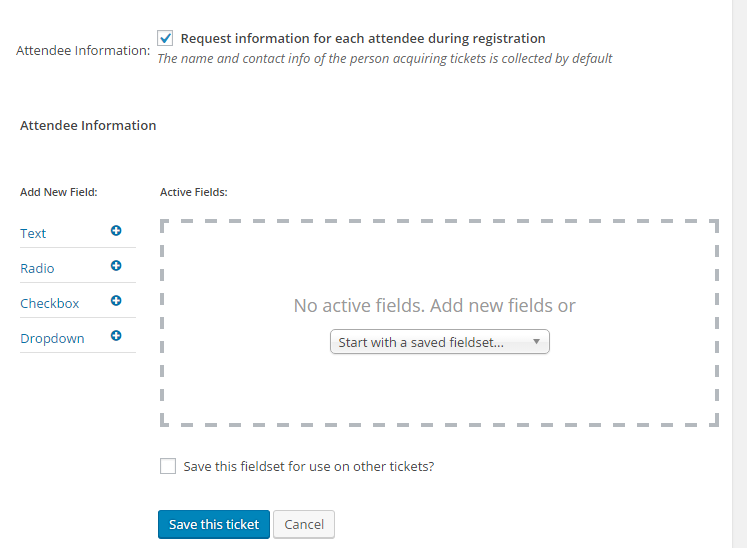
    I am stoked you are interested in this new feature. Basically there are four field types allowed: Text, Radio, Dropdown, and checkbox.

    attendee-meta-ss

    This is certainly a new feature for us. In the interest of giving you some background info we have started by releasing these fields so you can easily collect data with tickets. We’re still working on good ways to make this data useful for folks, such as bulk exports, attachign it to printed checking lists, etc. At the moment there is no easy way to export all of the data you collect in bulk, rather it is mostly only usable on an individual basis (not bulk).

    We do not have demos setup for the backend areas. However, we do have a 30 day refund policy, and you can take advantage of it for any reason including that the plugin is not what you needed/expected. Would that maybe suit your needs?

    Cheers!

    – Brook

    #1111083
    Support Droid
    Keymaster

    This topic has not been active for quite some time and will now be closed.

    If you still need assistance please simply open a new topic (linking to this one if necessary)
    and one of the team will be only too happy to help.

Viewing 3 posts - 1 through 3 (of 3 total)
  • The topic ‘Attendee meta demo’ is closed to new replies.