

Forum Replies Created
-
AuthorPosts
-
Brian
MemberGreat, glad it helps, I am going to go ahead and close this ticket, but if you need help on this or something else please post a new ticket.
Thanks!
MemberHi,
Sorry for the issues you are having. I can help troubleshoot this with you.
Is that error on every page?
Not sure why that is happening, did adding this stop it?
define( ‘TRIBE_DISABLE_PUE’, true );MemberHi,
Sorry for the mixup here.
Not sure what happened.
I have generated a license for both plugins.
Let me know if you do not see those in this account now.
Thanks
MemberI am glad to see you were able to figure it out.
I am going to go ahead and close this ticket. If you have a similar issue or another in the future, please do not hesitate to create a new ticket.
Thanks!
MemberSo I remembered this plugin that sends Organizers emails when a ticket is purchased:
https://github.com/thebeard/events-calendar-pro-organizer-mail/
You might be able to modify that or pull out coding from it to do what you would like.
Cheers
MemberThis reply is private.
MemberOk glad we are moving forward on this.
Also, please note the license is only needed for automatic updates. The plugin will work without the license.
For the tickets not showing.
What are your ticket settings for a ticket not showing:
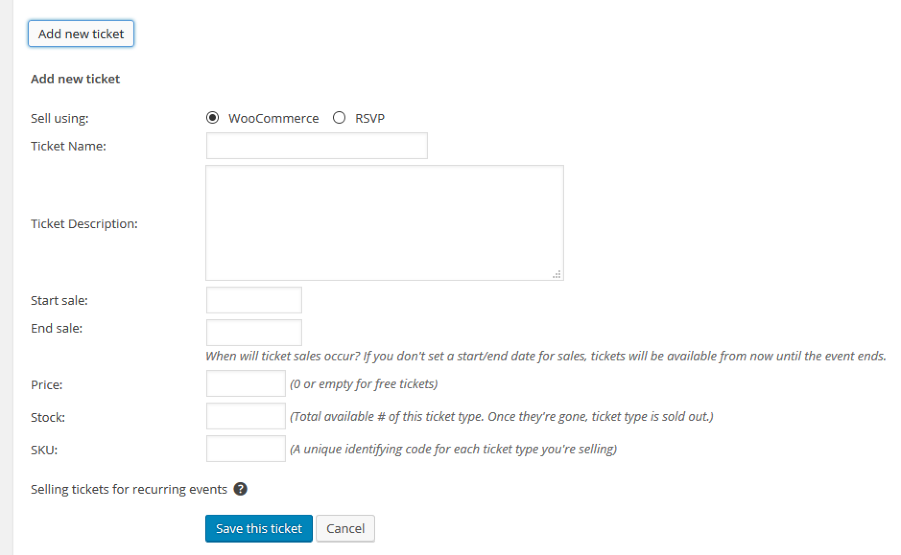
Also, I see in your May Event you have these links:
Purchase Conference Tickets
GLS 2016 ADULT TICKET
GLS 2016 YOUTH TICKET
GLS 2016 CHILD TICKET
GLS 2016 INFANT TICKETBut you are asking about the form to actually select a ticket quantity right in the event correct?
Let me know and we can go from here.
Thanks
MemberHi,
Thanks for using our plugins. Sorry for the late reply. I can try to help out here.
We are limited in providing support on customizations so not sure how that could be done on the checkout page.
What about using our new attendee meta and creating a checkbox that states they confirm the ticket is for an adult.
They would have to confirm per ticket, but the process to set that up takes minutes versus hours for a custom solution that we are unable to provide support on.
Using the attendee meta you can create the fields for that and reuse them on any “adult ticket”.
Here is more about that feature:
https://theeventscalendar.com/knowledgebase/collecting-attendee-information/
Does that help?
MemberHello,
Sorry for the issues you are having.
For this issue:
Fatal error: Call to undefined function tribe_events_single_event_meta() in /homepages/1/d555541552/htdocs/clickandbuilds/DrJonathanDavid/wp-content/themes/drjonathan/tribe-events/single-event.php on line 41
I can help resolve this. The function giving the fatal error, tribe_events_single_event_meta() was deprecated 20 months ago in 3.6 and removed in 3.11
To fix this you need to update your custom template single-events.php in your theme. ( /wp-content/themes/drjonathan/tribe-events/single-event.php )
You want to replace:
echo tribe_events_single_event_meta();with this function:
tribe_get_template_part( 'modules/meta' );For the license:
Can you please try removing your license keys from your account on TheEventsCalendar.com and then reactivating them on your site to see if that resolves the issue.
To do that, login to your account and go to My Account > License Keys
Click “Disconnect now” next to all the urls and go to your site and add those license keys back.
Let me know how that works out for you.
Thanks
MemberHi,
Thanks for using our plugins. I can help out here.
Currently we do no support recurring events and tickets.
It is a feature on our roadmap and hope to get it in an upcoming release, but I do not have a timeline for it.
Right now if you use Recurring Events with Tickets it will create 1 ticket that is used across all the events in the series.
Let me know if you have any follow up questions.
Thanks
MemberHi barback,
Thanks for the tip!
MemberHi,
Thanks for the interest in our plugins. I can answer your questions.
The Personal License can be used for any site without restriction. It is just called personal, but you are fine using it on your Swim Club Website
Cheers
MemberGreat, glad it helps, I am going to go ahead and close this ticket, but if you need help on this or something else please post a new ticket.
Thanks!
MemberHi,
If you could help by changing this within the child theme I would appreciate! You can access here:
I appreciate the offer!
However, our current policy is not to accept logins or to log in to customer servers/WordPress installations.
I am not sure where that coding is, but this css will hide it:
.post-type-archive-tribe_events .header-section {

	display:none;

}
Add that css to your theme’s stylesheet or through a plugin such as Simple Custom CSS.
Let me know if that helps.
Thanks
MemberHi,
I am not sure the exact issue of why it does not work with Groups. I believe it to be a permissions issue and not being able to read a Group’s events with our current authorization system. So that would have to change to resolve this. I do not have a timeline when it will happen although it is on our roadmap it will not be in our 4.2 release, which will be out in early summer.
The importer can import any single event that is public as it is being told what the event ID is. The issue with the Groups is we cannot scan the group to get those ids if we could then it would be no problem to import. I do not have a work around for that and can only support the existing features unfortunately.
If that is a deal breaker we do offer 30 refund on all our plugins and to request a refund please follow our policy outlined here:
And we can take care of it.
Thanks
-
AuthorPosts