
Home › Forums › Calendar Products › Events Calendar PRO › Sorry, this key is out of installs
- This topic has 5 replies, 2 voices, and was last updated 10 years, 5 months ago by
Brian.
-
AuthorPosts
-
April 14, 2016 at 5:22 am #1102359
Kevin
ParticipantHi, I updated my license key today (Expires: Apr 14th, 2017) but I keep getting the “Sorry, this key is out of installs” error message. I’m not using this license key anywhere else. As a result, no one can order tickets from my site. What can I do?
The visible error message that my users see in place of the ticket ordering button reads:
Fatal error: Call to undefined function tribe_events_single_event_meta() in /homepages/1/d555541552/htdocs/clickandbuilds/DrJonathanDavid/wp-content/themes/drjonathan/tribe-events/single-event.php on line 41April 14, 2016 at 5:36 am #1102371MemberHello,
Sorry for the issues you are having.
For this issue:
Fatal error: Call to undefined function tribe_events_single_event_meta() in /homepages/1/d555541552/htdocs/clickandbuilds/DrJonathanDavid/wp-content/themes/drjonathan/tribe-events/single-event.php on line 41
I can help resolve this. The function giving the fatal error, tribe_events_single_event_meta() was deprecated 20 months ago in 3.6 and removed in 3.11
To fix this you need to update your custom template single-events.php in your theme. ( /wp-content/themes/drjonathan/tribe-events/single-event.php )
You want to replace:
echo tribe_events_single_event_meta();with this function:
tribe_get_template_part( 'modules/meta' );For the license:
Can you please try removing your license keys from your account on TheEventsCalendar.com and then reactivating them on your site to see if that resolves the issue.
To do that, login to your account and go to My Account > License Keys
Click “Disconnect now” next to all the urls and go to your site and add those license keys back.
Let me know how that works out for you.
Thanks
April 14, 2016 at 5:49 am #1102377ParticipantHi, thanks for the quick reply – amazing customer service!
Thankfully, the license is working again and I’ve replaced that line in the sing-event.php file so I no longer get the error message.
However, for some reason, none of the ticket ordering information is being displayed so customers can’t order tickets. Our conference page is here:
http://www.jonathan-david.org/events/But when you click into an event, none of the ticket buttons are displayed anymore. Is there something else I’ve missed?
Kev
April 14, 2016 at 7:25 am #1102442MemberOk glad we are moving forward on this.
Also, please note the license is only needed for automatic updates. The plugin will work without the license.
For the tickets not showing.
What are your ticket settings for a ticket not showing:
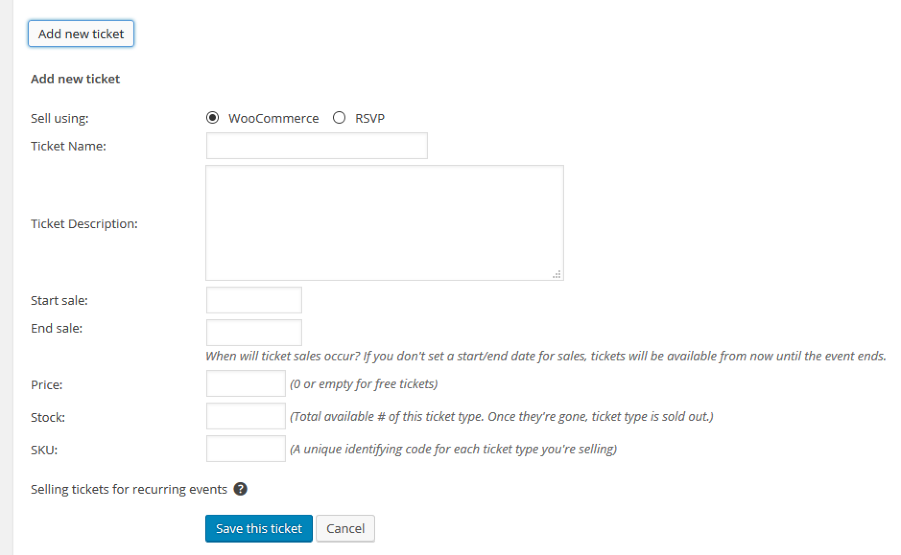
Also, I see in your May Event you have these links:
Purchase Conference Tickets
GLS 2016 ADULT TICKET
GLS 2016 YOUTH TICKET
GLS 2016 CHILD TICKET
GLS 2016 INFANT TICKETBut you are asking about the form to actually select a ticket quantity right in the event correct?
Let me know and we can go from here.
Thanks
April 14, 2016 at 8:04 am #1102465ParticipantHi Brian
Thanks, I checked those settings and everything has snapped back into place – if you look at the page now, the option to buy different kinds of tickets is back on again: http://www.jonathan-david.org/event/global-leaders-summit-2016-limited/
The links on the page were added temporarily as the options had gone missing.
By the way, your customer service is just fantastic – you’ve been really helpful and very fast at coming back to me, which is really what I needed after updating. Really appreciate the help Brian.
Cheers
Kev
April 15, 2016 at 5:38 am #1102948MemberGreat, glad it helps, I am going to go ahead and close this ticket, but if you need help on this or something else please post a new ticket.
Thanks!
-
AuthorPosts
- The topic ‘Sorry, this key is out of installs’ is closed to new replies.