

Forum Replies Created
-
AuthorPosts
-
September 16, 2015 at 12:05 pm in reply to: Plugin conflict effecting nav menu on event calendar & event pages #1005722
Brian
MemberHi,
I looked again and really not sure what the conflict is. It appears to be javascript based.
If I had to troubleshoot it I would start by trying to narrow down the conflicting scripts by removing them and then try to figure out the issue from there.
This is such a strange issue, but maybe a Google Search could reveal a similar problem and a solution too.
Also, the Event Views are archives in WordPress so that might be a piece to this puzzle.
Sorry I do not have more on this, but can try to answer some more questions.
Thanks
MemberThis reply is private.
MemberHi,
Thanks for the interest in iCal Importer.
I can help out here.
There is not feature to add a venue or tag taxonomy.
The importer is suppose to sync events when the ical changes, however it is a little to aggressive right now and we are patching it in a maintenance release.
When you import an event with a venue it looks for the venue name and uses that and add the address to those fields.
Let me know if you have any follow up questions.
Thanks
September 16, 2015 at 11:55 am in reply to: Facebook events integrate with tickets for woocommerce #1005717MemberHi,
Thanks for the interest in our plugins.
The Facebook Events Importer does not have a way to import Facebooktickets or integrate with WooCommerce Tickets.
Once an event is imported you could manually add tickets with WooCommerce Tickets, but beyond that we do not have the features you are looking for.
If you would like to request that feature please head to our UserVoice Page and add your own or upvote that feature as they will increase the chances of it being added to a future version.
MemberHi,
Sorry for the late reply. I hit send yesterday, but it looks like this did not send.
If you turn off this option:
“recurring event instances”
Does it help the home page?
MemberHi,
Sorry for the issues you are having. I can help troubleshoot this with you.
I took a look at your site and see what you mean.
I got a 404 error so can you please try our 404 error guide and see if that helps:
Let me know if that helps or we can go from here to resolve this.
Thanks
MemberHi,
Sorry for the issues.
There is a bug in the system causing this.
There are three temporary fixes until we can get a release to fix this.
If you uncheck this setting here:
Events > Settings > General Tab > “Recurring event instances”
It will resolve the issue and show events on the home page.
The other option is to disable Events from showing in the main loop:
Events > Settings > General Tab > “Include events in main blog loop”
The third option is to downgrade all Events Calendar Plugins to 3.11 following our manual update guide:
https://theeventscalendar.com/knowledgebase/manual-updates/
We have created a ticket to address this in a Maintenance Release and will update you here once that is available.
Let me know if you have any follow up questions.
Thanks
MemberHi,
Thanks for using our plugins. I can help out here.
I think we can provide some css to add this category.
Do you have a link to the Community Events form so we can take a look?
Let me know.
Thanks
MemberHi,
It is useful to see the links so I know what I am working with.
However, if you had custom templates for the nav it could be they were using older versions of the functions that might not work.
See if you can add them back with the versions currently shipped with the plugins.
Also for the isotope issue. I have seen that before on a site and it does not seem to stop javascript from running at least, but I could never figure out how to get rid of it ether.
Let me know if adding new links back work or not. If you do not want to show them and can hide them with css I can find them and show them just for me then.
Thanks
MemberHi Bryan, glad one option helps for now. Look for a patch soon to resolve this.
Hi Tim,
Thanks for posting here. I can certainly help you here, but we can help you better if you create your own topic in the forum, where we can interact with you one on one. Also, we encourage you to post on your own topic because every time we post it will email the author of the topic.
Having said,
You could try going to this replacing this file:
events-calendar-pro\src\Tribe\Recurrence_Meta.php
With this one:
https://www.dropbox.com/s/qinb5xeux1nacho/Recurrence_Meta.php?dl=0
Let me know if that works for you.
If not please create a new ticket so we can help you out and reference this one.
Thanks
MemberHi,
I took another look and I would try adding this snippet first to your theme’s functions.php to fix the issue:
function awi_tribe_events_js_bug_workaround() { ?>

    <script>if ( ! window.debug ) { window.debug = function(){}; window.debug.info = function(){}; }</script>

<?php

}

+add_action( 'wp_head', 'awi_tribe_events_js_bug_workaround' );
That might fix the issue. If not then keep the script and try this css too:
#tribe-events-content #tribe-events-photo-events {

	opacity: 1!important;

}
Add that css to your theme’s stylesheet or through a plugin such as Simple Custom CSS.
That may fix everything.
Thanks
MemberHi,
I took a look again at your site and we are talking about this area, correct?
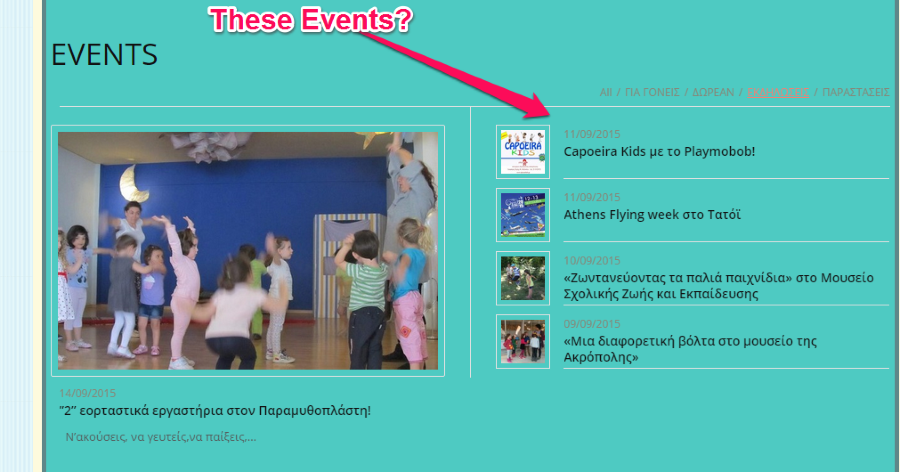
If so I looked at the coding and that is provided from your theme with the Magazine Slideshow Widget.
It looks like it orders by publish date so it would not respect the Event Date Order.
I do not have anything to fix this unfortunately and cannot troubleshoot 3rd party coding.
Can you instead try using our Event List Widget or Shortcode for it here instead?
That way you could get the correct order of events.
Cheers
MemberSounds good.
Would it be possible to share that coding?
No worries either way.
Thanks
MemberHi,
Sorry for the issues.
There is a bug in the system causing this.
There are three temporary fixes until we can get a release to fix this.
If you uncheck this setting here:
Events > Settings > General Tab > “Recurring event instances”
It will resolve the issue and show events on the home page.
The other option is to disable Events from showing in the main loop:
Events > Settings > General Tab > “Include events in main blog loop”
The third option is to downgrade all Events Calendar Plugins to 3.11 following our manual update guide:
We have created a ticket to address this in a Maintenance Release and will update you here once that is available.
Let me know if you have any follow up questions.
Thanks
MemberHi,
I have created a bug ticket for us to address this and we will update you once we have a fix for this.
I do not have a timeline when that might happen.
If this is something you need resolved right away I would recommend downgrading to 3.11 in the meantime.
Thanks
-
AuthorPosts