

Forum Replies Created
-
AuthorPosts
-
June 16, 2017 at 1:46 pm in reply to: How accessible are the calendars (ADA compliance question)? #1299369
Barry
MemberYou’re more than welcome.
MemberAwesome! If you’re happy to share that would be great and potentially very useful to others doing similar stuff, too 🙂
MemberHi Scott,
Those screenshots didn’t seem to attach.
I do also appreciate the desire for fast support by phone but, currently, support is primarily delivered here on the forums and phone or live chat based support is not an option for the time being.
We did look at your account and the records of interactions between your site and our servers in more detail, though: what you’re facing seems to follow a pattern triggered by a bug in The Events Calendar that we resolved a few releases back. So far as I can tell, however, you are not currently running the latest version of our plugins — would you be able to upgrade in the first instance?
Let me know if that is possible and if it helps!
June 16, 2017 at 11:58 am in reply to: Event upload does not fucntion as documented for Organizers and Venues. #1299306MemberIt does: as with organizers, this is/should be supported for venues. However, it only makes sense if support for multiple venues has been enabled (and by default, it is disabled).
We’ll make a note to clarify that part of the knowledgebase, though – thanks for flagging it!
MemberOK, well do let us know if you continue to hit difficulties in that environment … file permissions definitely need to be permissive enough to let WordPress operate normally or else you will indeed hit this sort of issue.
Thanks!
MemberWhile for a range of reasons we no longer provide tickets in PDF format, we do have the following optional extension which you may wish to explore (and will let users receiving the tickets grab a PDF version of them):
https://theeventscalendar.com/extensions/view-print-download-pdf-tickets/
Does that help?
MemberHi Reto: please do feel free to follow this topic, however if you need direct support I’d ask that you create a new topic of your own. The problem may seem the same, but the cause may be different – and it can quickly become confusing when multiple people are in the same topic at different stages of the troubleshooting process 🙂
It’s bad enough with the time difference but several days passing before any response just adds to my frustration.
Absolutely. I realize it’s frustrating – particularly in your case – and we are trying hard to get back to our expected response times.
No, there’s no imports happening, it still asks me to buy Event Aggregator in the drop down where i add new imports and all licenses still come up red saying server not available.
Let’s focus on this: your license seems valid and on testing it locally, works as expected. It also looks like – at some point – your site did successfully validate the license as we’ve got your domain showing on our own systems.
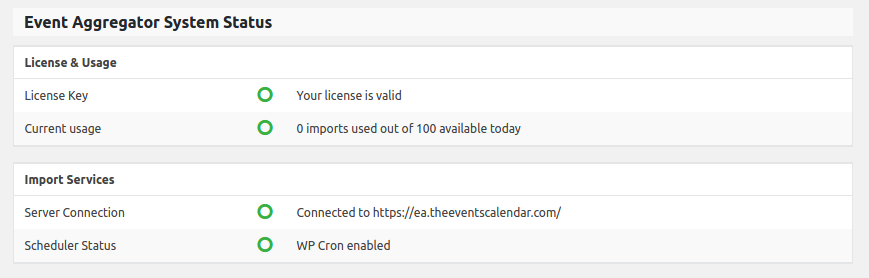
In the Events → Help screen, near the bottom, you should see something like the above. Am I correct in thinking that, in your case, the server connection is showing as not connecting?
Can you also try uploading this plugin (it’s in regular plugin zip format so can typically be added via the Add New Plugin screen in WordPress) and activate it, then return to the bottom of the Events → Help screen. What do you see?
If it is something other than Response: 200 for either EA or PUE I’d love to hear from you so we can take this further.
Thanks again for your patience while we investigate this.
MemberThanks for the note – could be useful for others, too 🙂
MemberHi Frederick,
Thanks for posting – though I’m sorry to hear you’ve hit up against some snags.
To assign terms from the event category taxonomy the edit_tribe_events capability is required, however we don’t enforce anything unusual merely for reading them and WordPress defaults are used. Can you shed any more light on what led you to this conclusion – what capabilities do your custom user roles have?
it loads for a minute and then comes up with a red box that says “Loading Failed.”
This sounds like something that would happen if an unexpected or malformed response comes back from the server; I wonder – do you have WP_DEBUG enabled and might PHP warnings or notices be “polluting” the response?
MemberHi Rob,
Thanks for considering Event Tickets Plus for your project 🙂
Can frontend users add events, or is this what the Community Events addon is for? This is indeed what Community Events provides – a convenient form and a set of controls to manage the process of accepting submissions from the public.
Event Custom fields, are there any limitations on amount of custom fields or field types? There’s no particular limit on how many you can add, but currently you are restricted to the field types that we ship out of the box.
Does Events Tickets Plus have any integration with the JustGiving system, either native or with an addon? In fact, Event Tickets Plus does not have any ‘native’ ability to interact with any payment gateway. Instead, it integrates with leading ecommerce plugins such as WooCommerce and Easy Digital Downloads and therefore utilizes their payment systems. So, depending on which ecommerce plugin you plan on using, it would be advisable to research and see if there is a donation/JustGiving focused gateway available there.
WooCommerce Reporting, does it combine product orders and Events, or can they be differentiated in the admin panel? WooCommerce sees tickets as regular products; however with a few tweaks/minor custom development work you can for instance apply a specific product category to tickets which might give you a means of differentiating when reviewing WooCommerce reports.
Is there an auto-response email sent out to the user after ticket purchase? If so, can we modify the content of this email? If so, can we potentially CHANGE the contents of this email at any point, and user purchases after that point receive the newly amended email? It sounds like you plan on using WooCommerce. With this plugin, ordinarily an acknowledgement or receipt email is sent to customers immediately after purchase. Event Tickets/Event Tickets Plus will subsequently send a further email containing the tickets themselves. All of these emails are customizable, but it may require that you set up custom templates to do this.
If customer adds ticket to basket and doesn’t checkout, how long until that ticket is sent back to stock? Tickets are, at their core, regular WooCommerce products – and will behave the same way.
Is there a backend demo we can take a look at, just to go through with a fine-tooth comb and make sure there isn’t some obvious functionality we’ll need that might be missing? Currently there is not, I’m afraid. Even so, we do have a pretty flexible 30 day refund policy so if you find it isn’t for you within that period, we’re generally happy to facilitate a refund.
I hope that answers your questions but let me know if you want to follow up on any specifics.
June 16, 2017 at 8:55 am in reply to: How accessible are the calendars (ADA compliance question)? #1299149MemberHi Gabriel!
Thanks for considering our plugins for your next project 🙂
We work hard to follow good design practices and – as part of that – are mindful of accessibility concerns. There may however be some areas however that don’t completely meet ADA or WCAG guidelines and we don’t claim complete compliance.
All of our plugins are built to be customizable, however, so it’s generally possible to address specific concerns that might be of particular importance to your project goals.
Both The Events Calendar and Event Tickets are freely available so please do consider taking a moment to test them out and put them through their paces/assess them for accessibility using whatever tools and strategies you prefer prior to making a purchase of one of our premium plugins – all of which build on the foundation laid by those free, core plugins.
I hope that helps and do let me know if you have any further questions 🙂
June 15, 2017 at 4:15 pm in reply to: "Show only first instance of recurring event" alters query for pages too?! #1298852MemberOK! Thanks for persevering.
With some tweaks to my test data, I can see this problem. An ‘easy’ solution would be to turn off the “Show only the first instance of each recurring event” setting only for this query, via a further query action/filter that does something along these lines:
$wp_query->set( 'tribeHideRecurrence', 0 );
Would that work for you, or do you need this setting in place here, too (but targeting only events)? If that is the case, I’m not too sure we have any great workarounds for you to use, unfortunately.
June 15, 2017 at 3:48 pm in reply to: Event upload does not fucntion as documented for Organizers and Venues. #1298839MemberHi Michael,
Our apologies for any inconvenience and thanks for pointing this out.
Support for importing multiple event organizers does indeed appear to be broken: I’ve filed a bug report and have attached this forum topic — as soon as we have something to report we’ll do our best to drop an update in here.
Regarding venues, by default multiple venues are not allowed (since this is an atypical scenario). However, they can be enabled with some custom code:
function enable_multiple_event_venues( $args, $post_type ) {
	if ( 'tribe_venue' === $post_type ) {
		$args['allow_multiple'] = true;
	}

	return $args;
}

add_filter( 'tribe_events_linked_post_type_args', 'enable_multiple_event_venues', 100, 2 );
The above could for instance be added to a custom plugin and should allow you to specify multiple venues per event. However, in relation to CSV imports, I expect the same bug will impact things.
I’ll mark this as ‘pending fix’ until we’re able to deliver a solution for the CSV import issue.
Thanks for your patience in the meantime 🙂
MemberHi Ruben,
Even with RSVPs (rather than paid/WooCommerce-driven tickets) the users should receive an email containing their tickets — you can see an example of how each ticket looks at the bottom of the following knowledgebase article:
theeventscalendar.com/knowledgebase/rsvps
They are part of an HTML format email, however – not a PDF. Is that what you are seeing – or are your customers in fact not receiving the ticket emails whatsoever?
June 15, 2017 at 2:42 pm in reply to: Monthly View with Default Page Template Does Not Display Results #1298811MemberHi Laura,
One of the reasons we provide those settings is to work around issues like this (not all themes are built the same way and they don’t all support the conventions we expect, which are based on those followed by default WordPress themes).
Is the primary reason you need to page template to take advantage of the sidebar or other similar elements/is it possible you can make the Default Events Template work?
Thanks!
-
AuthorPosts