

Forum Replies Created
-
AuthorPosts
-
Barry
MemberAfter some hard work, we’re pleased to share that this issue appears to have been resolved. We will of course continue to monitor things over the next 24 hours.
MemberHi Stephanie,
That sounds really frustrating.
As the problem isn’t specific to ticket emails (you mentioned that password reset emails etc are also not being delivered), it does sound like a more general configuration issue than something particular to Event Tickets or Event Tickets Plus.
I’m not actually familiar with SendinBlue, but it sounds like the undelivered emails are successfully being sent to that platform. Your note that SendinBlue suggests they have successfully been delivered is interesting … assuming that’s not a bug, perhaps the emails have for some reason been placed in the recipients’ junk folders, or something like that?
At any rate, what happens once the emails reach SendinBlue is really not something we can help with, much as we might want to. I’d recommend speaking to their own support team for further advice in the first instance.
Alternatively, perhaps you could switch to a different email delivery service? Sendgrid and Mailgun are both well known and we’ve heard good reports about them (though pausing to work with your existing provider probably makes a lot of sense, initially at least).
Thanks and good luck 🙂
MemberHi there @alliances – great question 🙂
Just a quick note first of all: we don’t generally provide support services out of normal working hours (so if you post on the weekend – or even late on a Friday – we may not get back to you before Monday or Tuesday in some cases).
I just want to change the ticket section. please let me know which PHP file I will need to change
Sure! The first thing I recommend is reviewing our Themer’s Guide, which describes the process for setting up template overrides:
theeventscalendar.com/knowledgebase/themers-guide
In this case specifically, you would copy event-tickets-plus/src/views/wootickets/tickets.php to YOUR_THEME/tribe-events/wootickets/tickets.php … you can then safely make your changes in the copy.
I hope that helps but please don’t hesitate to let me know if we can assist with anything else.
MemberHi Court,
Thanks for your interest in our plugins!
I’m afraid on our side we don’t have any carousels, modules or code for this sort of thing. Are you already a WP Bakery user? Perhaps their team can offer some more advice on this one 🙂
MemberHi John,
It’s certainly possible to modify the capabilities required to manage categories. A minimal example would look something like this:
https://gist.github.com/barryhughes/b907b8078d25fb2e8ac8b2d3b14b2d03
Once adjusted to meet your specific needs, this could be added either to a custom plugin (preferred) or else to your theme’s functions.php file.
To add your new capabilities to users, you might want to make use of the WP_Roles::add_cap() method or else you could possibly do a lot of this via a suitable plugin if you prefer a non-programmatic approach.
For custom dev tasks like this we’re going to have to leave a lot of the fine detail to you, but I do hope this at least helps to get you started 🙂
MemberHi Mike,
Thanks for your interest in our plugins!
Event Tickets Plus is compatible with both WooCommerce and Easy Digital Downloads. In both cases, tickets essentially map to regular products (or ‘downloads’, to use EDD parlance).
That to say, the full range of possibilities that those plugins open up are mostly available to you when you sell tickets. I could certainly envision a discount being applied automatically during checkout if a certain quantity of products is purchased, but the means of implementing this will vary and depends not just on the specific ecommerce plugin you use but of course your own vision of how this should work.
That to say, this is definitely possible – but there are parts of the puzzle we’re not best placed to answer 🙂
I hope that helps, but let me know if you have any other questions.
MemberHi Eric,
Thanks for your interest in our plugins 🙂
1 I am looking for an Event Planner but I would like any visitors to my website to register and then organise any event or a party themselves.
2 They would enter the name of the event for example ‘Johns 40th Birthday Party.
3 They would enter the date
4 The would enter the time everyone is meeting
5 They would enter the location and this would be linked to Google MapsSo far, sounds like our Community Events plugin might meet your needs. If you like, you can see a live demo over on our WP Shindig site (you will need to register for an account first of all).
6 The organiser would then enter all of the guest names and email addresses.
7 The invitation would be sent to all of the guests via my website with date time and link to the venue location.
8 The guest would then reply saying yes they will attending or no they can not
9 The organiser would then be able to see all replies.
10 The organiser would be able to email individual guests or broadcast one message to all guests
11 I would like to be able to down load all email address so I can use them for future promotions.This is where things become just a little trickier. Our Community Tickets plugin (which would also require that you add Event Tickets and Event Tickets Plus) would get you pretty close — however the sort of workflow you’ve outlined is not supported out of the box.
Specifically, there is no direct means of letting the organizer enter a list of guest names and email addresses. You could certainly workaround this and indeed you could work with a suitably skilled developer to smooth this out (our plugins are highly customizable).
That to say, it does sound like our plugins would get you 90% of the way. Perhaps you would even find that with a little creativity you can use them without any further adjustment if you are open to slightly different workflows for your users.
Let me know if you have any other questions about this, I’ll be happy to help!
MemberThanks for your patience here, Felix.
This is actually already possible and the information can be found in our knowledgebase (apologies we didn’t link you to this earlier!) – in essence the trick is to use so-called “pipe separated” values.
Let’s suppose we have a custom checkbox field for which any of the following are acceptable values:
- Anchovies
- Cheese
- Jalapenos
- Meatballs
- Pepperoni
Within your CSV data, you can nominate two or more of these for each event using this sort of syntax:
Anchovies|Jalapenos|Pepperoni
Does that answer your question?
MemberHi Sara,
I wanted to poke at this and see if we could do anything for you, but I’m not completely sure what you are seeking.
The venue title is already included in the event data returned by the REST API. Simplified example, drawing upon our WP Shindig test site:
$event = json_decode(
	wp_remote_retrieve_body(
		wp_remote_get( 'https://wpshindig.com/wp-json/tribe/events/v1/events/44822' )
) );

print $event->venue->venue;
MemberThanks Madeline — we appreciate you sharing those notes 🙂
April 9, 2018 at 9:53 am in reply to: Extensión PDF Tickets (cerrado anteriormente sin resolver) #1500686MemberThanks: I’ve added a note to the bug ticket to review what you’ve gathered 🙂
We’ll see what we can uncover (though, please also understand there may be a delay as extensions are optional extras that are not quite as high a priority for us as our core plugins).
April 5, 2018 at 1:22 pm in reply to: Extensión PDF Tickets (cerrado anteriormente sin resolver) #1497947MemberWe do have a bug ticket open that relates to this being a problem with paid tickets specifically, that’s true (though Jennifer could not replicate previously and I cannot replicate now). I’ll attach this conversation to the bug ticket and set it to “Pending Fix” while we wait on more work being done there.
April 4, 2018 at 3:20 pm in reply to: Extensión PDF Tickets (cerrado anteriormente sin resolver) #1496937MemberOK, well I guess there are a number of possibilities.
One is that there is a bug in our extension, however it works as expected when I test it and I receive the PDF attachments.
Another is that another plugin on your site (I see you have ‘must use’ security plugins in place, for example) is interfering and preventing them from being attached. A third is that there is a configuration issue or over-zealous safeguards in place with your email provider.
In this case, I do suspect one of the latter options: I followed up on my previous tests by creating a fresh demo site via poopy.life (despite the name, an excellent service provided by wpsandbox.io) and added the latest versions of the PDF extension, Event Tickets, Event Tickets Plus, WooCommerce and an SMTP plugin which I configured to use a test email account.
I ran through a few test purchases and the PDF attachments came through on each occasion. Here is a screenshot from an outlook.com email account, you can see I’ve opened one of the PDF attachments and the others are listed on the right:
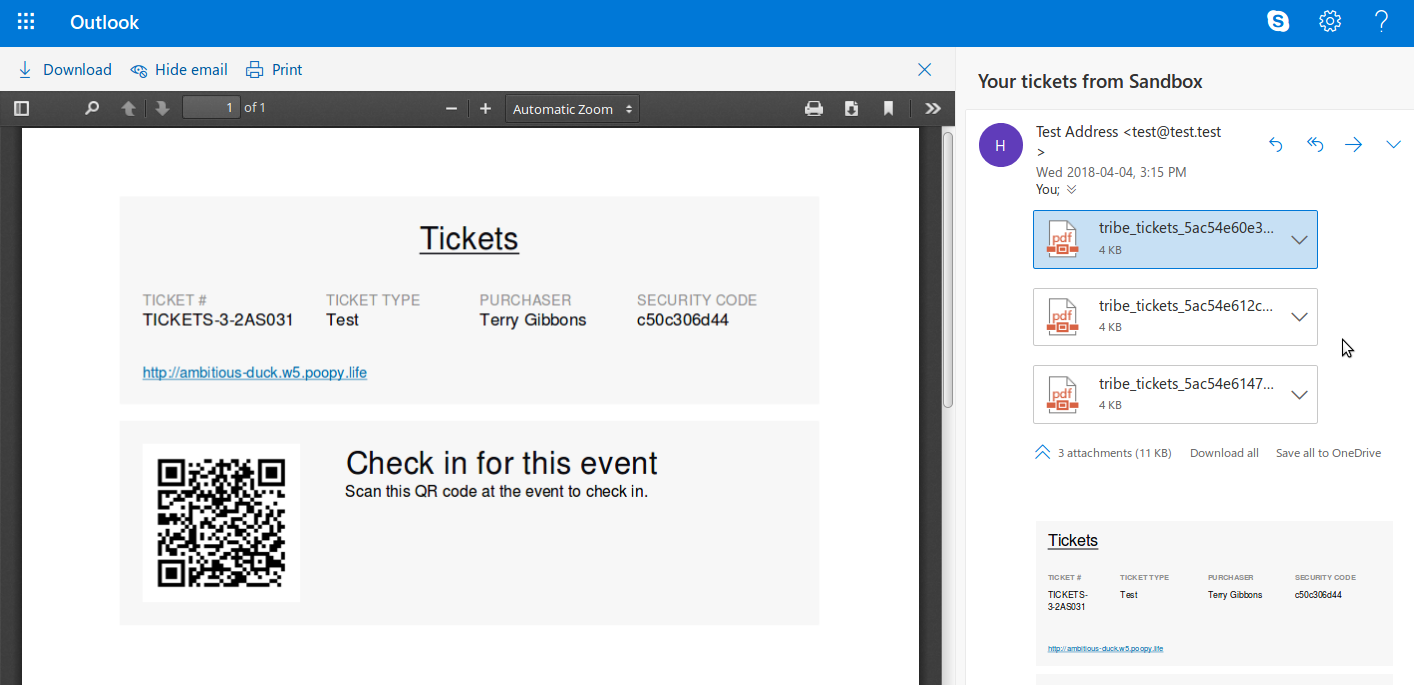
With this in mind, I’d recommend testing for conflicts by deactivating all but the minimal set of plugins I detailed above (in my own testing) and seeing if this resolves the problem. You could also work with your host to establish if there is a problem (or restrictions) when it comes to actually dispatching the emails.
Again, so far as I can determine, there’s no clear problem with the extension and this seems specific to your own installation, I’m afraid.
MemberHi there @ascender 🙂
To modify the ticket emails you would need to override the public/wp-content/plugins/event-tickets/src/views/tickets/email.php template (note, that’s in Event Tickets itself, rather than Event Tickets Plus) by copying it to YOUR_THEME/tribe-events/tickets/emails.php and you can make your changes there.
Does that help?
MemberSorry for the delay, Allison – as mentioned earlier custom development questions like this are generally out of scope and so we can’t guarantee being able to help with them (where we can, there may be added delay). I apologize if that has caused frustration, but I hope you can understand we need to prioritize questions that are within scope 🙂
In this case, would an alternative approach as outlined in the following snippet work for you?
https://gist.github.com/barryhughes/b27845f1b39c86d3900bd8df897cda2a
-
AuthorPosts