

Forum Replies Created
-
AuthorPosts
-
April 4, 2018 at 10:37 am in reply to: Extensión PDF Tickets (cerrado anteriormente sin resolver) #1496660
Barry
MemberGotcha. You should indeed receive the regular HTML ticket email — but with the extension enabled, it ought to be accompanied by attachments, too.
Are you able to peek inside your wp-content/uploads directory and can you check if there are any .pdf files in there, with this sort of file format: tribe_tickets_[RANDOM].pdf
If you do not see any then it might suggest that the extension cannot run in your environment or that it is not able to write to the uploads directory (which would effectively prevent it from attaching the PDFs).
MemberThanks!
I’d also like to clarify the situation with the lang.php file referenced earlier in the topic:
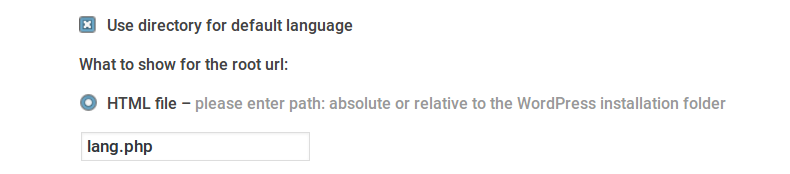
- Where precisely have you specified this in the settings – did you add this in the same area I’ve provided a screenshot of (below)?
- Where exactly does the file reside within your file system?
In your case, German is the default language and you wish to support URLs that look like example.com/DE/slug even for German, and similarly example.com/EN/slug etc for other languages – is that correct?
Is there a reason you are preferring this approach over the default, which I understand would simply be example.com/slug (for the default language)? While we want to support as many configurations as possible if switching away from your current strategy is a viable way to solve this, that may be best in the short term.
 Member
Excellent 🙂
Since you’re all set with that, I’ll go ahead and close this topic. For anything else, please create a fresh topic (I see you already have one other that you opened today – someone from the team will come by to help as quickly as they can).
Thank you!
April 4, 2018 at 8:42 am in reply to: Advanced Post Manager Filters not showing desired results #1496368MemberHi Xen,
As with Andras, I seem unable to replicate the same problems you showed via your screen recording.
Except that you already tested this angle, I would also have assumed a conflict with your theme or another plugin. It looks like you have a staging site available: normally we don’t log into customer websites but on this occasion that may be easiest if we’re to get a better idea of what’s going wrong.
If you’re happy to do so, can you:
- Provide credentials for your staging site
- Deactivate all plugins except those by Modern Tribe
- Switch to a default, unmodified theme such as Twenty Seventeen
- Install and activate a plugin called Query Monitor
Please note that we cannot accept responsibility for any problems arising from the troubleshooting process, though of course we will take reasonable care.
If you are able to facilitate the above steps, please do update this topic (using a private reply to share credentials).
Thanks!
April 3, 2018 at 7:24 pm in reply to: Community Events Submit Form is Really Slow & "Are You Sure You Want To Do This? #1495982MemberRegarding the “Are you sure you want to do this?” message, do you find this can still be reproduced with the caching plugin disabled? Does it primarily impact unauthenticated users, or can you also replicate while logged in?
For the performance issues when submitting new events through the Community Events submission form: can you confirm if you have a testing or staging site available and does the same problem with performance occur there, if you disable all other themes and activate a default, unmodified theme? To make this a ‘fair’ test, you could potentially copy across your exist post and postmeta data.
MemberHi Rubén,
Sorry first of all for the delay! Unfortunately, it seems like we temporarily lost track of this topic.
Regarding your Avada issue, please note that we don’t generally provide technical support here in the pre-sales forum.
If you hold a valid license key please login and post on our Events Calendar PRO forum instead – one of the team will be only too happy to help.
Alternatively, if you do not current hold a license key, you can post for help over on the free support forums (or indeed you may wish to reach out to the Avada team).
Thanks!
Hola Rubén,
Lo siento en primer lugar por el retraso! Desafortunadamente, parece que hemos perdido la noción de este tema.
En cuanto a su Avada, tenga en cuenta que generalmente no proporcionamos soporte técnico aquí en el foro de pre-venta.
Si tiene una clave de licencia válida, por favor, inicie sesión y publique en nuestro foro de calendario de eventos pro en su lugar – uno de los equipos estará encantado de ayudar.
Alternativamente, si usted no mantiene la corriente de una clave de licencia, puede publicar para la ayuda en los foros de soporte gratuito (o de hecho es posible que desee comunicarse con el equipo de Avada).
Gracias!
April 3, 2018 at 4:43 pm in reply to: Extensión PDF Tickets (cerrado anteriormente sin resolver) #1495913MemberSorry for the delay, Antonio. Unfortunately we lost track of this question.
In my initial testing it does seem to be working as expected and the ticket email contains PDF attachments. I’m conscious that I’m not conversing directly in your own language, though, so I’d like to check that this is indeed the problem in your case first of all.
Perdón por el retraso, Antonio.
En mis pruebas iniciales parece que funciona como se esperaba y el correo electrónico de entrada contiene archivos adjuntos PDF. Estoy consciente de que no estoy conversando directamente en su propio idioma, sin embargo, así que me gustaría comprobar que este es, de hecho, el problema en su caso en primer lugar.
MemberHi Michael,
Thanks for the update. Before we go any further, I’d like to be sure we have an accurate understanding of the remaining problem:
- This impacts recurring events only
- The translated English version of the events contains /de/ in the URL, whereas you expect it to contain /en/
Is that correct?
Last but not least, though we do strive to maintain compatibility with WPML it is, as Andras noted earlier, a third party plugin – in fact, in most cases with WPML we’re really talking about a suite of third party plugins rather than just one – that we have no direct control over.
We wish it were easier to keep their plugins and ours in sync, but as we’re talking about compatibility between two different sets of comparatively large-scale plugins made by different vendors, there are certainly very real challenges in doing so!
In any case, if you can confirm if my summary of the remaining bug is correct, we can ensure we have a corresponding and active bug report on our issue tracker.
Thanks for your patience and support!
MemberThis reply is private.
MemberApologies for the delay in responding, @dswiese – Andras is out this week but I wanted to stop by and try and keep this moving.
I see exactly the same problem locally and have filed a bug report, attaching this conversation to it so we can update you once a fix is ready (or indeed reach out if the assigned developer has any questions).
Sorry again for the frustration – but bear with us and we’ll see what we can do.
MemberHi Cathy,
So right now I see two events on 3rd May:
- Training – WordPress Using the UW Theme (now showing as taking place in Chicago time – thanks!)
- WordPress Open Lab Time (still UTC+0)
I don’t have Outlook 2016 available to test with and not many team members do, but I can say that the feed imports correctly into Google Calendar and other well established calendar apps. Nor do I see any obvious errors in the iCal feed.
- Is your PC set to a specific timezone, do you know which if so?
- Can Outlook 2016 be configured to always use a specific timezone, again do you know which if so?
- Given the iCal feed seems correct to us and it works appropriately with other calendar tools, is this something where you could reach out to the support team for that other product?
MemberHi Cathy,
If you’re sure there was no user error when the events were created, we’d need more information to figure out why they changed to UTC+0.
Before we look at that, though, can you confirm you are able to correct any events that were previously set to UTC+0 by changing them to Chicago time – and does that resolve the problem with the iCal feed? Or, can you try this for at least the event taking place on 3 May and let me know if the offset-by-one-hour problem is then resolved for that specific event?
Once we’re happy we have a solution for that part of the problem, we can investigate why events were incorrectly set to UTC+0 🙂
MemberHi Anastasia,
We try hard to stick to one question per support topic (this helps us to provide fair service to all our customers). I’ll be happy to help with your question about template overrides, but please create a fresh topic for your question about currency formatting 🙂
I change the single-event.php template in the plugin the-events-calendar (\the-events-calendar\src\views\list\single-event.php). Copy it to the folder /theme-child/tribe-events/src/views/list/
Close! However the override filepath should actually be:
theme-child/tribe-events/list/single-event.php
In other words, when you copy them template to your theme the src/views part of the filepath is simply replaced with tribe-events.
I hope that helps!
MemberHi @wiscweb,
Andras is out this week but I’d love to keep this conversation moving if possible.
When I look at your ICS feed I see that some events have a geographic timezone. Training – Introduction to Google Analytics on 26 March is a good example and is set to Chicago time, rather like in your screenshots – however many more events are set to use UTC+0, such as Training – WordPress Using the UW Theme on 3 May.
Those events (set to UTC+0) could be problematic and might result in off-by-one-hour errors when you import them. I realize you shared screenshots already, but can you double check that the timezone is correct for Training – WordPress Using the UW Theme and other events on your site?
Thanks!
MemberThanks for confirming, Brandon.
Given that and as you set this conversation to “Resolved” I am going to go ahead and close it, but if we can help with anything else please don’t hesitate to create new topics as needed 🙂
-
AuthorPosts