

Forum Replies Created
-
AuthorPosts
-
Barry
MemberHi markappeal,
I’m sorry to hear you have hit up against some problems.
I do see that the view selector is not working as expected, however list view itself is still accessible and appears to be working as expected:
http://www.ottleymusic.com/events/list
With regards to the view selector (which looks fantastic, by the way!) it does appear to have been customized quite a bit. Was this something you or a designer/developer working on your behalf put in place, or if not might it have shipped with your theme?
If it was something that shipped with your theme (which is probably the case if you have no knowledge of this) then I’d recommend contacting the theme vendor about this problem.
On the other hand, if this is the result of a piece of custom development, it could be worth revisiting that change.
Does that help at all?
June 17, 2015 at 6:24 am in reply to: I updated Version 3.10 but it still says that I need to update. #970008MemberHi pagan11460,
I’m sorry for the inconvenience: there was a slight glitch on our end which has now been fixed.
If you are still seeing this, can you first of all login to your own site and visit Dashboard → Updates – then return to the plugin admin screen. Are the update notices still present?
It may be that it has cleared itself up since you first posted, the above step should just help to trigger a refresh of the plugin update status.
Does that help here?
MemberHi Steve,
Thanks for your interest in Events Calendar PRO 🙂
I’m afraid that sort of facility does not ship “out of the box”, though it’s certainly in reach as a further customization. Do also remember you are welcome to propose new features (and add your support to existing ones) over here.
Does that answer your question?
June 17, 2015 at 6:14 am in reply to: Additional text line for an event which can be switched on/off #970002MemberHi!
It’s been a while so I’m going to go ahead and close this topic.
- Need help with anything else? Go right ahead and post a new topic, one of the team will be only too happy to help
- Still need help with this issue and need to re-open it? Again, please simply create a new topic and link to this one to provide the team with some context
Thanks!
MemberHi!
It’s been a while so I’m going to go ahead and close this topic.
- Need help with anything else? Go right ahead and post a new topic, one of the team will be only too happy to help
- Still need help with this issue and need to re-open it? Again, please simply create a new topic and link to this one to provide the team with some context
Thanks!
June 17, 2015 at 6:14 am in reply to: Changing the Website listing to a Register button with the same URL #970000MemberHi!
It’s been a while so I’m going to go ahead and close this topic.
- Need help with anything else? Go right ahead and post a new topic, one of the team will be only too happy to help
- Still need help with this issue and need to re-open it? Again, please simply create a new topic and link to this one to provide the team with some context
Thanks!
June 17, 2015 at 6:14 am in reply to: Include event category description in Events list view #969999MemberHi!
It’s been a while so I’m going to go ahead and close this topic.
- Need help with anything else? Go right ahead and post a new topic, one of the team will be only too happy to help
- Still need help with this issue and need to re-open it? Again, please simply create a new topic and link to this one to provide the team with some context
Thanks!
MemberOK – and can you confirm if any filters have been applied in the list widget settings?
MemberHi Martin,
This turns out to be a little sticky!
Instead of the code you were using from the previous topic you referenced, how about putting the following in place:
https://gist.github.com/barryhughes/e50376648e9fd0088377
Do note that while I successfully tested the above (with default page template enabled in the event settings and Twenty Fifteen) it is ultimately nothing more than a starting point which you may need to further tweak if it is to work with your own theme and plugin stack.
At any rate, I hope it helps a little 🙂
MemberI see where you’re coming from there and appreciate your further feedback.
I think what we will need to do here is emphasize the need to copy and paste the URL exactly as it is presented, rather than explicitly telling people not to include “www.” in the URL – for the reason that while it so happens your site doesn’t use the “www.” subdomain, other sites do (and will actually require it – almost the opposite of your own situation). Yet others will successfully work both with and without it.
In any case, I’m glad everything is working now and we will continue to adjust and improve this part of our settings interface – and the matching documentation – as needed.
At this point I will go ahead and close the topic, but if any other issues crop up please don’t hesitate to post a new topic and one of the team will be only too happy to help 🙂
MemberHi Martin,
In that case I’d suggest going through our complete troubleshooting steps and try deactivating all plugins but our own – additionally, be sure to try switching to a default, unmodified theme (such as Twenty Fifteen). It is very likely the conflict is with some other component.
When you do this work, be sure to also deactivate The Events Calendar Shortcodes: despite the name, this is not our plugin.
oh yea, and if I try to use the arrows to next event it wont show it. It’s stuck at the “mini golf”
So this is actually a separate problem and I’d ask you create a new topic if you need help with this one.
It does seem though that there is a Javascript error being introduced by “Custom Facebook Feed” which is at least one block in terms of those links working, so it may be you have to follow up with the author of that plugin/switch to a different plugin with comparable facilities.
Does that help? Let me know how you get on with the troubleshooting process!
MemberI’m glad everything is working 🙂
When I was adding the the URL and the Oauth I was inputting www. It would be really helpful in your user guide if it was clear that you need to use http:// and not the www.
That could certainly be a problem – the URL needs to be valid and exactly as you see it in the Eventbrite admin screen generated by our plugin.
Right now that field looks like this:

What if we changed it to this:

Essentially, calling out a little more forcefully that the oAuth URL to be copied exactly a it is. Would that have helped to avoid confusion?
MemberIs there no way to screen share or add screenshots in your forum?
Not directly, but if you upload them either to your WordPress site or a service such as Dropbox you can certainly paste the URLs in here.
I click Authorize and this takes me to the “allow access” page I click yes and it takes me to “resource not found”.
At this point, what is the URL showing in your browser’s address bar? If it is within your own site’s domain, it may be worth running through our standard troubleshooting steps in case another plugin or your theme is conflicting with the process.
MemberI’m genuinely unsure why you are hitting these problems. Let’s approach this step-by-step.
When you follow this link (which is provided in the Eventbrite settings screen, within your WordPress site), are you able to reach and complete a screen looking something like the following screenshot?
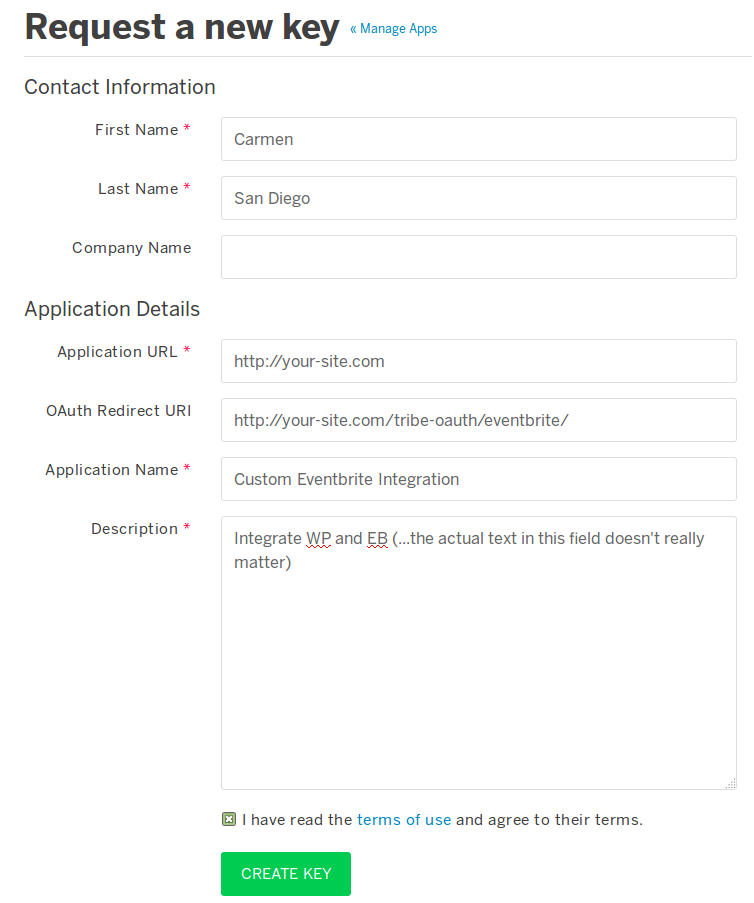
Can you tell me what happens immediately after submitting this form and also detail (by private reply if you prefer) exactly what you are inputting in the Application URL and oAuth Redirect URL fields?
I’m sorry if this seems like I’m repeating the same question, but I want to ensure we’re understanding each other.
MemberIf you don’t have any keys listed under Account → Developer → App Management (over on eventbrite.com) then something has probably gone wrong! Is that what you are experiencing?
Can you confirm that you copied and pasted the oAuth URL across when you ran through the setup procedures?
-
AuthorPosts