
Home › Forums › Ticket Products › Eventbrite Tickets › No longer showing EventBrite Widget
- This topic has 24 replies, 3 voices, and was last updated 11 years, 2 months ago by
Leah.
-
AuthorPosts
-
June 15, 2015 at 2:22 pm #969623
Barry
MemberI’m genuinely unsure why you are hitting these problems. Let’s approach this step-by-step.
When you follow this link (which is provided in the Eventbrite settings screen, within your WordPress site), are you able to reach and complete a screen looking something like the following screenshot?
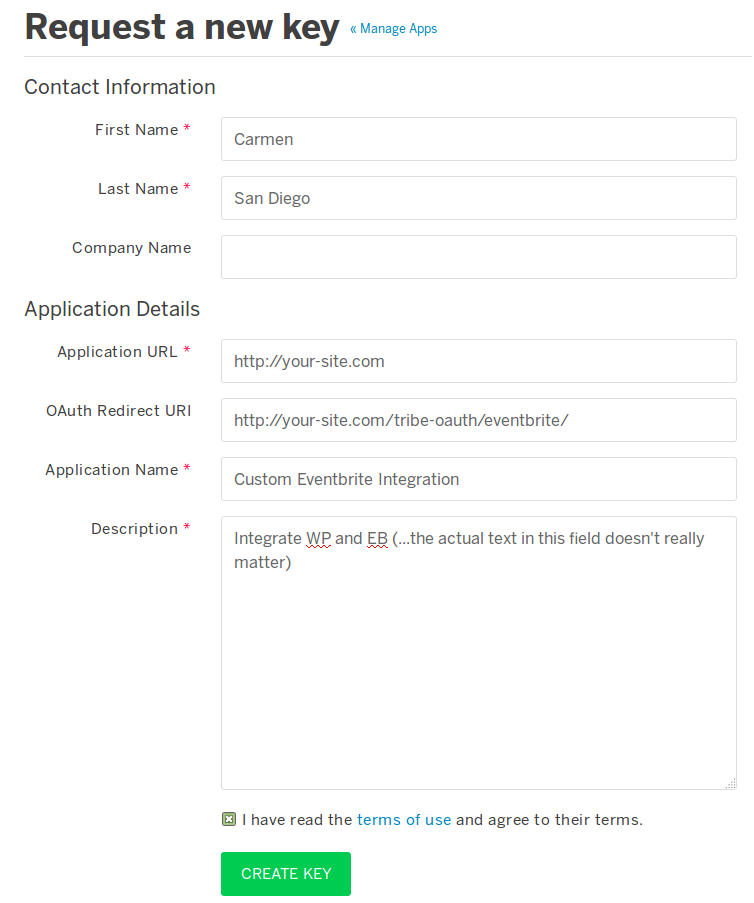
Can you tell me what happens immediately after submitting this form and also detail (by private reply if you prefer) exactly what you are inputting in the Application URL and oAuth Redirect URL fields?
I’m sorry if this seems like I’m repeating the same question, but I want to ensure we’re understanding each other.
June 15, 2015 at 3:08 pm #969633northwest
ParticipantThis reply is private.
June 15, 2015 at 3:43 pm #969637MemberIs there no way to screen share or add screenshots in your forum?
Not directly, but if you upload them either to your WordPress site or a service such as Dropbox you can certainly paste the URLs in here.
I click Authorize and this takes me to the “allow access” page I click yes and it takes me to “resource not found”.
At this point, what is the URL showing in your browser’s address bar? If it is within your own site’s domain, it may be worth running through our standard troubleshooting steps in case another plugin or your theme is conflicting with the process.
June 15, 2015 at 3:55 pm #969639ParticipantThis is the url I see after authorising acess https://www.eventbrite.com/ngapi/oauth/www.northwestphotographycourses.com/tribe-oauth/eventbrite?code=HBESKM64LT3BCGJJBDH7
June 16, 2015 at 1:47 am #969674ParticipantI thought I might have tracked down the problem to my having an admin@eventbrite account and a nigel@eventbrite account so I deleted the Nigel@ account, deleted the existing the key and created a new one.
I get an email from Eventbrite saying the new key is approved. When I enter the details in WordPress it takes me to the Eventbrite authorisation page which says “The application you’re trying to use has made an invalid request to Eventbrite. Please contact the application developer.”
June 16, 2015 at 2:33 am #969678ParticipantI think I have fixed the problem. When I was adding the the URL and the Oauth I was inputting www. It would be really helpful in your user guide if it was clear that you need to use http:// and not the www.
Thank you for your help
June 16, 2015 at 6:46 am #969718MemberI’m glad everything is working 🙂
When I was adding the the URL and the Oauth I was inputting www. It would be really helpful in your user guide if it was clear that you need to use http:// and not the www.
That could certainly be a problem – the URL needs to be valid and exactly as you see it in the Eventbrite admin screen generated by our plugin.
Right now that field looks like this:

What if we changed it to this:

Essentially, calling out a little more forcefully that the oAuth URL to be copied exactly a it is. Would that have helped to avoid confusion?
June 16, 2015 at 7:08 am #969731ParticipantThanks for the reply. For me (as essentially a non-tech, verbal sort of person) the thing that would make it crystal clear would be a simple verbal instruction like “don’t include the www in the URL”.
What I saw was the * field asking for the URL which I entered manually with the WWW, then I pasted the supplementary info onto an already incorrect URL
June 16, 2015 at 7:58 am #969763MemberI see where you’re coming from there and appreciate your further feedback.
I think what we will need to do here is emphasize the need to copy and paste the URL exactly as it is presented, rather than explicitly telling people not to include “www.” in the URL – for the reason that while it so happens your site doesn’t use the “www.” subdomain, other sites do (and will actually require it – almost the opposite of your own situation). Yet others will successfully work both with and without it.
In any case, I’m glad everything is working now and we will continue to adjust and improve this part of our settings interface – and the matching documentation – as needed.
At this point I will go ahead and close the topic, but if any other issues crop up please don’t hesitate to post a new topic and one of the team will be only too happy to help 🙂
July 20, 2015 at 12:36 pm #988053MemberHello,
Thank you again for bringing this issue to our attention. We’re happy to say that we have added a fix for this into our upcoming version 3.11 release. Keep an eye on your Updates page for the new version. If you have any trouble with the update (or are still seeing this problem after you update) please start a new thread and we’d be happy to help out.
Thank you for your patience while we got this release ready to go!
Best,
Leah
and the rest of The Events Calendar team -
AuthorPosts
- The topic ‘No longer showing EventBrite Widget’ is closed to new replies.